
SQL Editor
The SQL Editor in Tabularis is built around a highly customized integration of Monaco (the exact editor engine that powers VS Code). It provides a world-class typing experience optimized specifically for complex database querying.
Video unavailable
Intelligent Context-Aware Autocomplete
Unlike basic editors that simply suggest a static list of SQL keywords and table names, Tabularis implements a dynamic, context-aware autocomplete engine.
How It Works
- AST Parsing: As you type, a lightweight local parser analyzes your SQL statement to build an Abstract Syntax Tree (AST).
- Scope Resolution: The engine identifies which tables are present in the
FROMandJOINclauses. - Alias Mapping: It maps aliases to their source tables (e.g.,
FROM customer_orders AS co). - Targeted Suggestions: When you type
co., the editor immediately suggests only the columns belonging to thecustomer_orderstable, along with their data types.
Clause Awareness
Since v0.17.0 the completion engine also understands where the cursor is. A context analyzer classifies the cursor into one of 29 clause contexts and filters suggestions accordingly:
Video unavailable
- After
FROM,JOIN,UPDATE, orINSERT INTO— tables and keywords. - After
WHERE,ON,GROUP BY,SET, inside function arguments or anIN (...)list — columns and keywords. - Inside an
INSERT INTO t (...)column list — columns only. - Inside a string literal or a comment — no suggestions at all.
- On an empty buffer, after
;, or afterUNION— keywords only.
Subqueries are scoped per parenthesis frame (the outer clause is restored when the subquery closes), and CTEs, nested CASE … END, quoted identifiers, and escape sequences are all handled. Anything the analyzer doesn't recognize falls back to the previous suggest-everything behavior, so a miss can never hide valid suggestions.
Nearest-Table Ranking
Since v0.24.0, when multiple tables are in scope, autocomplete ranks columns from the nearest relevant table first. In an ON or USING clause this is the table currently being joined; in SELECT, WHERE and SET contexts it is the primary table. Aliases and nested subquery scopes are respected. Other in-scope columns remain available below them, and single-table queries are unchanged. Since v0.26.0 quoted identifiers and keyword-like table names no longer break the detection, and the nearest table is always fetched first, so it is not cut off when more than five tables are in scope and its columns win for shared names such as id.
Accepting suggestions
When the autocomplete dropdown is open, Enter accepts the highlighted suggestion by default (matching the behavior of every other Monaco-based editor). If you prefer Enter to insert a newline instead, toggle Settings → Appearance → SQL Editor → Accept Suggestion with Enter off. The setting is honored across every editor surface — main SQL tabs, notebook cells, and the Raw SQL tab of the trigger editor.
Tab always accepts the highlighted suggestion, regardless of the setting.
Caching Strategy
To ensure the editor remains responsive even on databases with thousands of tables, Tabularis caches schema metadata:
- TTL: Table metadata is cached in memory for 5 minutes.
- Size limit: The cache holds metadata for at most 50 tables. When the limit is exceeded, expired entries are evicted first; if still over the limit, the oldest entries are removed.
- Manual Invalidation: You can force a cache clear by clicking the "Refresh Schema" button in the sidebar or via the Command Palette.
Editor Features & Shortcuts
The Monaco integration brings powerful developer features:
| Feature | Shortcut (Mac) | Shortcut (Win/Linux) | Description |
|---|---|---|---|
| Execute | Cmd + Enter or Cmd + F5 |
Ctrl + Enter or Ctrl + F5 |
Runs the selected text; with nothing selected, runs the statement under the cursor. |
| Run All | Cmd + Shift + Enter |
Ctrl + Shift + Enter |
Executes every statement in the editor (also Ctrl/Cmd + Shift + F5, or the entry at the top of the Run dropdown). |
| Execute Selection | (context menu only) | (context menu only) | Right-click → "Execute Selection" to run highlighted text. |
| Format SQL | Shift + Option + F |
Shift + Alt + F |
Formats the whole buffer — or just the selection — using the active connection's dialect (also in the toolbar and the context menu). Style is configurable, see below. |
| Toggle Comment | Cmd + / |
Ctrl + / |
Comments/uncomments the current line or selection (built-in Monaco). |
| Multi-Cursor (click) | Cmd + Click |
Ctrl + Click |
Place multiple cursors for simultaneous editing. |
| Add Next Occurrence | Cmd + D |
Ctrl + D |
Select the next occurrence of the current selection and add a cursor. |
| Select All Occurrences | Cmd + Shift + L |
Ctrl + Shift + L |
Select all occurrences of the current selection and add cursors. |
| Cursors at Line Ends | Option + Shift + I |
Alt + Shift + I |
Add a cursor at the end of each line in the current selection. |
| Copy Line Up | Option + Shift + ↑ |
Shift + Alt + ↑ (Windows) / Ctrl + Shift + Alt + ↑ (Linux) |
Duplicate the current line above. |
| Copy Line Down | Option + Shift + ↓ |
Shift + Alt + ↓ (Windows) / Ctrl + Shift + Alt + ↓ (Linux) |
Duplicate the current line below. |
| Command Palette | F1 |
F1 |
Open the Monaco command palette. |
Running-Tab Indicators
Since v0.24.0, a tab with a query in flight replaces its type icon with a spinner in the connection's accent colour, with an Executing query tooltip. It remains visible while another tab is active, alongside the existing pulsing underline. Notebook tabs show it while at least one cell is executing, including Run All. Loading state is not restored across app sessions.
Video unavailable
Reordering Tabs
Since v0.18.0 tabs can be dragged along the tab bar to reorder them. Console, table, query-builder and notebook tabs share one tab bar, so any tab type can be moved — there is no console-only restriction. Reordering is scoped to the active connection: dragging reshuffles only that connection's tabs and leaves the others where they are. An insertion line shows where the tab will land, and dragging near an edge auto-scrolls the bar. The new order is persisted with the rest of your tabs in preferences.json.
Video unavailable
SQL Files
Since v0.23.0 the editor can work on files on disk. A folder icon in the tab strip opens a native file picker filtered on .sql, .psql and .pgsql; the file content becomes a new console tab titled with the file name and bound to that path, and nothing is executed on open. On a multi-database connection the tab inherits the currently selected database.
- Save writes the editor text back to the bound path. Save As asks for a new path, rebinds the tab and renames it. Both live in the toolbar's save split button (the main action saves, or opens Save As when the console is not bound to a file yet, and is disabled when there is nothing to save; the chevron menu also offers Add to Saved Queries) and at the top of the tab's right-click menu.
Ctrl/Cmd+Son a file-backed console tab saves the file. On every other tab it keeps its previous meaning and submits pending grid changes.- An amber dot next to the save icon and a bullet in the tab title mark unsaved changes. The dirty state is a comparison between the editor text and the content last read from or written to disk, so typing a character and deleting it again leaves the file clean. The tab tooltip shows the full path.
- File bindings and the last saved content are persisted with the tab, so a restored tab can still be saved to the same path after a restart.
- Close, Close Others, Close to the Right / Left and Close All ask for confirmation when any tab being closed has unsaved file changes.
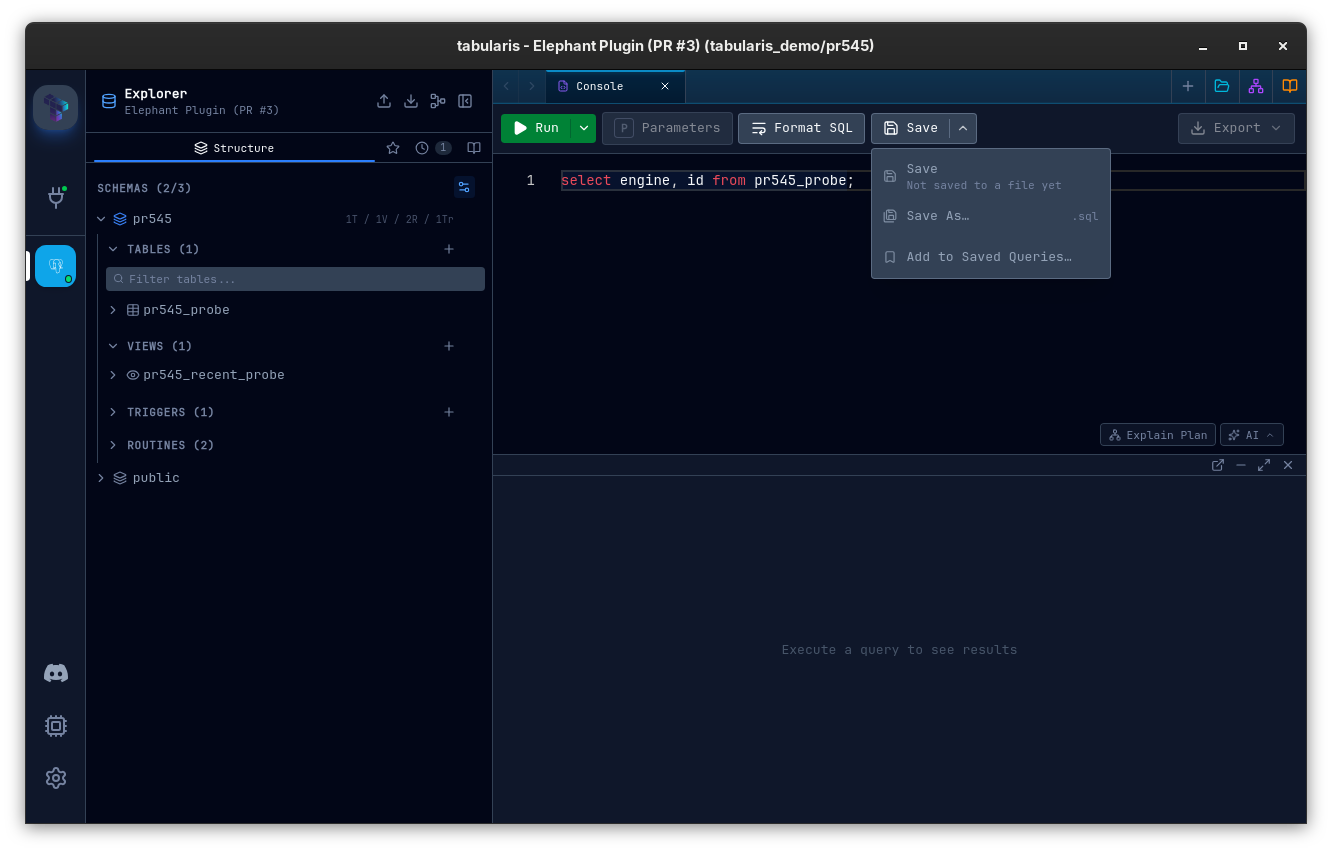
Reads are capped at 50 MB and go through the Rust backend, so files anywhere on disk can be opened and saved, not only those under the app data directory.
Statement Folding
Since v0.21.0 every multiline statement in the main query editor gets its own fold range in the Monaco gutter, computed with the same dialect-aware splitter that powers run-at-cursor, so dollar-quoted bodies and custom-DELIMITER blocks fold as one unit. Fold controls stay visible instead of appearing only on hover. Hovering a collapsed statement shows a syntax-highlighted preview of its content; you can move into the preview and scroll it without expanding the fold.
Video unavailable
Same-Name Tables From Different Schemas
Since v0.27.0, when the same table is open from two schemas on one connection (for example mira.clubs and mira_dev.clubs), each of those tabs reads schema.table in the tab bar and the tab switcher. The prefix appears only while the names collide; closing one tab turns the other back into the plain table name. Only the label changes, and tabs with a custom title are left alone.
Convert Selection to SQL List
Video unavailable
Since v0.27.0 the editor's context menu has Convert Selection to SQL List, shown only when text is selected. It turns the selected values, for example a column pasted from a spreadsheet, into a list ready for IN (...):
alice@example.com
bob@example.com
becomes 'alice@example.com', 'bob@example.com'.
- Values are split on newlines, tabs and commas, trimmed, and blanks are skipped.
- Embedded single quotes are doubled (
O'Brien→'O''Brien'). - Purely numeric input stays unquoted (
1, 2, 3). Values with a leading zero (007) or a leading+count as text, so IDs and phone numbers are not turned into numbers; mixed input is quoted throughout. - Every selection, multi-cursor included, is replaced in one undo step.
SQL Formatting
Video unavailable
Format SQL (since v0.17.0) is available as a keyboard shortcut (Shift+Alt+F, Shift+Option+F on macOS), a toolbar button, and a right-click context-menu entry. Select text first to format only the selection; with no selection the whole buffer is formatted and the cursor position preserved. The dialect follows the active connection (PostgreSQL, MySQL, SQLite, T-SQL, PL/SQL), and formatting pushes to the undo stack, so Cmd/Ctrl+Z reverses it.
The style is configurable in Settings → Appearance → SQL Editor → SQL Formatter:
| Setting | Options | Default |
|---|---|---|
| Keyword Case | UPPER / lower / Preserve | UPPER |
| Function Case | UPPER / lower / Preserve | Preserve |
| Indent Style | Standard / Tabular Left / Tabular Right | Standard |
| Indent Width | 2 / 4 | 2 |
| Use Tabs | on / off | Off |
| Lines Between Queries | 0–5 | 1 |
| Dense Operators | on / off | Off |
Settings persist in config.json and take effect on the next format action — no restart needed.
Multi-Statement Execution
When the editor contains multiple semicolon-separated statements, execution is cursor-driven (since v0.16.0):
Run the Statement at the Cursor
Press Execute (Ctrl/Cmd + Enter or Ctrl/Cmd + F5) with nothing selected and Tabularis runs the single statement the cursor is inside — no whole-file execution, no picker dialog. A subtle highlight shows which statement is armed to run; it disappears as soon as you make a selection. Explain follows the same rule, explaining the statement under the cursor.
Video unavailable
Prefer picking from a list? Turn off Run statement under cursor in Settings → General → Query Execution to restore the Query Selection Modal instead.
The Run Button Says What It Will Run
Since v0.18.0 the Run button is labelled with its actual target, so a multi-statement script cannot quietly execute one statement while the button still reads "Run":
| State | Label |
|---|---|
| A text selection is active | Run Selection |
| Multiple statements, nothing selected | Run Statement |
| A single statement, or a table tab | Run |
Behaviour is unchanged — this only makes it visible before you commit to it. When the button would run one statement out of several, the tooltip also surfaces Run All (Cmd/Ctrl+Shift+Enter), which is exactly the escape hatch you want at the moment the label warns you.
Video unavailable
Run All
Press Ctrl/Cmd + Shift + Enter in the editor (Ctrl/Cmd + Shift + F5 globally), or pick Run All at the top of the Run dropdown, to execute every statement in the editor. Results from each query appear in separate tabs in the results panel.
Session continuity — multi-statement scripts run via Run All share a single physical database connection across all statements (built-in drivers only). User variables (SET @var := …), LAST_INSERT_ID() / LASTVAL(), explicit BEGIN / COMMIT blocks, temporary tables, and PREPARE / EXECUTE pairs all behave the way they do in mysql CLI / psql / DBeaver. Plugin drivers fall back to sequential execution on separate pooled connections (ordering preserved, session state not guaranteed).
The Query Selection Modal (Optional)
With Run statement under cursor turned off in Settings → General, pressing Execute on a multi-statement buffer opens the Query Selection Modal instead:
- Run a single query — click any query in the list, or press its number
1–9. - Run All — press
Ctrl/Cmd + Enterinside the modal. - Run Selected — check specific queries and press
Shift + Enter(or click Run Selected (N));Spacetoggles the focused query,↑/↓move focus.
Execute Selection
If you highlight a text selection in the editor and run it, Tabularis splits the selection into statements and executes them one after another, in order, on the same session. Results appear as separate tabs in the multi-result panel.
T-SQL Batches
Since v0.27.0, on dialects with a batch separator (T-SQL, used by the SQL Server plugin) scripts are split on GO only, the way SSMS does, and the ;-separated statements of a batch are sent together. DECLARE @var, temporary tables and SET options are scoped to the batch, so they stay visible to every statement in it. This applies to every execution path: the Run button, Run All, a selection, Execute Selection, the run dropdown and auto-run. Running at the cursor runs the whole batch under the cursor, up to the surrounding GO, and the Run button label counts batches. Each SELECT in a batch still gets its own result tab. The destructive query confirmation checks each statement inside a batch, so a DELETE without WHERE cannot hide behind a SELECT. Other dialects are split per statement as before.
Multi-Result Panel
When multiple queries are executed (via Run All or Execute Selection), results are displayed in a results panel at the bottom of the editor. Each query gets its own result with independent pagination, error handling, and loading state. The rows-per-page selector in the pagination bar applies to the whole tab (see Data Grid → Pagination), and query errors are selectable with a Copy button.
The panel supports two view modes — Tab view (default) and Stacked view — switchable via the toggle button in the top-right corner of the results bar.
Tab View
The default view. Each query result lives in its own tab. Click a tab to switch between results.
Since v0.27.0 a result tab is named after its statement's leading comment: -- Active customers or /* Active customers */ before a statement becomes the tab name, with whitespace collapsed and the label capped at 80 characters. Statements without a comment keep the numbered name, and renaming a tab by hand overrides it.
Video unavailable
| Action | How |
|---|---|
| Switch tab | Click the tab header |
| Close tab | Click the X button or middle-click |
| Rename tab | Double-click the tab header or right-click → Rename |
| AI rename | Click the sparkles icon (requires AI enabled in Settings) |
| Context menu | Right-click a tab for Close / Close Others / Close Right / Close Left / Close All |
| Re-run | Click the play icon on a tab to re-execute that query |
A summary bar shows the total number of queries and how many succeeded or failed. Each tab displays a collapsible query preview, row count, and execution time.
Stacked View
Inspired by SQL Server Management Studio, the stacked view displays all query results vertically in a single scrollable panel — no tab switching required.
| Action | How |
|---|---|
| Collapse / Expand | Click a result header to toggle its content |
| Collapse All / Expand All | Click the collapse button in the top bar |
| Close result | Click the X button or middle-click on the header |
| Rename | Double-click the result label |
| AI rename | Click the sparkles icon on the header |
| Re-run | Click the play icon on the header |
| Resize | Drag the resize handle between results to adjust height |
Each result section shows the query label, a collapsible SQL preview, row count, execution time, and pagination controls — all inline in the header. When collapsed, the header still shows key metadata (row count, execution time, error summary).
Since v0.26.0 every result grid, in tab and stacked view alike, keeps its scroll position when you switch to another editor tab and back. The position is reset by a new run, a page change or a re-run of that result.
Video unavailable
Window Controls & Detachable Results
The right side of the results bar carries a set of window controls:
| Control | What it does |
|---|---|
| Minimize | Collapses the panel without losing data — the Show Results button restores it. |
| Maximize | Hides the editor so results take the full height; click again to restore the split. |
| Detach | Pops the active tab's results into a separate OS window. |
| Close | Collapses the panel (same as Minimize; data is kept). |
Manual drag-to-resize of the panel is unchanged.
Detach is the one to reach for on a multi-monitor setup: it moves the active tab's results into their own window so you can keep the grid on one screen while you keep editing SQL on the other. The detached window stays in sync with the tab it came from, and closing it folds the results back into the main layout.
Video unavailable
Success Feedback for Non-SELECT Statements
A statement that returns no result set — INSERT/UPDATE/DELETE or DDL such as CREATE/ALTER/DROP — no longer shows a misleading "0 rows retrieved" empty grid. Instead the result area renders a success panel: a check icon, "Query executed successfully", the affected-row count when there is one, and the execution time. This applies to both single statements and multi-statement batches.
Query Parameters
When running multiple queries that contain :param placeholders, Tabularis collects parameters across all queries and prompts you once via the parameters modal before execution begins.
Parameter detection skips string literals and comments (since v0.17.0): WHERE value = 'x:y' no longer prompts for :y, and URLs, timestamps, or JSON-in-text with colons pass through untouched. Detection reuses the same dialect-aware tokenizer as the query splitter below.
Destructive Query Confirmation
Both the SQL editor and notebook cells guard against the queries that are easiest to regret. Before it runs a DELETE or UPDATE with no WHERE clause, or a DROP or TRUNCATE, Tabularis pops a confirmation dialog with kind-specific copy and a read-only preview of the exact statement it flagged. Since v0.21.0 the five-second countdown on the confirm button is opt-in: enable Delay safety confirmations in Settings → General to bring it back, and it then applies to production-write confirmations too. On a production connection only the production warning is shown; the standard destructive-query dialog is suppressed because the production one already covers it.
The detection is not a naïve substring match — it ignores comments and string literals (including backslash-escaped quotes), understands data-modifying CTEs, and handles multi-statement batches.
Total Row Count
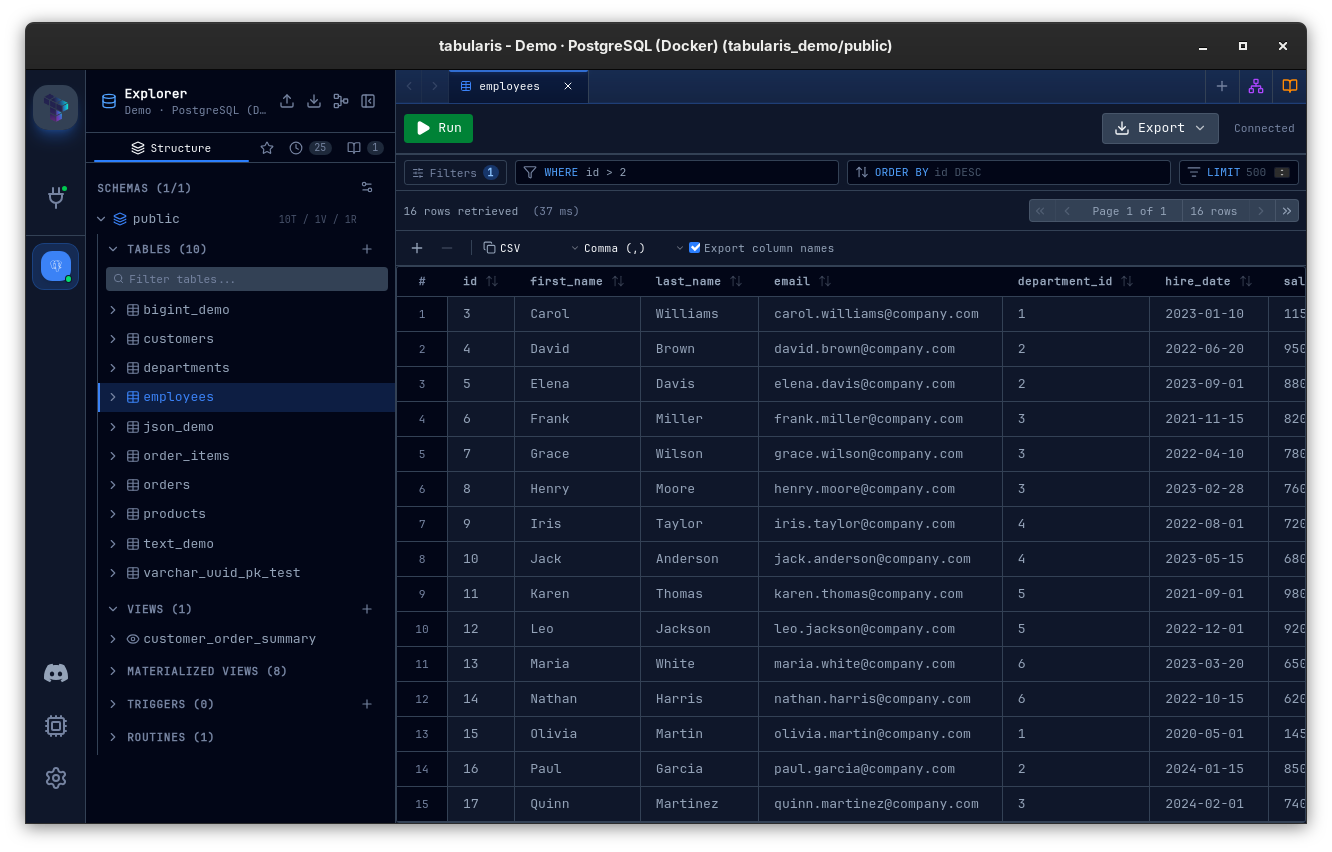
The pager shows the exact size of the current result — {total} rows next to the page indicator — counted against the reconstructed filtered query, so a filtered grid reports the filtered total rather than the base table's. The count resets when the query or filter changes and is preserved across pagination.
Query Splitting
Tabularis splits multi-statement SQL with its own dialect-aware splitter — a tokenizer that understands the quoting and block rules of each engine (postgres, mysql, mssql, sqlite, oracle, and a generic fallback) rather than naively breaking on every ;. It correctly handles stored procedures and functions that contain internal semicolons:
CREATE FUNCTION example()
RETURNS INT
LANGUAGE PLPGSQL
AS $$
BEGIN
    RETURN 10::INT;
END;
$$;
The splitter treats this as a single statement rather than breaking on the internal ; inside the $$ dollar-quoted block. Beyond dollar-quoting, it also tracks:
- Comments — leading/trailing comment-only segments are folded into the adjacent statement instead of becoming empty statements.
- Oracle PL/SQL blocks —
BEGIN ... END;source units are merged up to the terminating/. - MySQL
DELIMITERchanges — the active statement delimiter is tracked as it is redefined.
Each split statement is also classified (e.g. result-set-returning vs. not) to drive the Query Selection Modal and per-statement result handling.
Autocomplete: Multi-Database and Multi-Schema
Autocomplete suggestions are scoped to the active context:
- Schema-aware connections (PostgreSQL): when a non-default schema is active, suggestions come from the tables in that schema only.
- Multi-database connections (MySQL / MariaDB): suggestions come from the tables of all selected databases.
This ensures that you see relevant completions regardless of how many schemas or databases your connection exposes.
Query Execution & Data Grid
When you execute a query, Tabularis handles the results asynchronously, streaming them into the integrated Data Grid.
Query History Sidebar
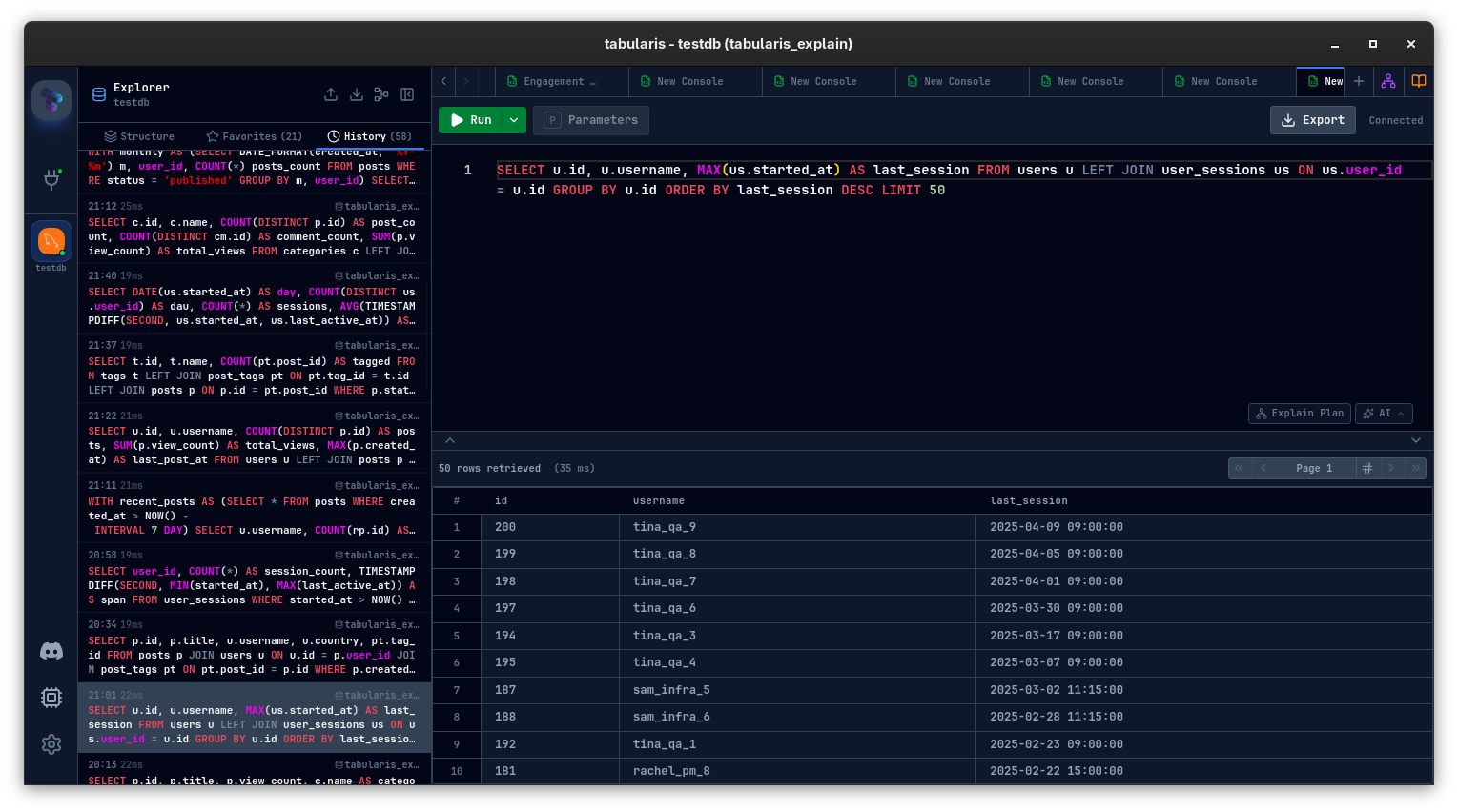
Every execution is also written to the Explorer's History tab for the active connection.
What gets stored
Each history entry includes:
- The SQL text
- Execution timestamp
- Execution duration
- Success or error status
- Rows affected when available
History is stored per connection, newest first. If you run the exact same SQL twice in a row, Tabularis updates the latest entry instead of appending a duplicate immediately after it.
Working from history
The History tab supports:
- Search by SQL text
- Date grouping such as Today / Yesterday / older buckets
- Double-click (or
Enter) to open a query in a new console tab and run it - Context menu actions: Copy Query, Run Query, Insert to Editor / Open in New Tab (both open the query in a console without running it), Add to Favorites, and delete the entry
- Clear All for the current connection only
This makes the sidebar history a fast iteration loop: run a query, tweak it, and jump back to any earlier version without digging through editor tabs.
History retention
The maximum number of stored entries is controlled in Settings → General → Query History. The backing config key is queryHistoryMaxEntries, with a default of 500.
Durability & corruption recovery
Since v0.13.0, history writes are atomic (written to a temp file, then renamed onto the target) and serialized per connection, so multi-statement scripts recording many entries concurrently can never corrupt the file. If a history file from an earlier version is found corrupt, Tabularis backs it up as <id>.json.corrupt-<timestamp>, starts fresh, and shows a dismissible banner in the History panel with the backup path — instead of silently showing an empty panel and recording nothing.
Transaction Management
By default, queries are executed in auto-commit mode. However, you can manually wrap your statements in BEGIN; ... COMMIT; blocks. If an error occurs midway through a block, Tabularis halts execution and outputs the precise line and database engine error.
A tab keeps its transaction between runs (PostgreSQL)
Since v0.26.0, on PostgreSQL (the built-in driver, and the PostgreSQL plugin from 1.0.0-rc.5), an editor tab behaves like a session. BEGIN, the changes, a verifying SELECT and the final COMMIT can each be a separate run: when a run leaves an explicit transaction open, the tab keeps that connection instead of returning it to the pool, and the next run from the same tab continues the same transaction.
Video unavailable
- While a transaction is open the tab shows a TX badge ("Transaction open — this tab keeps its connection until you COMMIT or ROLLBACK"). Its uncommitted changes are not visible to other tabs.
COMMIT,ROLLBACK, closing the tab, disconnecting, quitting the app or 30 minutes of inactivity release the connection. A released connection is always rolled back before it goes back to the pool.- Transaction control is detected from a statement's leading keywords (
BEGIN,START TRANSACTION,COMMIT,END,ROLLBACK,ABORT,PREPARE TRANSACTION,... AND CHAIN).ROLLBACK TO SAVEPOINTkeeps the transaction open. - After a failed statement the transaction stays open but aborted, so you can
ROLLBACKfrom the same tab. A failedCOMMITends it. - Paging, row counts, exports and Copy all rows run on the tab's session, so they see its uncommitted changes.
- Tabs that never open a transaction hold no connection. Other drivers keep the per-run behaviour.
Powerful Data Grid
The results grid is heavily optimized to handle thousands of rows without dropping frames:
- Inline Editing: Double-click any cell to modify its content. Changes are marked in yellow and can be committed back to the database with a single click (generating
UPDATEstatements securely via primary keys). - Rich Data Types: JSON / JSONB columns and long text columns open in a Monaco editor with diff and side-by-side toggles; JSON cells additionally open in a standalone Tauri window (see Data Grid → JSON & long text cells). Spatial data displays coordinates.
- Foreign Key Navigation: FK cells get a click-to-navigate affordance and a context-menu entry that opens the referenced table filtered to the matching row. See Data Grid → Foreign Key Navigation.
- Exporting: Export the current view to CSV, JSON or Markdown instantly.
- Copying with headers: The Export column names toggle in the results toolbar adds a header row to CSV and Markdown copies, so data pastes cleanly into Excel or Google Sheets.