


v0.9.0 introduced the plugin system. v0.9.2 makes it production-ready. This release adds granular control over each plugin, a proper version history that lets you roll back, a new cross-platform Python driver for CSV folders, and a Task Manager to observe every running process from a single panel.
Plugin Lifecycle: Enable, Disable, and Shut Down Cleanly
The first gap in the original plugin system was the lack of a toggle. You could install and remove plugins, but if you wanted to temporarily deactivate a driver — perhaps to troubleshoot a conflict or free up resources — the only option was to delete it and reinstall later.
Each installed plugin now has a simple on/off switch in Settings → Plugins. Disabling one:
- Sends a graceful shutdown signal to the running process.
- Drops all active connections backed by that driver.
- Removes the driver from the connection form immediately.
- Persists the disabled state across restarts — the process is never started at all on the next launch.
Re-enabling follows the reverse path: the process spawns, the driver registers, and new connections become available — no restart required. The app state reflects the change in real time.
This matters in practice. Plugin processes consume memory and file handles. Being able to turn off drivers you are not currently using is a basic hygiene feature that was missing.
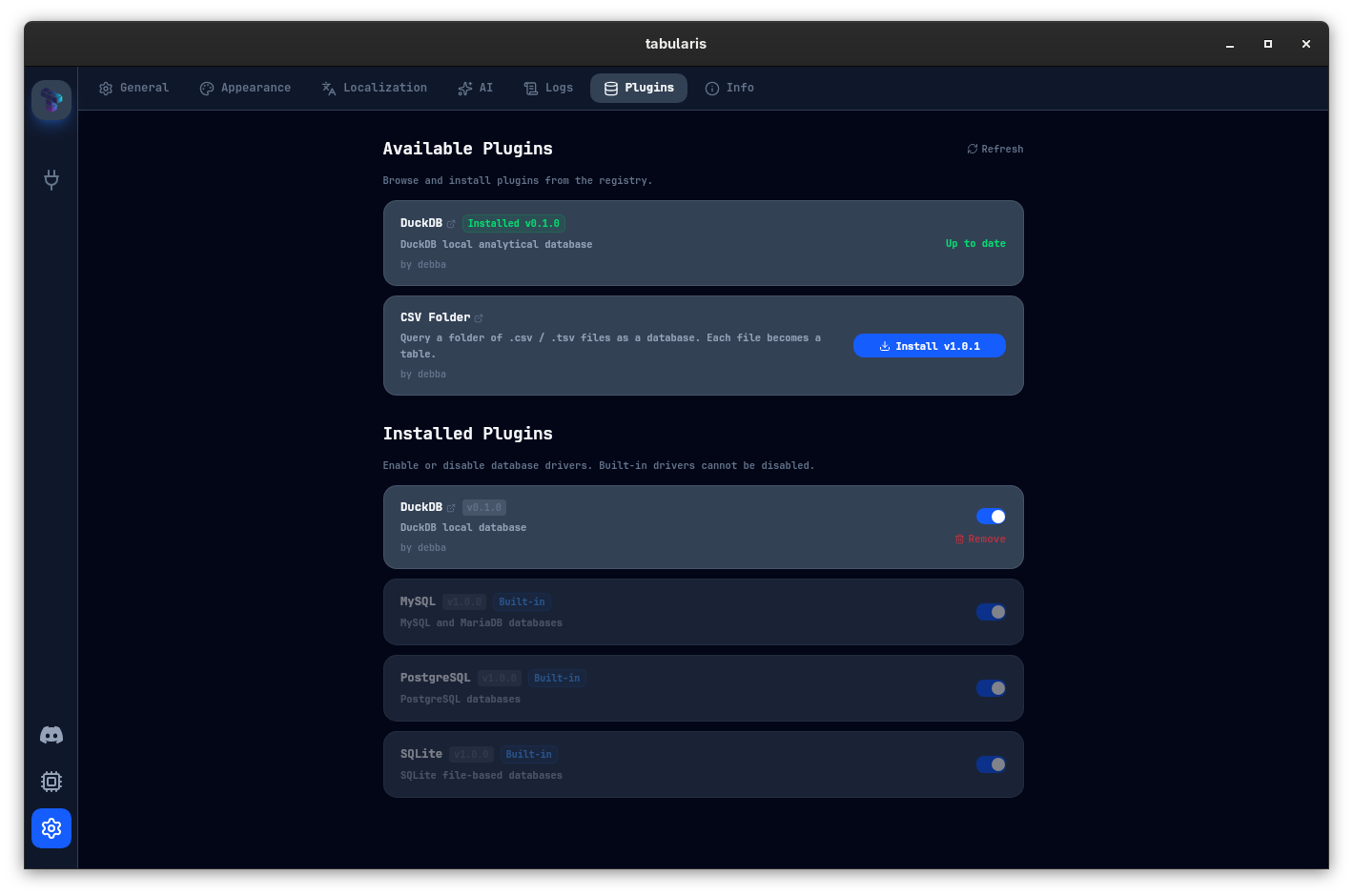 Plugin Manager — available plugins from the registry above, installed drivers with enable/disable toggles below.
Version History and Rollback
The second gap was version management. Until now, the plugin registry tracked a single latest_version per plugin. Upgrading always meant replacing whatever you had. There was no record of what you previously ran, and no way to go back.
v0.9.2 restructures the registry format. Each plugin now exposes a full releases array:
{
  "id": "duckdb",
  "latest_version": "0.2.0",
  "releases": [
    {
      "version": "0.1.0",
      "min_tabularis_version": "0.8.15",
      "assets": { ... }
    },
    {
      "version": "0.2.0",
      "min_tabularis_version": "0.9.2",
      "assets": { ... }
    }
  ]
}
Each release declares the minimum Tabularis version it requires. The UI uses this to surface only compatible releases for your installation. If you are on an older version of the app, you will see the latest release that works for you — not a broken one.
And if a new plugin release introduces a regression, you can downgrade. Select the previous release from the version list in Settings → Plugins and reinstall. The older binary replaces the new one; your connections keep working.
The CSV Folder Plugin: A Python Story
The DuckDB plugin was written in Rust. That made sense for a performance-critical analytical engine. But the plugin protocol is language-agnostic — any process that speaks JSON-RPC 2.0 over stdin/stdout qualifies. The new CSV Folder plugin demonstrates this in the most direct way possible: it is written in Python.
The plugin lets you point Tabularis at a directory of .csv or .tsv files and query it like a database. Each file becomes a table, columns are inferred from the header row, and you can run SQL across them immediately — joins included.
SELECT o.customer_id, c.name, SUM(o.amount) AS total
FROM orders o
JOIN customers c ON o.customer_id = c.id
GROUP BY o.customer_id, c.name
ORDER BY total DESC
LIMIT 10;
Where orders.csv and customers.csv are just flat files in the same folder.
The Python implementation is deliberately minimal. No compiled extension, no build step. The plugin is a single script with a standard library JSON parser and a dependency on the csv module that ships with Python. Install Python, install the plugin, point it at a folder.
Because the plugin distributes as a universal asset — a single .zip that works on Linux, macOS, and Windows — the release process is straightforward. There are no platform-specific binaries to cross-compile. Python handles the portability; Tabularis handles the UI.
This makes it a practical starting point for anyone who wants to write a Tabularis plugin. The barrier is a working Python environment and a JSON-RPC loop — nothing more.
Query a folder of .csv / .tsv files as a database. Each file becomes a table.
Custom Registry URL
The official registry at tabularis.dev is the default, but organizations sometimes need to distribute private plugins internally. v0.9.2 introduces the customRegistryUrl key in config.json. Set it while the app is closed and Settings → Plugins will fetch from your endpoint instead:
{
  "customRegistryUrl": "https://your-internal-host/plugins/registry.json"
}
The format is identical to the public registry — same schema, same version structure. This lets teams distribute internal drivers, or run a local registry for plugins in development, without touching the main app.
Smarter Pagination: LIMIT+1 Instead of COUNT
Every paginated query previously fired two database round-trips: the data query, and a SELECT COUNT(*) FROM (...) wrapper to know the total number of rows. On large tables that count can be slow — a full sequential scan just to display "page 1 of 847".
v0.9.2 drops the automatic count query entirely. Pagination now uses the LIMIT+1 trick: request one more row than the page size. If you get back page_size + 1 rows, there is a next page (has_more: true); truncate the extra row before display. If you get back page_size or fewer, you are on the last page.
// Before: two queries per page
SELECT COUNT(*) FROM (your_query) as count_wrapper;   // expensive
SELECT * FROM (your_query) LIMIT 50 OFFSET 0;

// After: one query per page
SELECT * FROM (your_query) LIMIT 51 OFFSET 0;  // 51 = page_size + 1
// has_more = rows.len() > 50 → truncate if true
The tradeoff is that total_rows is no longer automatically known — it is now Option<u64> and starts as None. When you explicitly need the total count (for displaying "X rows total"), a separate count_query command is available and can be called on demand. Browsing through results page by page — the common case — never pays the count cost at all.
This change applies uniformly across all three built-in drivers: PostgreSQL, MySQL, and SQLite.
Task Manager
The plugin system now runs multiple external processes — one per active plugin connection, plus the app itself. That raises a question that was previously unanswerable from within Tabularis: what is actually running, and how much is it consuming?
Settings → Task Manager answers that. The panel shows a live table of all processes associated with Tabularis:
- The app process — memory, CPU, threads.
- Plugin processes — one row per active plugin driver, with CPU and memory usage.
- Child processes — sub-processes spawned by plugins, fetched on demand to avoid unnecessary overhead.
Each row refreshes in real time. If a plugin is misbehaving — leaking memory, spiking CPU, or getting stuck — you will see it here before it affects your work.
From the same panel you can kill or restart any plugin process directly. Kill terminates the process immediately; restart spawns a fresh one and re-registers the driver. Neither action requires restarting the app. Existing tabs connected through that plugin will show a disconnected state and offer a reconnect prompt.
The resource data comes from sysinfo, a cross-platform Rust crate for system metrics. CPU percentages, resident memory, and disk I/O are available across all supported operating systems. The child process list is fetched on demand rather than on every polling tick — a deliberate trade-off to keep idle overhead low.
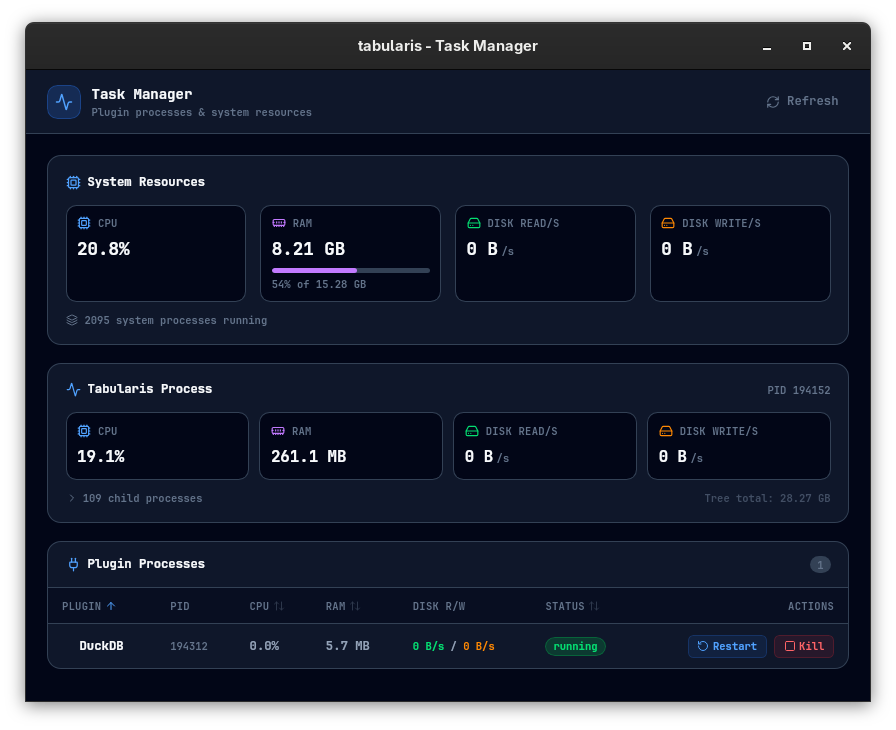 Task Manager — monitor the app and all plugin processes in real time, with kill and restart controls.
The plugin system shipped in v0.9.0 was the foundation. v0.9.2 is the first release where it feels complete: you can install, update, rollback, enable, disable, and monitor plugins without touching the filesystem manually. The CSV plugin shows that building a driver does not require a compiled language. The Task Manager ensures that the processes powering your connections are never a black box.