
v0.9.10, UI Extensions in Progress, and Two Real Plugins

v0.9.10 is a maintenance release — no headline features, just a set of fixes that were blocking clean usage after the multi-database work shipped in v0.9.8. Behind the scenes, feat/plugin-system-ui is heating up: the slot-based UI extension system is now far enough along to test with real plugins, and two of them are already running.
What Changed in v0.9.10
Multi-database window title
When you open a connection with multiple databases selected, the window title now reflects all of them. Previously it would show only the first database in the selection, which made it confusing to tell windows apart when you had two multi-database sessions open side by side.
Database selection in record operations
INSERT, UPDATE, and DELETE operations in the Editor now correctly target the selected database in a multi-database session. Before this fix, record mutations would fall back to the first database in the list regardless of which one was active in the UI, which was both surprising and dangerous.
Editor toolbar padding
The editor toolbar was using inconsistent padding that caused the toolbar items to feel cramped and misaligned with the surrounding UI. The spacing has been adjusted to match the rest of the interface.
Modal name input focus and placeholder
When a validation error occurs in a modal that has a name field, the input now receives focus automatically so the user can correct it without an extra click. The placeholder text was also updated to be more descriptive.
What Is in Progress: Plugin UI Extensions
Phase 2 of the plugin system was sketched out in a post from a few days ago. The design is slots: named insertion points in the host UI where a plugin can render a React component. Ten slots are currently defined:
| Slot | Where it appears |
|---|---|
row-edit-modal.field.after |
Below each field in the row edit modal |
row-edit-modal.footer.before |
Before the action buttons in the modal footer |
row-editor-sidebar.field.after |
Below each field in the row editor sidebar |
row-editor-sidebar.header.actions |
Extra action buttons in the sidebar header |
data-grid.toolbar.actions |
Alongside filter/sort/limit in the data grid toolbar |
data-grid.context-menu.items |
Extra items in the row right-click menu |
sidebar.footer.actions |
Persistent buttons in the main sidebar footer |
settings.plugin.actions |
Action area in the plugin's settings panel |
settings.plugin.before_settings |
Above the settings form for a plugin |
connection-modal.connection_content |
Custom content inside the new connection modal |
Each slot receives a typed SlotContext — connection ID, driver name, table name, current row data, column name, and more depending on the slot. Plugin components are standard React components; they receive context and pluginId as props and return JSX. The plugin API (@tabularis/plugin-api) exposes utilities for read-only queries, toasts, theme detection, and reading plugin settings. That is the entire approved surface — direct Tauri access and DOM mutations outside the plugin subtree are blocked.
Manifests declare UI extensions alongside the existing driver configuration:
{
  "ui_extensions": [
    {
      "slot": "row-editor-sidebar.field.after",
      "module": "dist/index.js",
      "order": 50
    }
  ]
}
Modules are lazy-loaded when the target slot first mounts. Plugins that declare no ui_extensions are unaffected — everything is additive.
Testing with Two Real Plugins
The best way to find out what the slot API is missing is to write plugins against it. I am currently running two:
JSON Viewer
The JSON Viewer plugin (tabularis-json-viewer) targets two slots: row-editor-sidebar.field.after and row-edit-modal.field.after. When the active column holds a JSON or JSONB value, it renders a formatted, syntax-highlighted preview directly below the text input. No extra buttons, no modal — the preview appears inline, in both the sidebar and the modal editor.
{
  "id": "json-viewer",
  "ui_extensions": [
    { "slot": "row-editor-sidebar.field.after", "module": "dist/index.js", "order": 50 },
    { "slot": "row-edit-modal.field.after",     "module": "dist/index.js", "order": 50 }
  ]
}
This is a UI-only plugin — no driver, no backend process. It demonstrates that Phase 2 plugins do not need to speak JSON-RPC at all: if the only goal is to enhance the interface, the manifest just declares ui_extensions and ships a compiled JS bundle.
Google Sheets Plugin
The Google Sheets plugin (tabularis-google-sheets-plugin) already existed as a Phase 1 driver. With Phase 2, it picks up two UI slots:
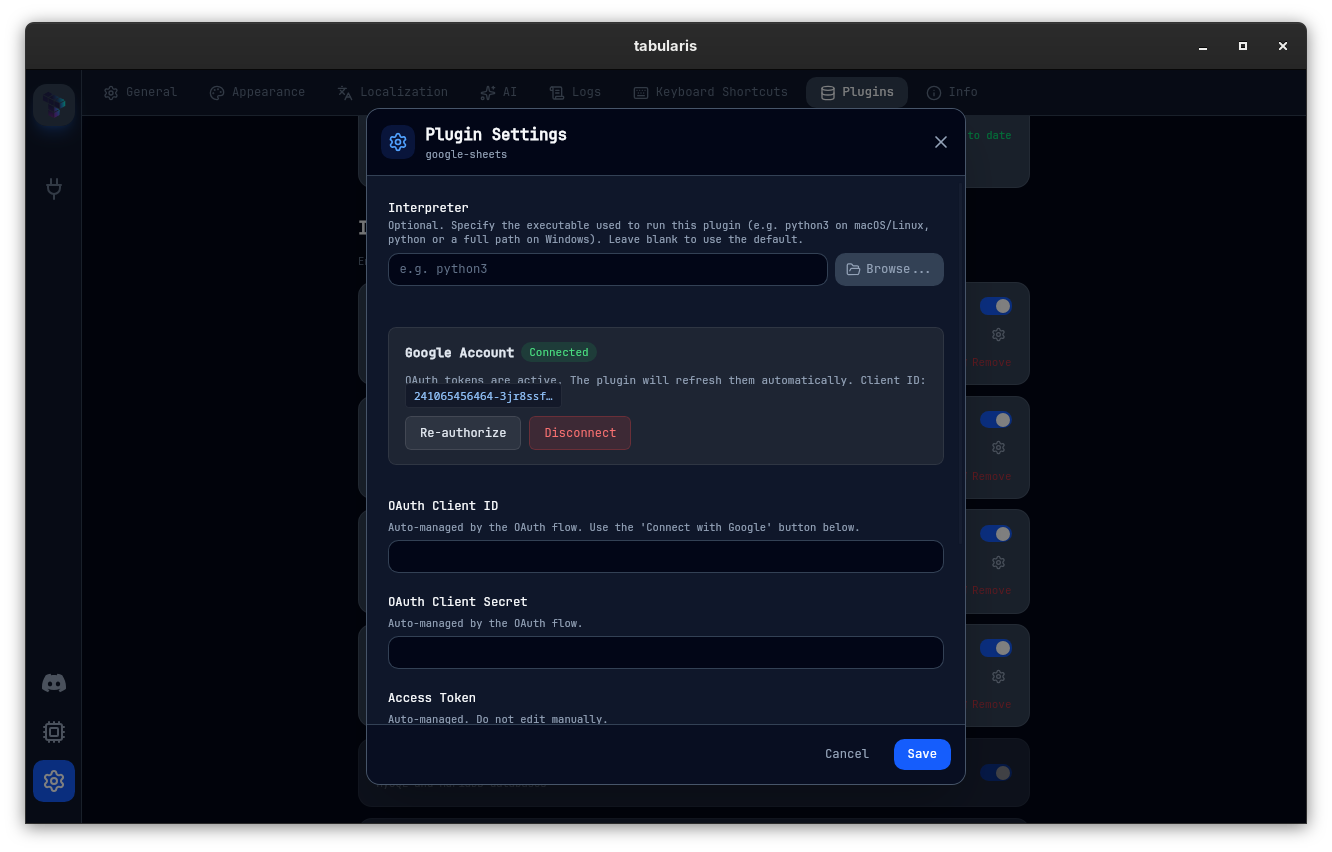
settings.plugin.before_settings— renders a "Connect with Google" OAuth button above the plugin's settings form. The button opens a browser, completes the OAuth flow, and writes the tokens back to the plugin settings automatically. Previously the user had to paste tokens by hand.
connection-modal.connection_content— replaces the generic database field in the new connection modal with a Google Sheets spreadsheet selector. When the driver isgoogle-sheets, the modal shows a search box and a list of the user's spreadsheets instead of a raw text input.
{
  "ui_extensions": [
    {
      "slot": "settings.plugin.before_settings",
      "module": "ui/google-auth.js",
      "order": 10
    },
    {
      "slot": "connection-modal.connection_content",
      "module": "ui/google-sheets-db-field.js",
      "order": 10,
      "driver": "google-sheets"
    }
  ]
}
The driver filter on the second slot is worth noting: connection-modal.connection_content contributions are only active when the selected driver matches. Other drivers do not see this component.
Finding Tabularis useful? Star it on GitHub — it takes a second and helps more developers discover the project. Star on GitHub
What Is Still Missing
Running two real plugins surfaced a few gaps that will need to land before the branch merges:
- Error surfaces — the error boundary catches crashes correctly, but the warning UI is currently just a text node. It needs a proper component with a "reload plugin" affordance.
- Stable theme tokens — the JSON Viewer needs to match the host's syntax-highlighting palette across light and dark mode. Right now it hardcodes colors. A public theme contract is the prerequisite.
None of these block testing, but all of them need to be resolved before the feature is ready for general plugin authors.
Testing with real plugins is also surfacing cases where the current ten slots are not enough. The connection modal and the settings panel are well covered, but there are interaction patterns — particularly around the data grid and the sidebar — where a plugin naturally wants to inject UI in a place that has no slot yet. I am keeping a list and will likely add a few more anchors before the branch merges.


v0.9.10 is available now. Update via the in-app updater, or download from the releases page.