
AI Assistant & Context Engine
Tabularis integrates a privacy-first AI assistant directly into the SQL Editor and notebooks. It goes beyond simple autocomplete by understanding your database structure to generate, explain, and label queries.
Video unavailable
How Context Injection Works
A common failure of generic AI tools (like ChatGPT) is hallucinating column names. Tabularis solves this via Schema Snapshots.
When you ask the AI to "Find users who ordered in the last 30 days", Tabularis intercepts the request and builds a condensed, token-optimized snapshot of your current database structure.
The snapshot is loaded through the driver of the editor's active connection and schema. Tabularis waits for that metadata before sending the request, so a fast click on Generate SQL cannot race ahead with an empty schema. Up to 20 tables are included with their columns, primary-key markers, nullability, defaults, and available foreign-key relationships; the prompt notes when additional tables were omitted.
Example snapshot injected into the system prompt (it replaces the {{SCHEMA}} placeholder):
Table: "users"
  - id uuid PK NOT NULL
  - username varchar NOT NULL
  - created_at timestamptz NOT NULL DEFAULT now()
Table: "orders"
  - id uuid PK NOT NULL
  - user_id uuid NOT NULL
  - total numeric
  - status varchar
  FK: user_id -> users.id
... and 12 more tables (not shown)
By feeding this exact structural context to the LLM alongside your natural language prompt, the AI knows exactly which JOIN clauses to write and which data types it is dealing with.
Plugin drivers
AI Query Assist uses the same driver registry as the rest of Tabularis, so it also works with external database plugins. Existing plugins receive automatic support through their standard get_tables, get_columns, and get_foreign_keys metadata methods. A plugin can optionally implement the batched get_ai_schema_context JSON-RPC method when its database offers a more efficient metadata query; if that method is absent, Tabularis falls back automatically.
Plugins return structured metadata only. Tabularis keeps ownership of truncation safeguards, prompt formatting, and provider dispatch, which gives built-in and external drivers the same behavior.
Supported Providers & Local Privacy
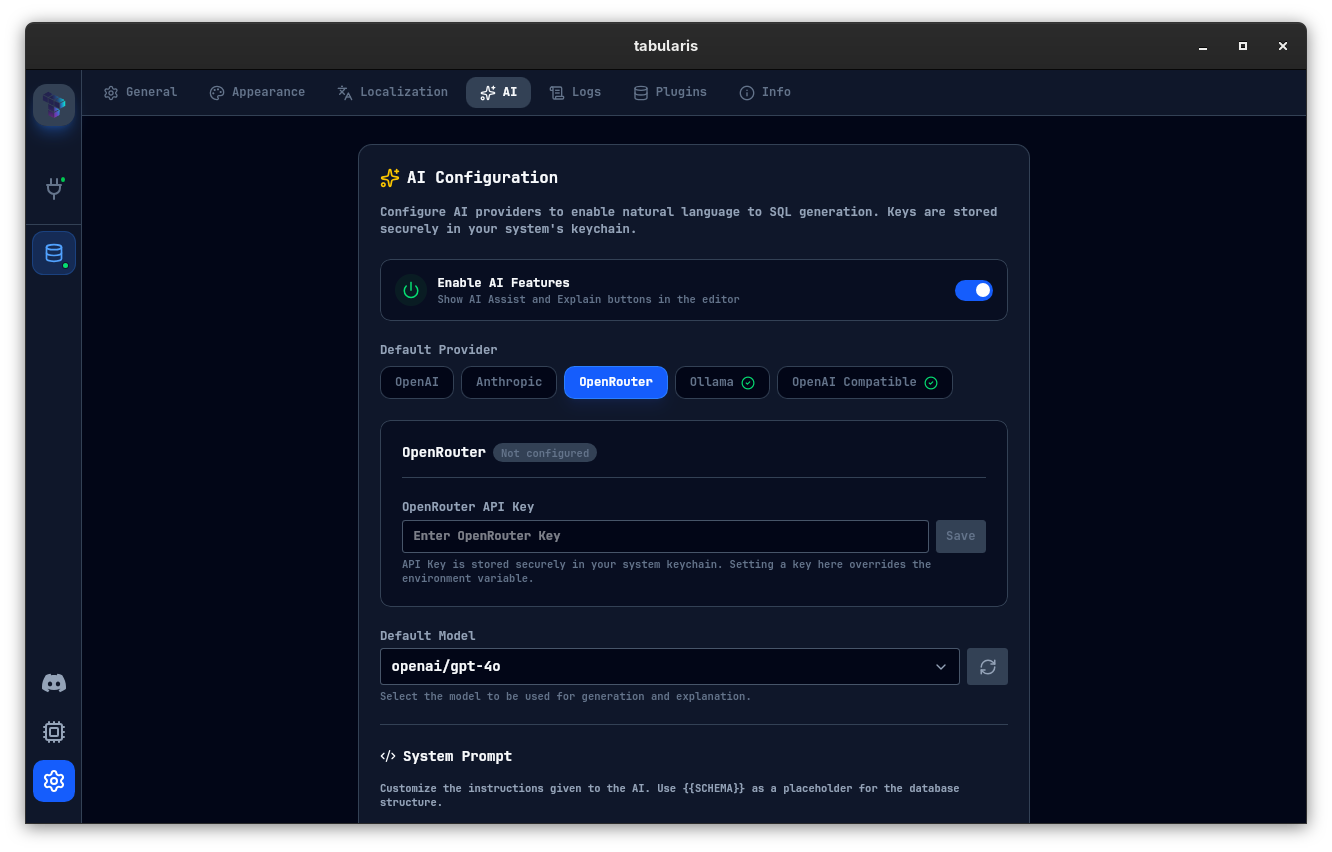
Tabularis is provider-agnostic. Configure your preferred engine in Settings:
1. Cloud Providers
- OpenAI (
openai): Uses your own API key. The model list shipped with the app is merged with the GPT models your key can access (cached for 24 hours; use the refresh button in Settings → AI to reload it), and you can add custom model entries. - Anthropic (
anthropic): Good for complex query explanations and structured reasoning. - MiniMax (
minimax): Available as a first-class provider in the AI settings. - OpenRouter (
openrouter): Access a broader multi-model catalog through a unified API. - Custom OpenAI-compatible (
custom-openai): Any endpoint that speaks the OpenAI API (e.g. LM Studio, vLLM, Groq-compatible gateways). SetaiCustomOpenaiUrland choose a model in Settings.
2. Local Execution (Zero-Knowledge Privacy)
For enterprise databases with strict compliance requirements, you cannot send schema data to third-party servers. Tabularis natively integrates with Ollama.
- Install Ollama on your machine.
- Pull a coding model:
ollama pull codellamaorollama pull llama3. - In Tabularis Settings, set the provider to Ollama. The default port is
11434; change it viaaiOllamaPortif needed. Result: Powerful AI assistance with a guarantee that zero bytes of data ever leave your network.
Provider Proxy Overrides
Since v0.24.0, the selected provider in Settings → AI can inherit the global Network proxy, use a custom HTTP CONNECT/SOCKS5 proxy or disable proxying for that provider. An explicit provider choice wins over the global AI scope. Proxy passwords are kept in the OS keychain. A proxy changes the route, not which provider receives the prompt; choose your endpoint and TLS configuration accordingly.
Explain & Optimize Queries
The AI is not limited to generating SQL. From the editor you can ask it to explain the current query, and the explanation prompt is configurable in Settings. The assistant breaks down joins, subqueries, and filters in plain language and can suggest likely optimization directions.
Notebook Cell Naming
In SQL Notebooks, the AI can generate descriptive names for cells based on their content:
- Single cell: Click the AI icon on any cell header to generate a name for that cell.
- Batch naming: In the notebook Outline panel, click the sparkles icon (Generate names for unnamed cells with AI) to name all unnamed cells at once.
The naming prompt is customizable in Settings > AI > Notebook Cell Name Prompt. The cell content (SQL or Markdown) is sent as the user message alongside the prompt.
Query Tab Naming
Tabularis can also generate short names for SQL result tabs. In multi-result views, the AI uses the current SQL text and a dedicated Query Tab Name Prompt from Settings to propose a concise label.
Custom Prompts
The AI settings currently expose five editable prompts:
- SQL Generation (system prompt). Use
{{SCHEMA}}as the placeholder for the schema snapshot. - Query Explanation. Use
{{LANGUAGE}}as the placeholder for the output language. - Notebook Cell Name Prompt
- Query Tab Name Prompt
- Explain Plan Analysis Prompt, used by the AI tab of Visual Explain. It also accepts
{{LANGUAGE}}.
Model Context Protocol (MCP)
Tabularis ships with a built-in MCP Server, allowing external AI agents like Claude Desktop, Claude Code, Codex, Cursor, Windsurf, or Antigravity to interface with your saved connections over stdio.
- Open the MCP Server page from the sidebar (CPU icon).
- Install the config for your target client.
- The agent can then list saved connections, inspect schemas and tables, and execute SQL through the Tabularis MCP server.