
View Management
Tabularis provides full CRUD support for database views — CREATE VIEW, ALTER VIEW, and DROP VIEW — through a dedicated visual editor. Views appear alongside tables in the Explorer sidebar, grouped under their own section.
Browsing Views
When you connect to a database, views are listed in the sidebar under the Views section for each database or schema. Each view entry is expandable: click the arrow to reveal its columns, just like a table.
Double-click a view to open its data in the Data Grid. The grid works identically to table browsing — pagination, sorting, filtering, and export all apply.
Creating a View
- Right-click the Views section header in the sidebar and choose Create View.
- The View Editor Modal opens with two fields:
- Name — the view name (e.g.,
active_users). - Definition — the
SELECTstatement that defines the view. A syntax-highlighted Monaco editor is provided.
- Name — the view name (e.g.,
- Click Preview to test-run the SELECT statement and verify it returns the expected results.
- Click Create to execute
CREATE VIEW <name> AS <definition>.
The sidebar refreshes automatically after creation.
Editing a View
Right-click an existing view in the sidebar and choose Edit View. The View Editor Modal opens pre-populated with the view name (read-only) and the current SELECT definition.
Databases often hand back a view definition as a single dense line — MySQL, for example, stores SELECT c.id,c.name,... with no whitespace. Click the Beautify button (available in both the create and edit views) to pretty-print the definition using the active driver's SQL dialect before you start editing.
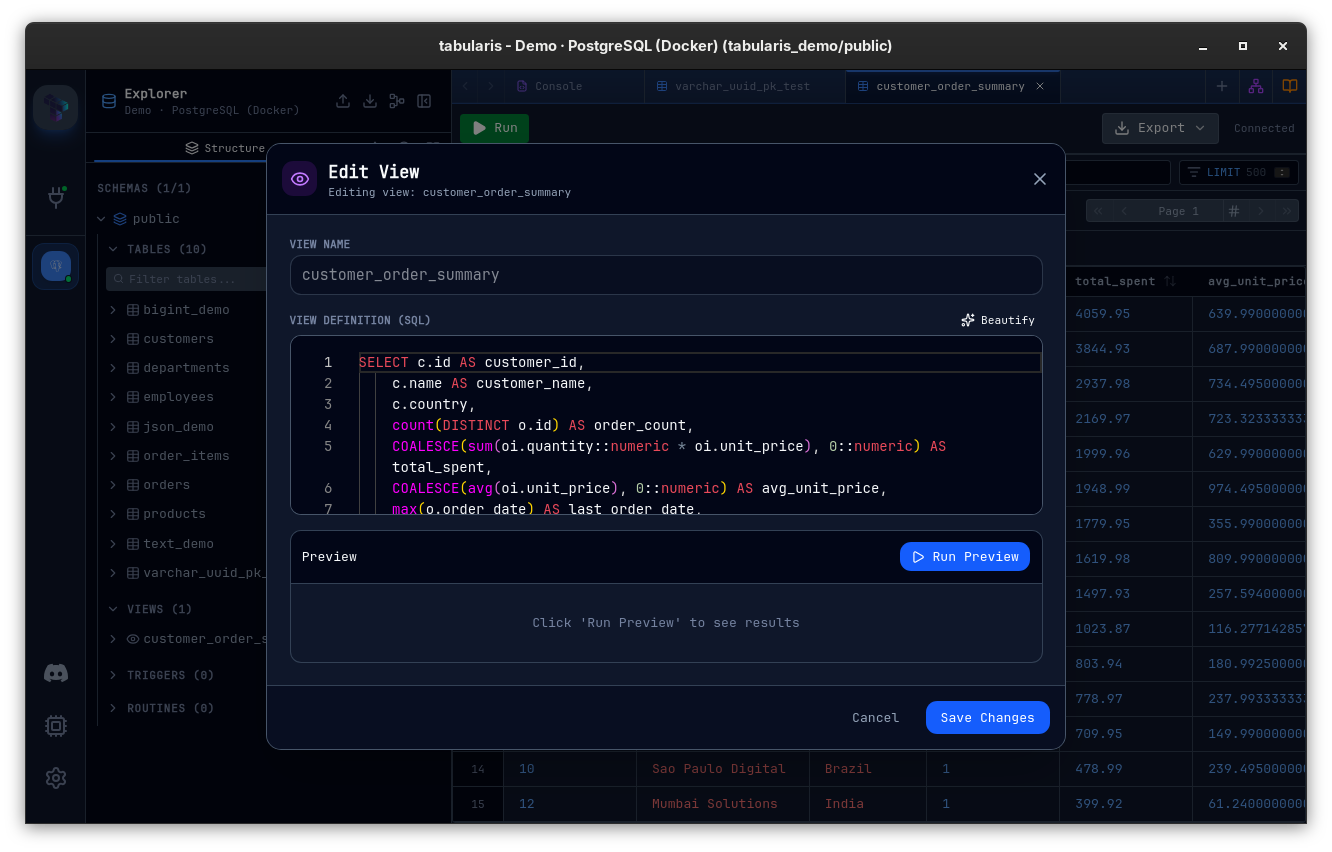
Modify the definition and click Save. Tabularis executes an ALTER VIEW (or CREATE OR REPLACE VIEW, depending on the driver) to update the view in place.
Dropping a View
Right-click a view → Drop View. A confirmation dialog is shown before the DROP VIEW statement is executed. This action is irreversible.
Viewing the Definition
Right-click a view → View Definition to see the full CREATE VIEW SQL in a read-only editor tab. This is useful for copying the definition into migration files.
View Columns
Expand a view in the sidebar to see its output columns. Each column shows:
- Column name
- Data type
This information is fetched via the driver's get_view_columns command, which queries INFORMATION_SCHEMA.COLUMNS (or the driver-equivalent catalog).
Materialized Views (PostgreSQL)
PostgreSQL materialized views are browsed in their own Materialized Views section in the sidebar, separate from regular views and collapsed by default. The section only appears when the connection's driver reports support for them, so MySQL and SQLite connections never show an empty group.
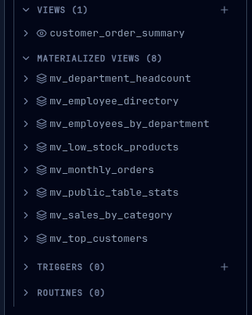
- Browse columns and indexes — expand a materialized view to see its columns; its indexes render with the same list Tabularis uses for tables.
- Open the data — double-click to load the materialized data in the Data Grid. Because a materialized view holds a stored snapshot rather than a live query, it is read-only in the grid — inline editing is disabled.
- Refresh — refreshing runs
REFRESH MATERIALIZED VIEWand shows an in-flight spinner on the item until the server finishes. - Active schema — materialized views are resolved against the schema currently selected in the sidebar header (see Multi-Schema Support).
Driver Support
| Feature | PostgreSQL | MySQL / MariaDB | SQLite |
|---|---|---|---|
| List views | Yes | Yes | Yes |
| View definition | Yes | Yes | Yes |
| View columns | Yes | Yes | Yes |
| Create view | Yes | Yes | Yes |
| Alter view | Yes | Yes | Yes |
| Drop view | Yes | Yes | Yes |
| Materialized views | Yes | — | — |