

Dump & Import
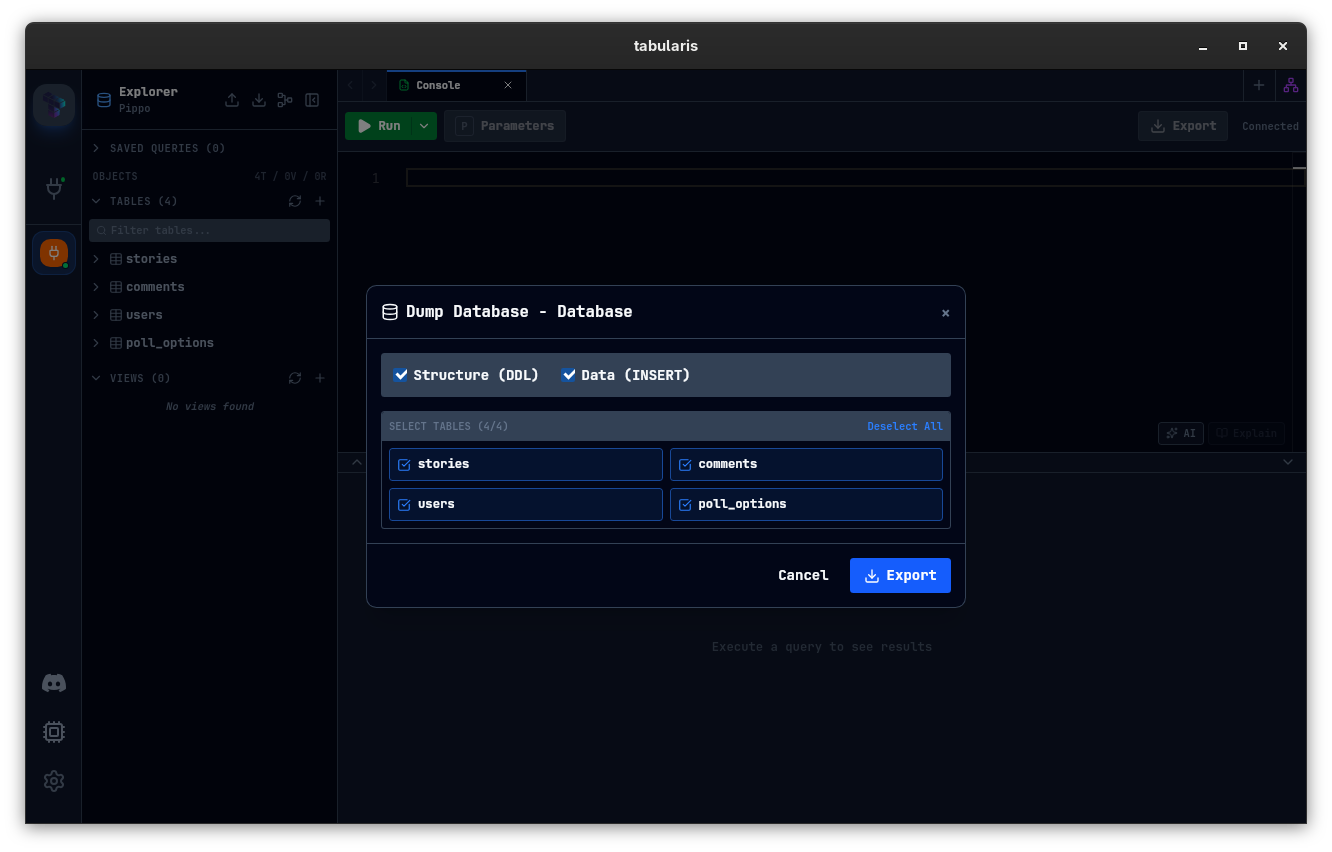
Tabularis lets you dump a database to a .sql file and import an existing .sql file back into a PostgreSQL, MySQL/MariaDB or SQLite connection — or, since v0.29.0, a plugin driver connection — right from the sidebar, without leaving the app.
Dump a Database
Right-click a database in the sidebar and choose Dump Database. A modal opens with the following options:
| Option | Description |
|---|---|
| Structure (DDL) | Exports CREATE TABLE, CREATE INDEX, and other DDL statements, each table preceded by DROP TABLE IF EXISTS. |
| Data (INSERT) | Exports INSERT INTO statements for all rows. |
| Select Tables | Choose which tables to include. Use Select All / Deselect All for convenience. |
At least one of Structure or Data must be selected, and at least one table must be chosen before starting.
Since v0.23.0 string literals are escaped per dialect (MySQL doubles backslashes and writes NUL as \0; PostgreSQL and SQLite only escape quotes) and JSON / JSONB columns are written as JSON literals with UTF-8 emitted as-is, so dumps round-trip on re-import. Before that, PostgreSQL and SQLite text columns came back with doubled backslashes and MySQL JSON columns could fail to import or lose non-ASCII text.
Click Export to open the OS file save dialog. The default filename is <database>_dump_<date>.sql. Tabularis streams the dump to disk as it runs — you can see the elapsed time in real time. Click Cancel at any time to abort the operation.
To dump a database every day without opening this modal, use Scheduled Database Backups (since v0.30.0) in Settings → Backup.
Import a Database
Right-click a database in the sidebar and choose Run SQL File..., then select a .sql file — or a .zip archive, in which case the first .sql file inside it is used. After you confirm the warning that the import may overwrite existing data, the import starts and shows:
- An indeterminate progress bar with the number of statements executed so far.
- The elapsed time.
The import can be cancelled at any time. Tabularis will close the modal automatically after a successful import.
Note: Import executes the SQL statements in your file sequentially, inside a single transaction that is committed at the end. If a statement fails, execution stops and the error is displayed. To speed up loading, MySQL/MariaDB imports turn off
FOREIGN_KEY_CHECKSandUNIQUE_CHECKSfor the session, and PostgreSQL imports defer constraints (SET CONSTRAINTS ALL DEFERRED). Statements that commit implicitly on the server (such as DDL on MySQL) are not rolled back by a later failure.
Schemas (PostgreSQL)
On PostgreSQL connections, dump and import work on the active schema: the dump reads the selected tables from it, and the import runs with search_path set to it. There are no separate schema-level menu entries. On a PostgreSQL multi-database connection (since v0.29.0), each database node has its own Dump Database and Run SQL File..., which target that database.
How to Access
- Right-click a database node in the left sidebar → Dump Database / Run SQL File...
- The same two actions are in the actions menu and buttons at the top of the Explorer.
Plugin Drivers
Before v0.29.0 both actions were available for the built-in drivers only. Since v0.29.0 they also work on plugin drivers, including the PostgreSQL plugin:
- The dump lists tables and reads their DDL through the plugin's
get_tablesandget_table_ddl, and exports data page by page throughexecute_query. JSON columns are written as JSON literals. - String and boolean literals follow the driver's declared
sql_dialect/sql_syntax, not its driver id. - The import sends each statement of the file to the plugin one at a time through
execute_query. There is no transaction across a plugin, so a failure stops the import but does not roll back the statements already executed.