


There is a new plugin in the registry: Hacker News.
It exposes the public HN Firebase API as a queryable SQL database. Stories, comments, users, and poll options become real in-memory tables powered by DuckDB. No API key, no authentication, no setup beyond installing the plugin.
Fair warning upfront: this is as much a stress test for the new per-plugin settings system (introduced in v0.9.7) as it is a genuinely useful tool. HN made an ideal guinea pig — public API, no auth, rich enough data variety to exercise different configuration combinations. But it does actually work, and the queries below are real.
What You Can Query
-- Top stories from the last 24 hours with at least 10 points
SELECT title, score, by, epoch_ms(time * 1000)::TIMESTAMP AS posted_at
FROM stories
WHERE time > epoch(now()) - 86400
  AND score >= 10
ORDER BY score DESC;

-- Who posts the most — and how well do they do?
SELECT by, COUNT(*) AS posts, AVG(score) AS avg_score
FROM stories
GROUP BY by
ORDER BY posts DESC;

-- JOIN stories with their top-level comments
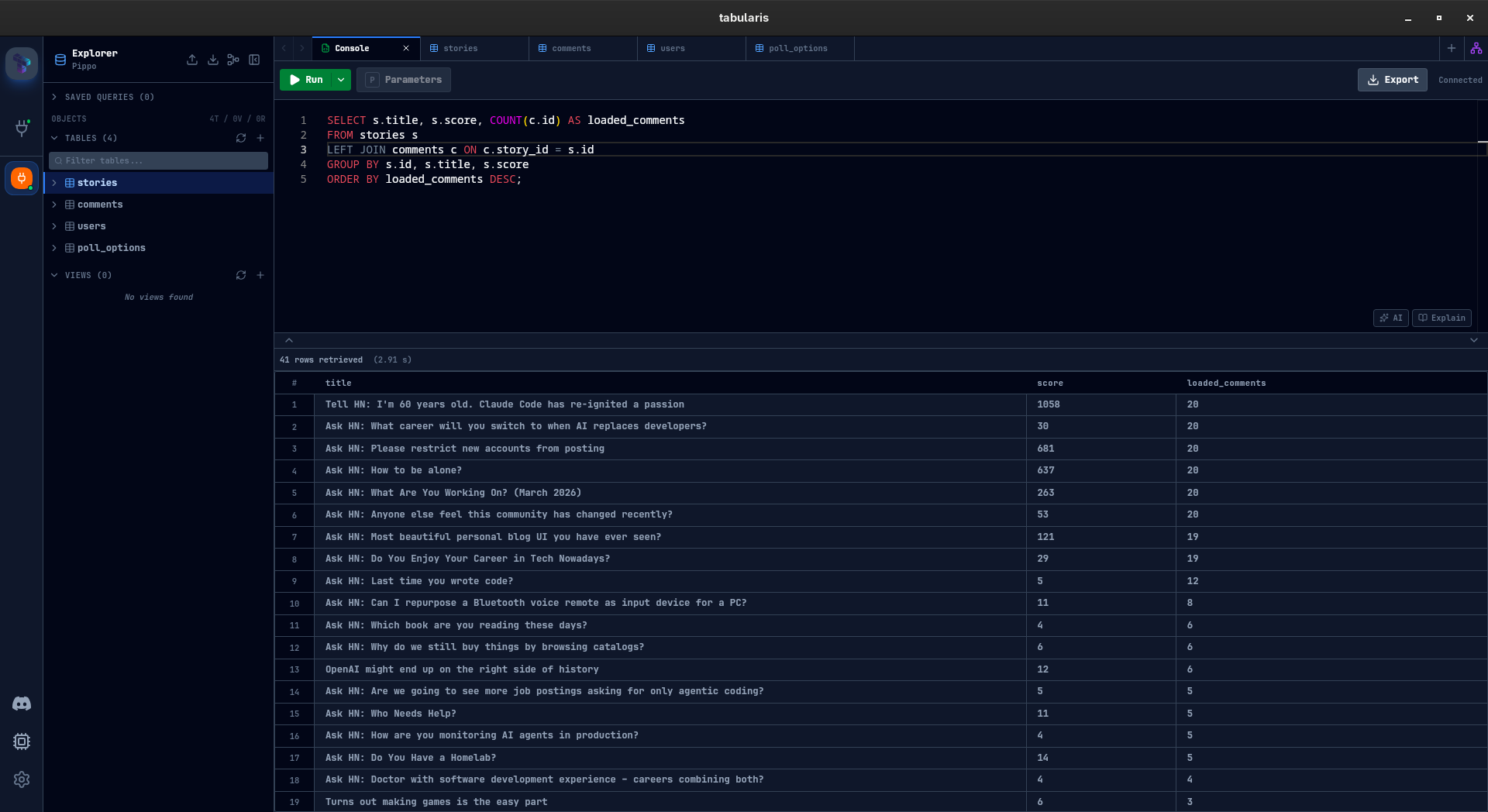
SELECT s.title, s.score, COUNT(c.id) AS loaded_comments
FROM stories s
LEFT JOIN comments c ON c.story_id = s.id
GROUP BY s.id, s.title, s.score
ORDER BY loaded_comments DESC;
Full SQL is supported: JOIN, GROUP BY, CTEs, window functions — anything DuckDB handles. The stories table is always available; the rest are optional and enabled through plugin settings.
Optional Tables
The plugin exposes four tables, three of which are opt-in via settings:
| Table | Contents | Default |
|---|---|---|
stories |
Feed items (title, score, author, time, url) | Always loaded |
comments |
Top-level comments, up to 3 levels deep | Optional |
users |
Karma and bio for all story/comment authors | Optional |
poll_options |
Voting options for poll-type stories | Optional |
Enabling comments and users increases the number of API calls on the first query — HN's Firebase API is item-by-item, so fetching author details for 500 stories means up to 500 additional requests. The TTL and HTTP timeout settings let you tune this trade-off for your connection.
Plugin Settings in Practice
This plugin was designed to exercise the declarable plugin settings feature from v0.9.7. It declares its full configuration schema in manifest.json, and Tabularis renders the settings UI automatically — no app changes needed:
| Setting | Type | Default | Description |
|---|---|---|---|
| Feed | select | top |
Which HN feed to load: top, new, best, ask, show, or jobs |
| Max Stories | number | 30 |
How many stories to fetch (max 500) |
| Include Comments | toggle | off | Enables the comments table |
| Comment Depth | number | 1 |
Nesting levels to fetch (1–3). Higher values mean many more requests |
| Max Comments | number | 500 |
Global cap on total comments fetched (max 5000) |
| Include Users | toggle | off | Fetches author karma and bio. Enables the users table |
| Include Poll Options | toggle | off | Fetches voting options for poll-type stories. Enables the poll_options table |
| Timeout (s) | number | 10 |
HTTP request timeout in seconds for the HN API |
| Cache TTL (min) | number | 0 |
Auto-refresh data after N minutes. Set to 0 to disable |
The three include_* toggles are the main cost knobs. With all three off (the default), only stories are fetched — fast, minimal API calls. Enabling comments at depth 3 with a large story count can trigger thousands of requests; the Max Comments cap and Timeout exist to keep that bounded.
It also uses the no_connection_required flag — since there is no host or credentials to enter, Tabularis hides the connection form entirely. You give the connection a name and start querying.
How It Works
Tabularis spawns the plugin as a child process and communicates via JSON-RPC 2.0 over stdio. On the first query, the plugin fetches from the HN API, builds an in-memory DuckDB instance, and keeps it alive for the session duration (or until the TTL expires). Subsequent queries hit the local DuckDB instance directly — no network round-trips.
The plugin is written in Rust. Source is on GitHub.
Installation
Open Settings → Available Plugins and install Hacker News from the registry. That's it — no manual download, no interpreter to configure.
Query Hacker News stories, comments, users and polls as SQL tables using the public API.
Feedback is welcome — particularly on the per-plugin settings UX and what other public APIs would make good candidates for this kind of driver. The pattern (public API → in-memory DuckDB → SQL) generalizes well, and the plugin serves as a concrete reference implementation for anyone who wants to build something similar.