
v0.25.0: A New Theme System, AWS SSM Tunnels and Startup Improvements

v0.25.0 follows v0.24.0 with a release about the things around your queries rather than the queries themselves. Themes stop being a fixed list of twelve presets and become packages you install, preview, update and remove the way you already handle driver plugins, with a command-line tool for authors. Connections gain a third tunnel method, AWS Systems Manager Session Manager port forwarding, next to SSH and Kubernetes. Available updates for the app and for installed plugins are counted in the sidebar and announced once at startup instead of waiting in Settings. Startup itself loads far less JavaScript. On the MCP side, every tool can return TOON instead of JSON, and the standalone MCP process now notices plugins that were installed, disabled or removed while it was running. Table and column comments from PostgreSQL and MySQL reach the schema inspector, the sidebar and the grid. The community fixes cover read-only JSON viewers, plugin display names, schema text selection and MongoDB replica set URIs.
Themes Become Installable Packages
PR #793, with the follow-up #803, addresses #791: themes are now declarative packages that travel through the same registry and the same install lifecycle as driver plugins. A theme package is a ZIP with a .tabularium manifest of kind: "theme" and one JSON file per variant, typically a light and a dark one. It contains data only. Nothing in a theme package is executed, and theme packages are excluded from the driver activation path entirely.
Two surfaces change. Settings → Appearance → Manage themes lists built-in, personal and installed themes together. Preview applies a theme temporarily and shows a read-only SQL sample rendered by the shared Monaco renderer; Cancel or Escape restores the saved selection, Apply saves it. Installed packages are read-only; Duplicate as personal creates an editable copy. The application theme and the SQL editor theme are selected independently, and the Follow System light and dark picks from v0.22.0 continue to work with installed variants. Settings → Plugins gains a Filter by type control with Drivers and Themes, so theme packages can be installed from the registry, updated, enabled, disabled and uninstalled next to drivers. Removing a theme package reuses the plugin removal dialog and states that every variant of the package is affected. Installing a package never selects a variant on its own: close the dialog and pick it explicitly in Appearance.
The lifecycle underneath is the careful part. The archive is inspected with size bounds, every path and payload is validated, the package is staged privately under a lock, and the install is committed by atomic replacement with rollback on failure. Interrupted operations have an explicit Recover interrupted installs action rather than silent repair. A saved selection that points at a package that is currently unavailable, because it was disabled or its file went missing, falls back to a built-in theme without overwriting your preference; the moment the package is back, the selection is restored. Packages are stored by kind, in plugins/themes/<package>/ beside plugins/drivers/<package>/, and discovery still finds the legacy flat layout.
Imports and exports round it out. Import from VS Code accepts a VS Code JSON or JSONC theme, converts it, lists what could not be mapped and asks you to pick the light or dark base when it cannot tell. Import Tabularis JSON and Export standalone JSON keep the old single-file format, and Export author package produces the package layout for a theme you want to publish. Theme definitions and manifests accept optional $schema hints for editor completion; the runtime ignores them for validation and never fetches a remote schema.
For authors, @tabularis/create-plugin 0.3.0 ships a second binary, tabularis-theme, which scaffolds a two-variant repository, validates both variants offline with the same schemas the app uses, and builds a deterministic ZIP. The generated repository includes a validation workflow for branches and pull requests and a separate draft-release workflow for tags. The guide is THEMES.md. The reference implementation is Ember, a warm amber and copper pair.
One caveat, stated plainly: v0.25.0 is the first release that can install theme packages, so a package must declare min_runtime_version: "0.25.0" and older clients will refuse it. At the time of writing no theme package has been published to the registry yet, Ember included. The Themes filter in Plugins will fill up as authors publish; until then, local ZIP installs and VS Code imports are the way to try it.
Video unavailable
Connect Through AWS SSM Session Manager
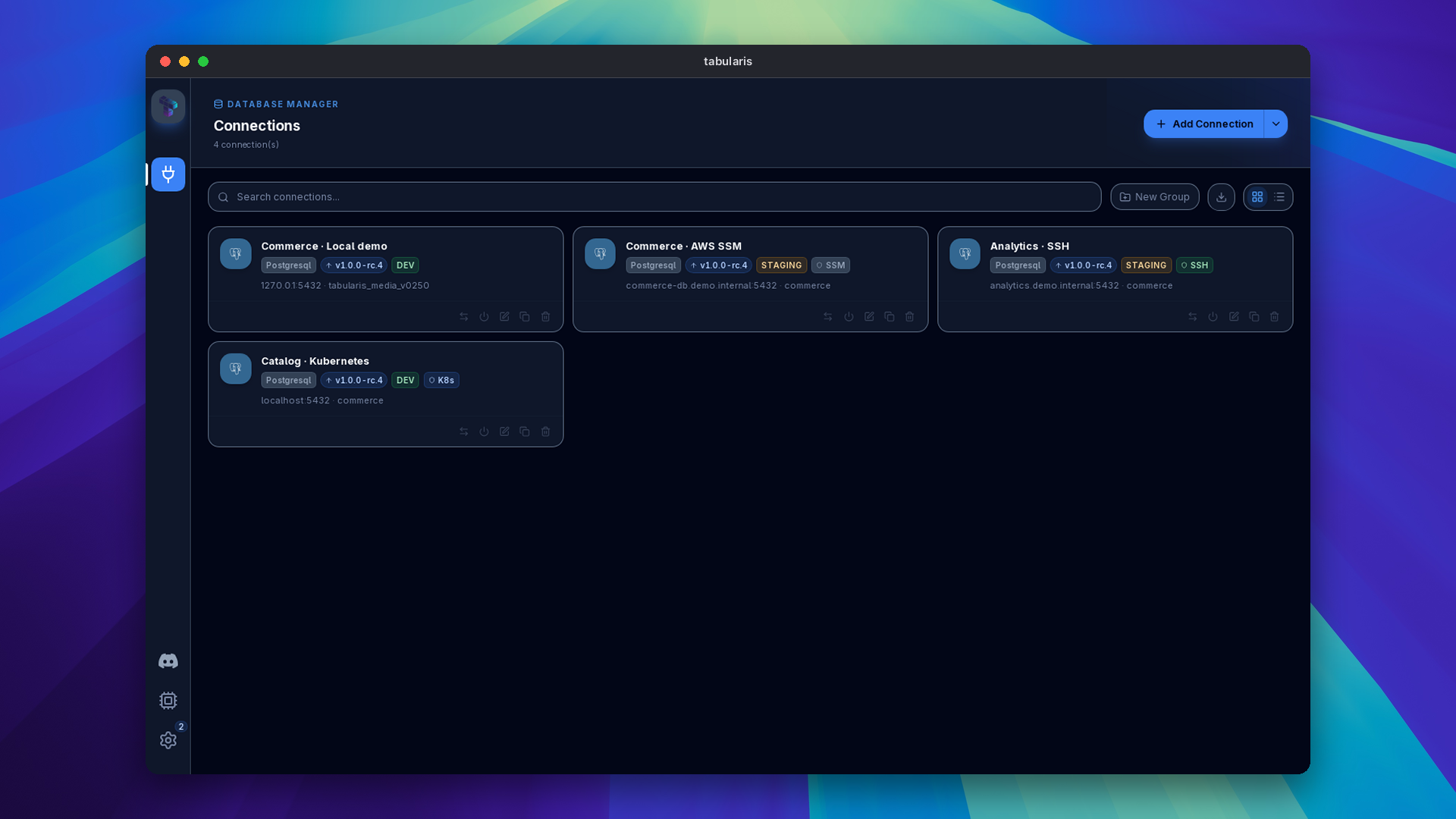
@Davydhh adds a third tunnel method in PR #766, closing #765. The connection modal gains an AWS SSM tab with Use AWS SSM Port Forwarding, a Managed Node id, and optional AWS Profile and AWS Region. On connect, Tabularis runs aws ssm start-session as a port-forwarding session and points the driver at the resulting local port, exactly as the SSH and Kubernetes methods do. The forward target is the host and port from the General tab, so a connection to an RDS instance behind a bastion node needs no extra fields.
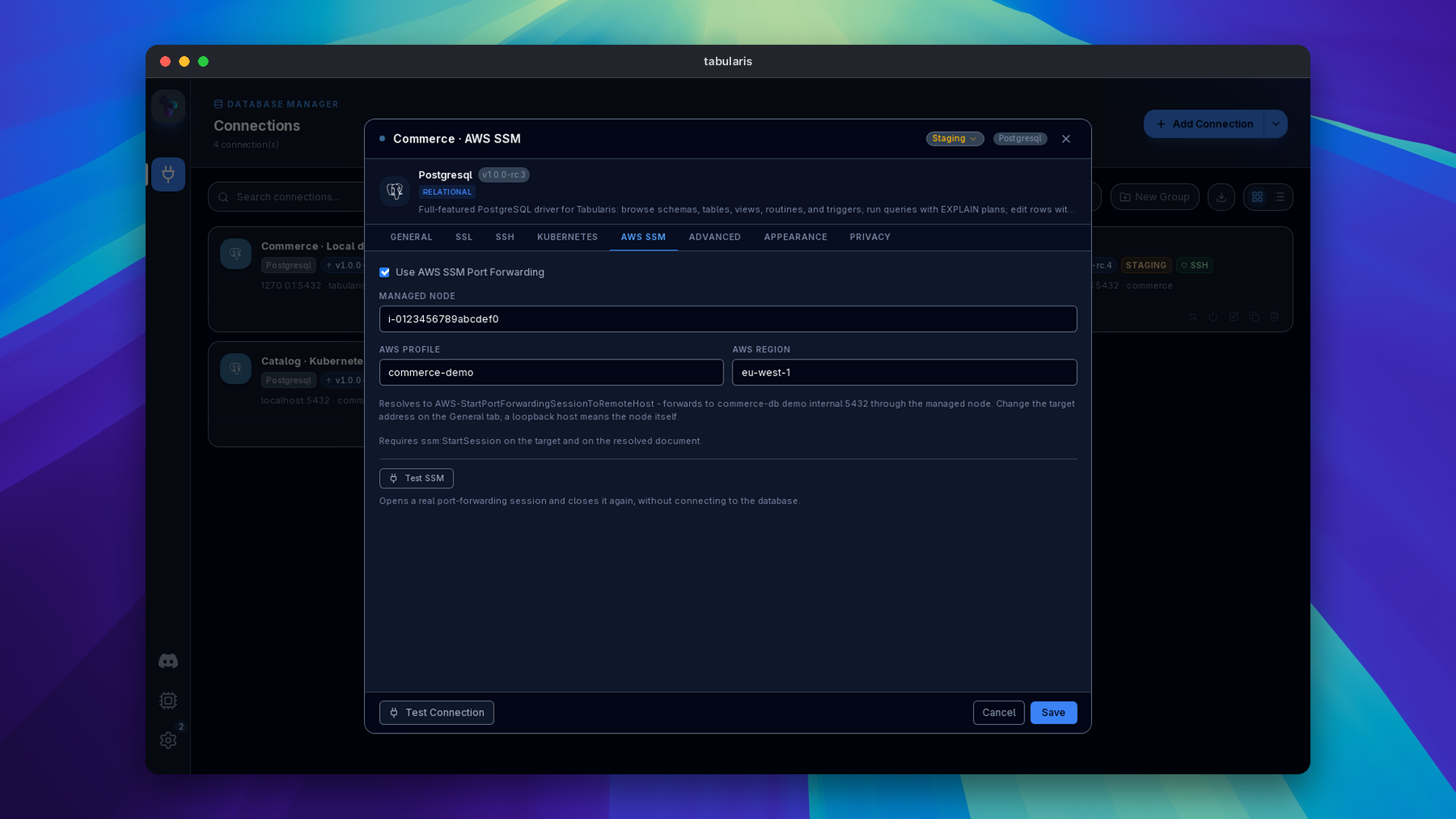
The SSM document is derived from that target instead of asked for:
| Target host | Document |
|---|---|
Loopback (localhost, 127.0.0.1, ::1, blank) |
AWS-StartPortForwardingSession |
| Anything else | AWS-StartPortForwardingSessionToRemoteHost |
Both are supported on purpose. Some IAM policies grant only the plain document, and a remote-host-only implementation would lock those users out. The tab shows which document will be used and reminds you that ssm:StartSession is needed on the target and on that document. A Test SSM button opens a real session and closes it again without touching the database.
Three decisions are worth knowing. Readiness is taken from the AWS CLI reporting its own open port on stdout, never from probing the local port; a probe also succeeds against a foreign process that won the race for that port, which would silently query the wrong database. Teardown signals the whole process group, because the CLI spawns session-manager-plugin as a child and that child is what holds the port. Cached sessions are checked for liveness before reuse, since AWS ends sessions on idle timeout. Credentials are delegated to the AWS CLI, so SSO, assumed roles and credential processes behave as in your terminal, and nothing SSM-specific is written to the keychain.
Failures are classified into actionable messages: plugin missing, expired SSO, absent credentials, TargetNotConnected, IAM denial, port conflict, wrong region. The second commit fixes the frontend classifier, which read an IAM "Access denied" as a database login failure and a missing aws binary as an unreachable database server. SSM, SSH and Kubernetes are mutually exclusive on a connection, and connections using SSM carry an SSM chip on the Connections page and in the sidebar. Static access keys, a plugin path override, EC2 and RDS target discovery and Secrets Manager passwords are out of scope for now.
Updates Show Up Where You Look
PR #786 surfaces core and plugin updates without opening Settings. The sidebar rail carries one aggregated counter; inside Settings, Plugins and Info each show their own count with a tooltip naming the plugins or the version involved. The Plugins badge used to count configuration entries, built-in drivers included; it now counts installed plugins with an update that is compatible with your app version and platform. Registry state is shared between navigation, Settings and the startup check, and refreshes after a plugin install, update or removal.
When plugin updates are found at startup, one dismissible toast appears. Clicking it or Open Plugins lands on Settings → Plugins with the Updates filter applied, also when Settings is already open. No toast is shown for an empty or failed initial check, so an offline registry stays quiet. For core updates, Remind Me Later keeps suppressing the modal on background checks but no longer hides the fact that an update exists: the sidebar badge and the Info details remain.
The same PR reworks how status is drawn. A semantic tone system with shared Chip and CountBadge primitives replaces hardcoded palette classes on connection cards, list rows, plugin cards, the sidebar rail and the Settings navigation, so every one of the twelve bundled themes gets readable badges; a coverage test checks chip contrast on each preset. The Plugin Center gets clickable metric tiles, a single toolbar, split-button actions with a keyboard-navigable version list, and status moved into the chip row. The Info tab gains an update status card with check, release notes and install actions.
Video unavailable
Startup Loads Less
Opening the Connections screen used to load 8.79 MB of JavaScript, repeat several bootstrap IPC requests, and do work for dialogs that were closed and features that were off. PR #790 loads the editor, secondary screens, dialogs and locales on demand, shares bootstrap reads with explicit invalidation, publishes persisted settings before the optional AI discovery runs, and skips the initial theme rewrite. Session restore opens the last active connection and its editor first, then restores the remaining connections in the background without stealing focus. Native plugin registration no longer waits for each enabled plugin's initialization handshake; a plugin is initialized once, before its first RPC.
| Metric | Before | After |
|---|---|---|
| Initial JavaScript | 8.79 MB | 1.43 MB |
| Initial JavaScript requests | 9 | 2 |
| Initial CSS | 344 KB | 181 KB |
| Initial IPC calls | 49 | 29 |
| Remote changelog requests at startup | 1 | 0 |
The timing figures in the PR (Connections ready in 85 ms instead of 190 ms, first paint in 68 ms instead of 176 ms) come from a Chromium benchmark with simulated Tauri IPC, not from a measured native launch, and were taken before the update-notification work above landed. The size and request counts are what you get. The trade is that Monaco, non-English translations and plugin initialization now pay their cost on first use. The audit lists what remains.
MCP: TOON Output and a Registry That Keeps Up
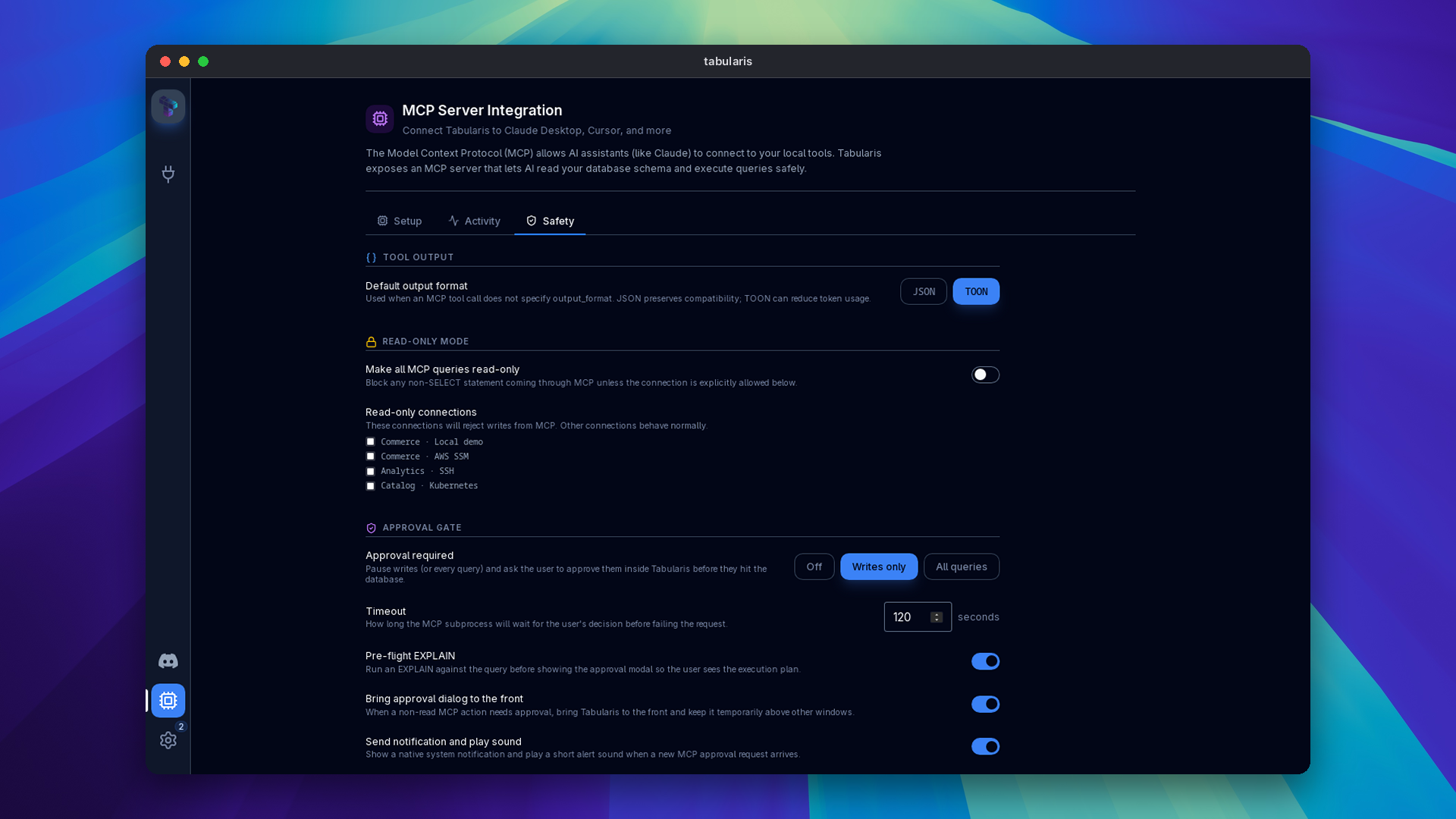
Two changes for the MCP server. PR #762, fixing #758, adds an optional output_format argument to all five tools. It accepts json, the documented default, and toon, the Token-Oriented Object Notation encoding that represents repeated records compactly. The transport stays JSON-RPC; only the content[0].text payload changes. Calls that omit the argument get the same pretty-printed JSON as before, and an invalid value returns -32602 before any connection is resolved or query executed. A new MCP Server → Safety → Tool output → Default output format picks the encoding used when a call does not specify one; it is stored as mcpOutputFormat in config.json.
The second change comes from @aesslinger, in three PRs. The standalone tabularis --mcp process built its driver registry once at startup, so a plugin installed or enabled in the GUI, or a connection migrated to a plugin, produced Unsupported driver until you restarted your MCP client. PR #784, fixing #783, rescans installed plugins against the on-disk config on a registry miss and retries, rate-limited to once every two seconds so a connection with a genuinely wrong driver id cannot force a filesystem scan per call. The rescan is idempotent and keeps the collision refusal for plugins claiming a built-in id. PR #789, fixing #787, covers the other direction: a driver disabled or uninstalled in the GUI is now unregistered from the running MCP process, checked on every resolution under its own cooldown. PR #800 folds the two hand-rolled cooldown gates into one tested Cooldown type with no behaviour change. Both fixes were verified against a live process without restarting it.
Table and Column Comments
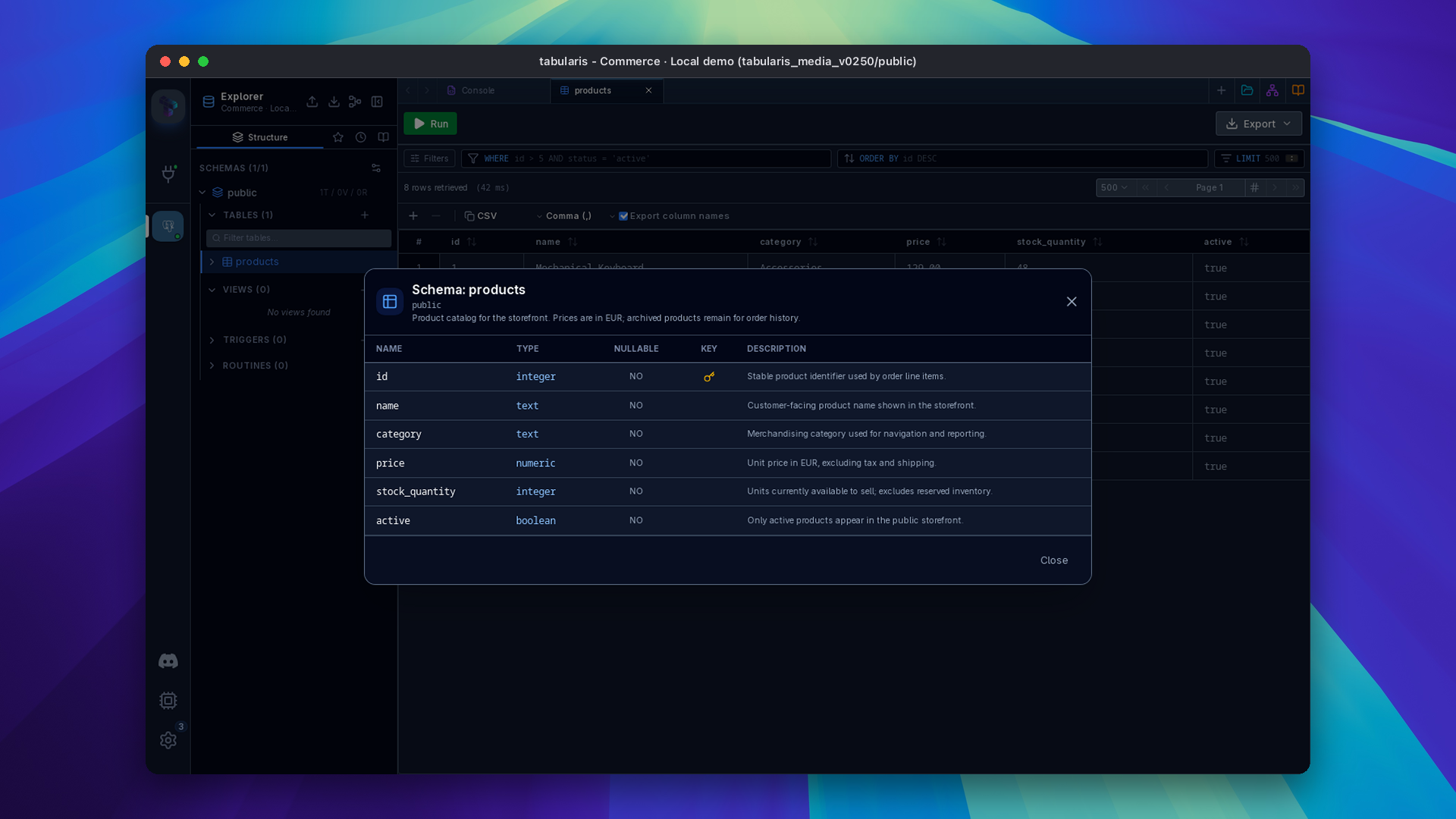
#722 asked for the descriptions that live in the database to be visible in the client. PR #764 adds an optional comment to table and column metadata, reads it from PostgreSQL and MySQL/MariaDB including the batch metadata path, and shows it in three places: the View Schema modal gets a table description and a comment column, the sidebar shows table and column comments as tooltips, and the data grid header tooltip shows the column comment next to its type. Generated DDL preserves them, as inline COMMENT clauses for MySQL and COMMENT ON statements for PostgreSQL and Oracle, with apostrophes escaped and Unicode and newlines intact.
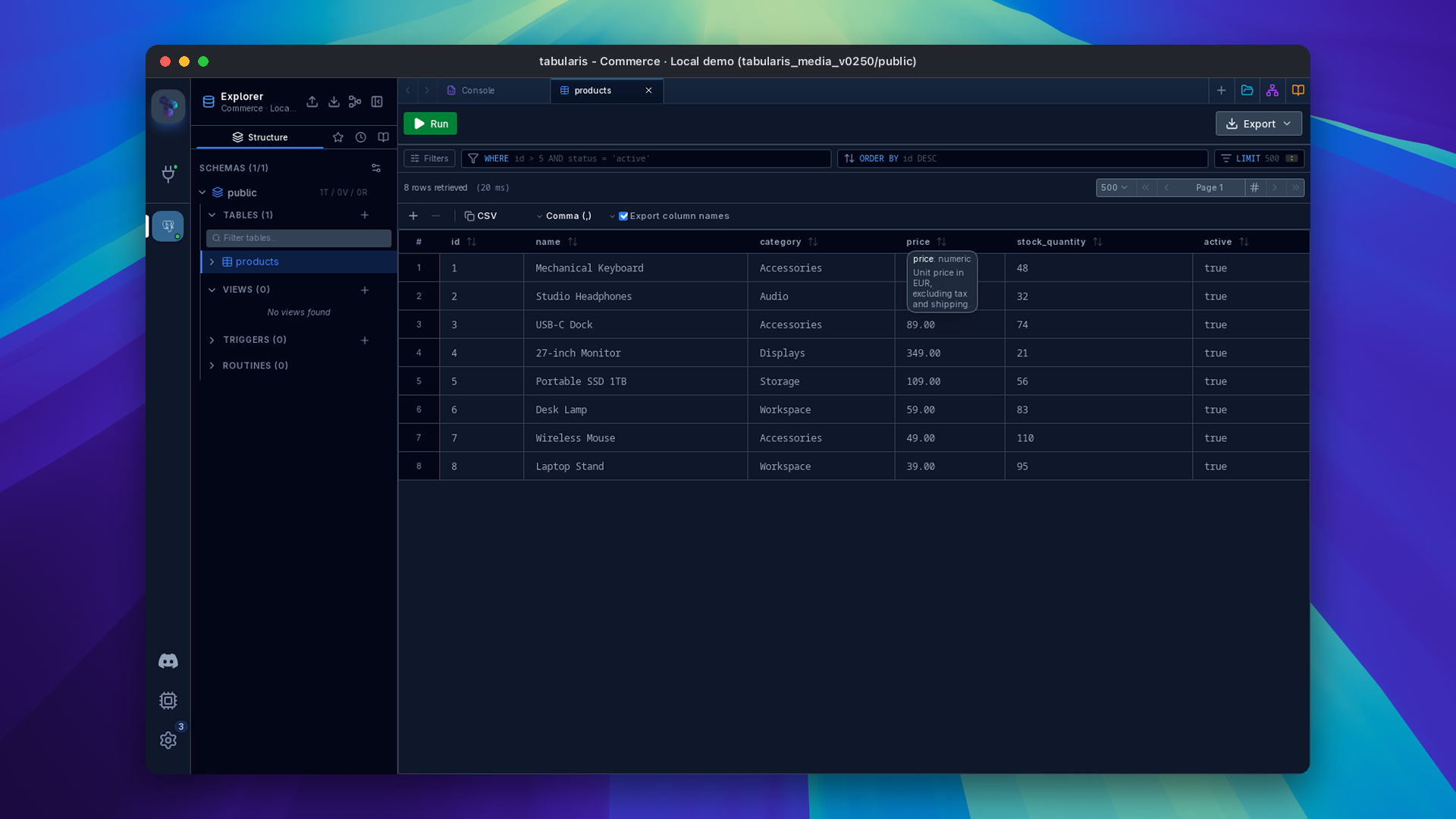
The plugin contract is additive: get_tables and get_columns may return comment: string | null, legacy payloads without it still deserialize, and no capability flag, RPC method or runtime floor is involved. The ClickHouse plugin already emitted comments from system.tables and system.columns; this release makes them visible. Follow-ups for the PostgreSQL, DuckDB, Db2, Oracle and SQL Server plugins are tracked in their repositories. SQLite has no comment syntax and returns none.
Plugins Can Hide the Login Fields
Driver plugins that authenticate without a database login, such as Windows integrated authentication, IAM tokens or Kerberos, had no way to remove the username and password inputs from the connection form. PR #780 extends the connection-modal.extra_fields slot context with credentialFieldsHidden and setCredentialFieldsHidden(hidden). Hiding removes the block and clears both values so a stale login never reaches the driver, and the flag resets whenever the driver changes. The plugin's own choice lives in the opaque extra map the host already persists.
The follow-up commit closes a keychain gap that surfaced with it: on edit, an empty password was omitted from the payload and the stored secret survived, so the next connect injected it again with no visible field to fix. While the inputs are hidden the modal now sends an explicit empty password, update_connection deletes the keychain entry on "", and a connection-string import ignores the login part. The design comes from @egertaia's work in #775 and the SQL Server plugin, where the Use Windows Authentication checkbox will use this hook; this PR moves it onto a driver-agnostic slot so any plugin can do the same. The typed context ships in @tabularis/plugin-api 0.2.0.
Smaller Things
- JSON viewers open on read-only results (@igorzelaya-io, PR #763, closes #654): double-click or Enter on a JSON cell in a query or notebook result grid opens the viewer, including for generated columns. The blob editor and the row sidebar stay behind the existing read-only guard.
- Plugin display names are honoured (@NewtTheWolf, PR #795, related #759): with Tabularium 0.14.0 a manifest can carry
idas the stable identifier andnameas the human-readable name. The catalogue now shows that name for standalone plugins instead of title-casing the slug; shared engine cards keep their engine title, and saved connections and folders are unaffected. The plugin guide documents the migration order: addidequal to the existing slug first, then changename. - Schema text can be selected and copied (PR #797, fixes #794): View Schema inherited the application's global
user-select: none. Column names and metadata are selectable again, with theme-derived selection colours that stay readable in High Contrast. - MongoDB replica set URIs are accepted (PR #740, closes #739): the WHATWG URL parser rejected comma-separated multi-host authorities. Passthrough schemes are recognised first, the URI is preserved verbatim for the driver, and only the first host is used for the form's display fields.
- Nightlies build from the right commit (PR #798): the nightly gate trusted the ordering of a filtered workflow-runs API and once built from a commit older than the previous stable. It now sorts a 30-day window locally, refuses to build behind the previous nightly, patches
src/version.tsso the UI shows the nightly version, and tags the commit actually built. - DynamoDB plugin 0.1.7 (@fuleinist, PR #796): the plugin adds its own AWS region, profile and session token fields through the
extra_fieldsslot and fixes credentials-only connections that were rejected for a missing host. Notes in the plugin release. - npm packages publish themselves:
@tabularis/create-plugin0.3.0 and@tabularis/plugin-api0.2.0 are published with provenance whenever a version onmainis not yet on the registry, and each package now runs its own tests in CI. Thetabularis-create-pluginCLI reads its version frompackage.jsoninstead of a hardcoded0.1.0. - Connection metadata cache keys are canonicalised (commit b2317f8e): the per-connection discovery cache from v0.24.0 sorts JSON object keys, plugin extras included, before deriving its key, so the same parameters in a different order hit the same entry.
Thanks
Six external contributors land in this release. @Davydhh built AWS SSM Session Manager port forwarding, from document derivation to teardown and error classification (#766). @aesslinger made the standalone MCP process follow plugin installs, disables and removals without a restart, then cleaned up the cooldown logic (#784, #789, #800). @igorzelaya-io opened the JSON viewers on read-only results (#763).
@NewtTheWolf separated plugin identity from display names (#795), @fuleinist shipped DynamoDB 0.1.7 with plugin-owned connection fields (#796), and @egertaia designed the hidden-credentials behaviour that became the generic slot hook (#775, #780).
If you want a theme that is not one of the twelve, reach databases through Session Manager, or keep forgetting which plugins have an update waiting, this is the upgrade.


Download the latest published version from the download page. Release notes and packages are available on GitHub Releases.