
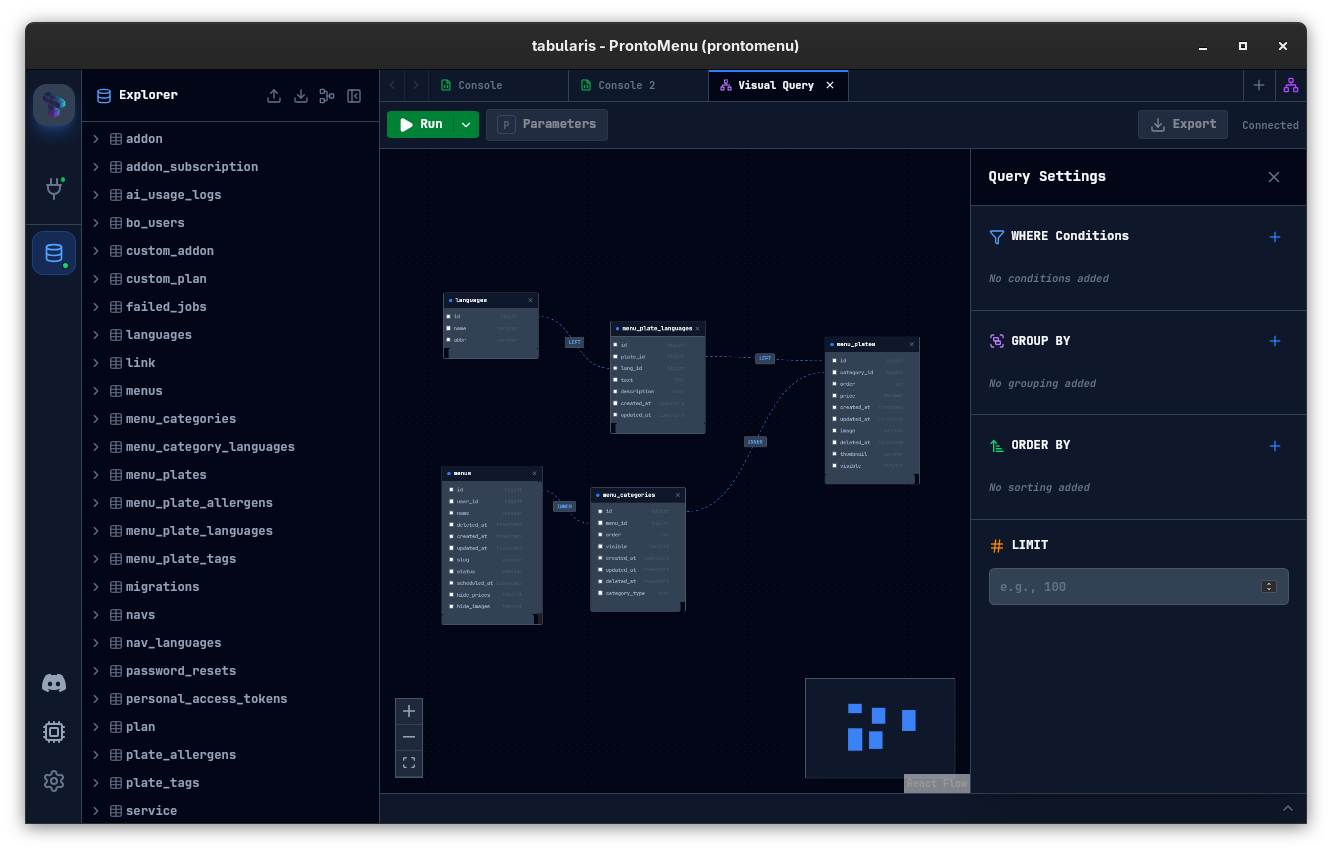
Build queries visually. Compile to clean SQL instantly.
Hand-writing complex SQL queries with multiple table joins, grouping clauses, and filters can be slow and error-prone. One misplaced comma or join condition can produce syntax errors or, worse, incorrect results that are hard to spot.
The Tabularis Visual Query Builder provides an infinite drag-and-drop canvas for generating SQL statements. Instead of typing syntax, you drag tables, click checkboxes, and draw connections. Tabularis parses this layout into an Abstract Syntax Tree (AST) and compiles it into highly formatted, database-specific SQL in real-time.
Video unavailable
Point. Click. Query.
The Query Builder is designed for a fast, visual-first workflow:
- Infinite Canvas: Open a Visual Builder tab and drag tables directly from your database sidebar onto the workspace.
- Auto-JOIN Detection: If your database has foreign keys defined, Tabularis automatically draws relationships between tables. If not, simply drag a line from one column to another to create an ad-hoc
JOIN. - Select Columns: Toggle checkboxes next to the column names inside each table node to specify what fields you want in your
SELECTclause. - Group & Filter: Use the query panel at the bottom to configure conditions (
WHERE), sorting (ORDER BY), and aggregations likeCOUNT,SUM,AVG, orMAXwithout writing standard syntax.
Real-Time Code Generation
As you interact with the canvas, the preview pane updates instantly.
- Dialect Parity: The compiler respects your database dialect (e.g., escaping names with backticks
`on MySQL, double-quotes"on PostgreSQL, or square brackets[]on SQLite). - Clean Formatting: The generated SQL is fully indented and formatted, ready to copy or execute.
Zero Lock-in: Open in SQL Editor
The Visual Builder is a starting point, not a restriction.
At any time, you can click "Open in SQL Editor" to transfer the generated query into a fully-featured code editor. This allows you to hand-optimize the SQL, append Common Table Expressions (CTEs), utilize window functions, or run advanced database-specific operations that cannot be represented visually.
Best fit
- Developers exploring unfamiliar database schemas.
- Analysts who prefer visual interfaces over raw SQL syntax.
- Anyone looking to draft query structures quickly before hand-tuning them.
- Users learning SQL who want to see how visual joins map to raw code.
Not the best fit
- Composing highly advanced SQL queries (e.g., recursive CTEs, complex window functions, or
UNIONstructures). - Non-relational query pipelines.