
v0.11.0: A Real Editor Inside Every Cell, Triggers, and 日本語

v0.11.0 is the fattest tag since v0.10.0 — and it's almost entirely external work. Four community contributors land in this cycle (two of them new), shipping the JSON/JSONB viewer that has been a top request since #24, a trigger manager that lights up the third major database object after tables and routines, a Japanese translation, and a reliability fix to the driver layer that you only notice the day it isn't there.
If v0.10.x was about getting connections to behave, v0.11.0 is about what happens once you're inside.
JSON / JSONB Cells, Now With a Real Editor
The most-requested data-grid issue since the project started (#24) was simple to state and unpleasant to live without: "Let me look at this JSONB column." Up to v0.10.3 a jsonb cell rendered as one long string of escaped braces, and editing it meant typing valid JSON into a textarea that did nothing to help.
@NewtTheWolf shipped the fix in PR #181 — and it's the kind of feature you can tell was reverse-engineered from how DBeaver's Value Panel and DataGrip's Value Editor actually feel to use, not just what they look like.
Video unavailable
A JSON / JSONB cell now gets three affordances:
- A chevron on the row that expands an inline editor pane below it — Monaco running in JSON mode with syntax highlighting, bracket matching, and a manual Diff toggle that compares the original cell value against the pending edit (unified by default, with a one-click switch to side-by-side).
- A braces icon that opens the cell in a standalone Tauri window dedicated to the value. Multiple cells can have their viewers open at the same time — each window keeps its own session and remembers its bounds — so comparing two rows is now "click, click" instead of "copy, paste into a different tab, come back, repeat".
- A double-click that opens the viewer window directly in edit mode, for when the chevron isn't where your hand wants to go.
Edits round-trip through the grid's pending-changes machinery rather than going straight to the database — you can review the unified diff, decide you don't like it, close the viewer, hit Submit on the row when you do. Two viewer windows open on the same connection don't interfere with each other; session state lives in a Rust Mutex<HashMap> keyed by ULID, and saves flow back to the grid via a Tauri event.
On the PostgreSQL side the driver finally binds json / jsonb natively through tokio-postgres' with-serde_json-1 impl. INSERTs and UPDATEs of object/array values that used to round-trip through a string cast now go straight through as typed parameters; the same code path is used by inline edits, the viewer save, and the row editor sidebar. Scalar JSON values (a bare 42, "hello", true) are JSON-encoded before binding, so you can't accidentally feed Postgres a malformed payload from the grid.
The same PR also lands a per-connection toggle that scans plain text columns for JSON-shaped content and routes them through the same cell renderer. It's per-connection on purpose — you almost always want it on for your audit-log database and off for the one where TEXT means "free-form prose".
Video unavailable
Full reference in the wiki: Data Grid → JSON & long text cells.
Long Text and LONGTEXT, Same Treatment
The week after #181 merged, @NewtTheWolf extended the same chevron + Monaco + diff pattern to plain string columns in PR #208, closing #207.
Any text-like column whose value is longer than 80 characters or contains a newline — TEXT, LONGTEXT, VARCHAR(500), VARCHAR(MAX) — now renders with the same chevron. Expand the row and you get Monaco in plaintext mode, with the same Diff and Side-by-side toggles. Markdown articles, code snippets, SQL queries you stored as text, multi-paragraph notes: all of it readable inline, all of it diffable before commit. The row-editor sidebar in the right-hand panel got the same upgrade — a long field there now opens in a Monaco-backed input instead of a textarea, with the diff toggle right there, and the editor pane itself is drag-resizable so you can give a long markdown article the height it deserves.
There is no separate viewer window for plain text — by design. Text cells aren't compared as often as JSON, and the chevron + inline expansion was the entry point that mattered. JSON cells keep both the chevron and the dedicated-window path.
Trigger Management
Stored procedures and functions have been browsable for a while. Triggers — the third major database object you reach for in real schemas — were the visible gap. PR #183 from @thomaswasle closes it across all three built-in drivers.
The Explorer sidebar grows a Triggers accordion under every schema (PostgreSQL), database (MySQL multi-db), and in the flat layout for MySQL single-db / SQLite. Each entry shows the trigger name, a timing/event badge (BEFORE INSERT, AFTER UPDATE, INSTEAD OF DELETE…), and a tooltip with the target table. There's a filter field at the top of the accordion, matching the existing table-filter pattern.
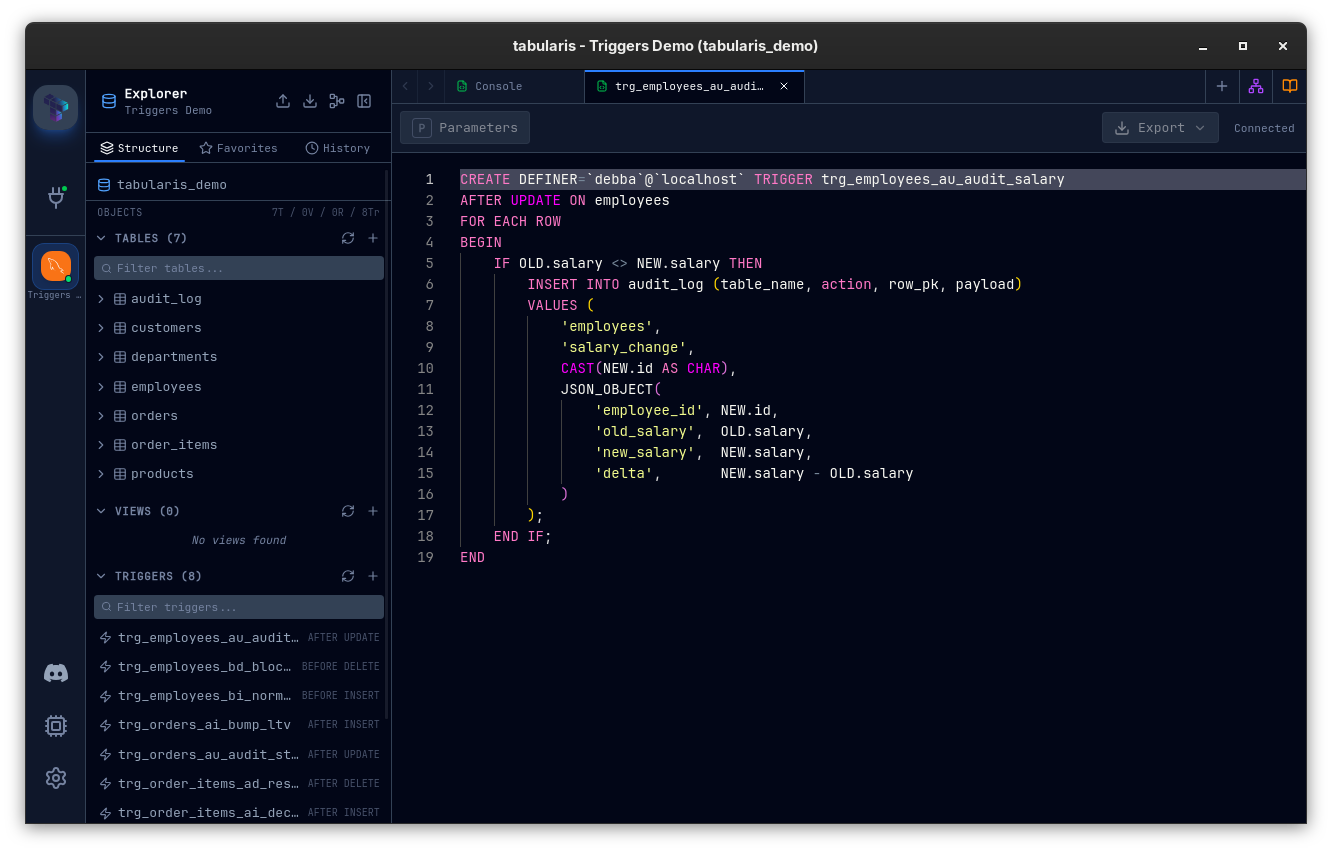
Right-click a trigger for the actions you'd expect:
- View Definition — opens the trigger SQL in a read-only editor tab (Run and Explain Plan are hidden, since you're looking at DDL).
- Edit — opens the Trigger Editor Modal in Guided mode: name, table, timing (BEFORE / AFTER / INSTEAD OF), event checkboxes (INSERT / UPDATE / DELETE / TRUNCATE), a body editor, and a live SQL preview. A Raw SQL tab is always available for hand-edits. Editing a trigger warns that it's executed as drop + recreate and runs the two statements atomically.
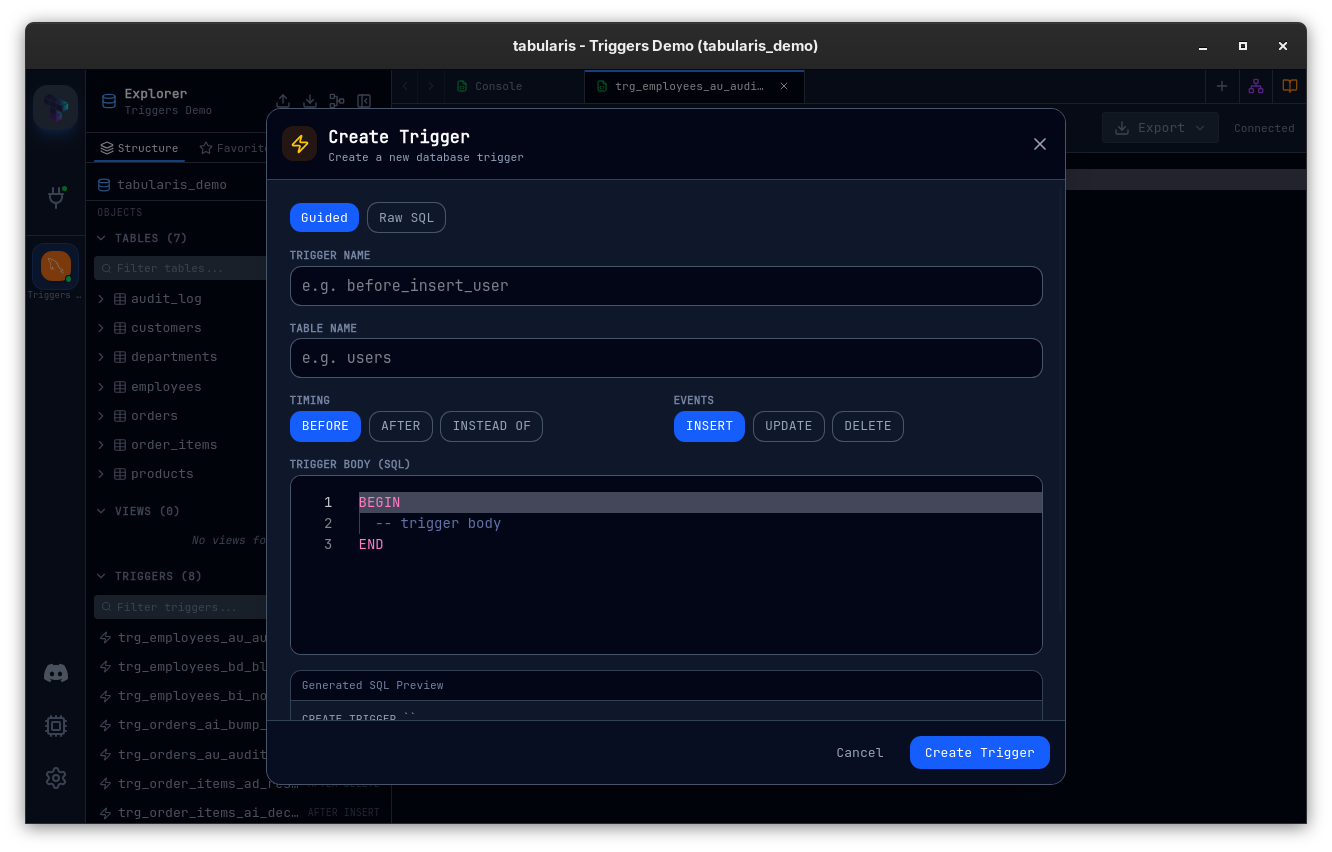
- Create Trigger from the table or accordion header — same modal, blank slate.
- Drop Trigger — with the standard confirmation.
The Rust side is the part you can tell required a database driver author to write. Each engine has its own quirks:
- PostgreSQL aggregates multi-event triggers via
string_aggoninformation_schema.triggers(a single trigger can fire onINSERT OR UPDATE, and the catalog stores those as separate rows). Definitions come frompg_get_triggerdef. - MySQL uses
sqlx::raw_sqlfor trigger DDL to bypass server error 1295 (the prepared-statement protocol doesn't acceptCREATE TRIGGER/DROP TRIGGER). The connection pool is also switched to the correct database beforeCREATE TRIGGER, which is the kind of detail that only shows up in a multi-database setup. - SQLite parses
sqlite_master.sqlto extract the timing and event metadata that the catalog itself doesn't decompose.
Plugin drivers that don't implement triggers degrade gracefully — get_triggers returns an empty list rather than failing the whole schema load.
The new wiki page covers the lot: Triggers.
Foreign Keys: Click to Navigate
Hover an FK cell in the result grid; a small ↗ icon appears on the right. Click it and the referenced table opens in a tab, already filtered to the row you came from. Right-click the same cell and the context menu's first entry is "Open referenced row in <table>". Same pattern TablePlus and Postico use, finally in Tabularis (PR #197).
fetchPkColumn now fetches columns and foreign keys in parallel when a tab opens, and the FK list lives on the tab so subsequent clicks don't re-query. The WHERE fragment is built with the existing quoteIdentifier(driver) helper — backticks for MySQL/MariaDB, double-quotes elsewhere — with number / bigint / boolean / string formatting matching what the row-copy SQL INSERT format does. Numeric-looking strings are quoted unless the source column reports a numeric type, which guards against bigints that some drivers ship as JS strings.
If the referenced table is already open as a tab, that tab is reused — the WHERE filter is overwritten and the query re-runs.
V1 sticks to single-column FKs. Composite constraints and cross-schema navigation are noted in the PR and on the roadmap.
Enter Accepts Autocomplete Suggestions
A small but breaking default change (#186, PR #194): when the autocomplete dropdown is open in the SQL editor, Enter now accepts the highlighted suggestion instead of inserting a newline. The behavior every other Monaco-based editor ships by default, finally lined up.
If you preferred the previous behavior, Settings → Editor → Accept suggestion on Enter turns it back off. The setting is honored across every editor surface — main SQL tabs, notebook cells, the trigger editor's Raw SQL tab.
The bump from 0.10.x to 0.11.0 comes from this change — it's the kind of default switch that warrants a minor bump rather than slipping it into a patch.
Multi-Statement Scripts Now Share a Connection
@ymadd — who landed the Notebook database-selector portal fix in v0.10.3 — shipped a much deeper driver fix in PR #200, closing #199.
Up to v0.10.3, when you ran a multi-statement script through Run All the editor fanned out via Promise.allSettled — each statement acquired its own pooled connection. The result was that cross-statement session state silently broke: SET @var := … in statement 1 was invisible to statement 2, LAST_INSERT_ID() / LASTVAL() returned 0 against the wrong session, explicit BEGIN / COMMIT blocks didn't form a transaction, temporary tables couldn't be read, and PREPARE / EXECUTE pairs failed. The behavior was "execute everything fast" instead of "execute everything like mysql CLI / psql / DBeaver does".
The fix is a new execute_batch method on the DatabaseDriver trait. The three built-in drivers override it to acquire one pooled connection and run every statement on it in order. The frontend's runMultipleQueries is replaced with a single invoke("execute_query_batch"); the whole batch shares one cancellation handle. Plugin drivers fall back to a default impl that preserves ordering without session-state continuity — the explicit trade-off so plugins don't break.
The same PR fixes a long-standing reporting bug: the three built-in drivers were hardcoding affected_rows: 0. INSERTs, UPDATEs, and DELETEs now report the real count execute() returned. There are seven new integration tests pinning the behavior down.
This is the kind of work that's invisible until the moment it isn't.
Finding Tabularis useful? Star it on GitHub — it takes a second and helps more developers discover the project. Star on GitHub
A Bigger Cancellation Fix, Too
@ymadd also lands PR #203, closing #201.
QueryCancellationState stored one AbortHandle per connection_id. So the second execute_query / execute_query_batch / explain_query_plan against the same connection overwrote the previous handle, and cancel_query could only stop the most recently registered one. The earlier Tokio task kept running on its pooled connection until completion.
The fix switches the slot to a Vec<Arc<AbortHandle>>, prunes finished handles on register, removes specific handles by Arc identity on unregister, and drains the whole slot on cancel. Five new unit tests and a fresh integration test (two SELECT SLEEP(5) on the same connection, single cancel, both report JoinError::is_cancelled()) lock the behavior in. The same fix landed in the export / dump / import path in the follow-up commit, so the cancellation story is consistent across every long-running operation.
If you've ever hit Cancel on a heavy query and watched the dot keep spinning on the connection, this is the upgrade.
日本語
PR #202, also from @ymadd, adds a full Japanese translation. Every key in en.json has a counterpart in ja.json, including the strings that landed this cycle — the trigger management UI (sidebar.*, triggers.*), the connection export/import flow, the Discord callout, and the new "Accept suggestion on Enter" setting. Pick 日本語 from Settings → Appearance → Language to switch.
This brings the locale list to English, Italian, Spanish, French, German, Chinese, and Japanese.
To make this kind of contribution easier going forward, this release also lands a built-in Import / Export translations flow in the Locales settings. Open a single JSON file, edit it offline (or in the AI tool of your choice), import it back in. The export warning makes clear that any unsaved app-level setting will be merged with whatever your file contains, so accidental key loss is avoidable.
Smaller Things
- MCP config path on Windows (@kennelken, PR #204) — the
directoriescrate'sconfig_dir()resolves to%AppData%\Roaming\tabularis\configon Windows, but the app storesconnections.jsonone directory up at%AppData%\Roaming\tabularis. The MCP server was looking in the nested folder, finding nothing, and shipping an empty connections list to the client. The fix uses the parent of the defaultconfig_dir()on Windows, so MCP discovery matches the rest of the app. If you're on Windows and the MCP server reported zero connections, this is the upgrade. - SQL string color across themes (@thomaswasle, PR #192) — Monaco's SQL tokenizer sets
tokenPostfix: ".sql", so single-quoted SQL strings tokenize asstring.sql, notstring. Monaco 0.55 doesn't reliably fall back, which left SQL strings rendering as a barely-readable dark red on every dark theme (Dracula was the worst offender). Every bundled theme JSON now has an explicitstring.sqlrule using the same color as the genericstringrule; the three built-in themes get the rule injected bygenerateMonacoTheme(). - "New Console" in sidebar context menus (#187, PR #188) — right-click a database for New Console to open a blank SQL editor scoped to that database; right-click a table for New Console to open one pre-filled with
SELECT * FROM table_name. Faster than opening the editor and navigating the schema selector when you know exactly what you want to query. - Export through SSH tunnels (PR #185) — query export over an SSH-tunneled connection was using the connection's raw host/port instead of the tunnel's ephemeral local port, so exports against tunneled databases would fail or — worse — hit the wrong server. Export now expands SSH params through the same helper the editor uses.
- Docker Compose demo environment —
demo/docker-compose.ymlbrings up a PostgreSQL withtabularis_demoandanalytics_demodatabases, plus a MySQL withtabularis_demo, all seeded withcustomers,departments,employees,orders,order_items,products, plus the newjson_demoandtext_demotables that exercise the JSON and long-text cells covered above. Onedocker compose up -dand you have something to point Tabularis at.
Thanks
Four external contributors land in v0.11.0. This is the largest contributor-driven release Tabularis has shipped to date.
@NewtTheWolf lands the headline feature in two PRs and ships the seed data that makes it testable. PR #181 is a properly substantial piece of work — a new Rust module for the viewer windows, ULID-keyed sessions, the Postgres native binding path, the per-connection JSON-detect flag, every locale string, the test plan written out — and it lands ahead of the request queue rather than chasing it. PR #208 extends the same pattern to text cells the week after, with the side-by-side diff toggle as the right generalization across both. Dominik has now shipped the JSON viewer, the long-text viewer, the Firestore plugin in v0.10.3, the Discord release template, and the seed data behind half of this changelog — and is still finding obvious-in-hindsight gaps in the UX faster than I am.
@thomaswasle ships the trigger manager in PR #183 — a full vertical slice from the Driver trait down through three driver-specific implementations, a Tauri command surface, a sidebar accordion, a guided modal, and the read-only definition view in the editor — and quietly fixes the SQL string color across every Monaco theme in PR #192. The trigger PR is the kind of contribution that requires you to have read enough of the codebase to know where the Driver trait lives, what the sidebar item conventions are, and how the editor's read-only-tab flag interacts with the existing run-button rendering. Thomas has now shipped triggers in 0.11.0 and SQL INSERT export + cell selection in 0.10.2 — pattern-matching the work to "the parts of Tabularis that are obviously a database tool".
@ymadd turns into a regular contributor in this cycle. PR #200 is the kind of fix that requires you to have used the editor enough to notice that SET @var := doesn't survive across statements, and then to track it through Promise.allSettled into the Rust driver trait. The PR ships with seven new integration tests, the MySQL error 1295 workaround for DDL through prepared statements, and a real-vs-zero affected_rows fix folded into the same diff. PR #203 takes the cancellation slot from "one handle per connection, last write wins" to a properly per-task Vec<Arc<AbortHandle>>. PR #202 is the entire Japanese translation, with every recently-added string already covered. Three PRs in one cycle, every one of them is the kind you accept without changes.
@kennelken (Sergey Tarasenko) is new to the contributor list, and lands a fix in PR #204 that the Windows MCP users have been hitting silently — empty connections list, no error, just a server that acts like nothing's configured. The diagnosis took working backwards from "MCP returns nothing" through the directories crate's platform-specific behavior; the fix is one branch in get_app_config_dir. Welcome.
If you live in JSONB columns, work across long text fields, want triggers managed without leaving the app, prefer your autocomplete to accept on Enter, run multi-statement scripts that need to share a session, are on Windows and connecting through MCP, or have been waiting for 日本語 — this is the upgrade.


v0.11.0 is available now. Update via the in-app updater, or download from the releases page.