

v0.12.0 is a broad follow-up to v0.11.0. Three new external contributors land in this tag — alongside three returning ones — and the cycle leans further into the parts of a database client that you feel every day: telling two MySQL connections apart at a glance, looking at the row a foreign key points at without losing the one you're on, and a SQL splitter that actually understands what DELIMITER // means in MySQL and what $body$ means in PostgreSQL.
If v0.11.0 was about what happens inside a cell — JSON, long text, triggers — v0.12.0 is about what happens around it: the connection, the relationship, the grid, the driver, the language.
Per-Connection Accent Color and Icon
Issue #189 was simple to state: "I have a MySQL local and a MySQL prod sitting one above the other in the sidebar, they share the dolphin and they share the orange, and I have hit Enter on the wrong one." Up to v0.11.0 every connection rendered with its driver's default icon and its driver's default color — Postgres elephant blue, MySQL dolphin orange, SQLite cylinder grey — and there was no way to override either.
@NewtTheWolf shipped the fix in PR #241.
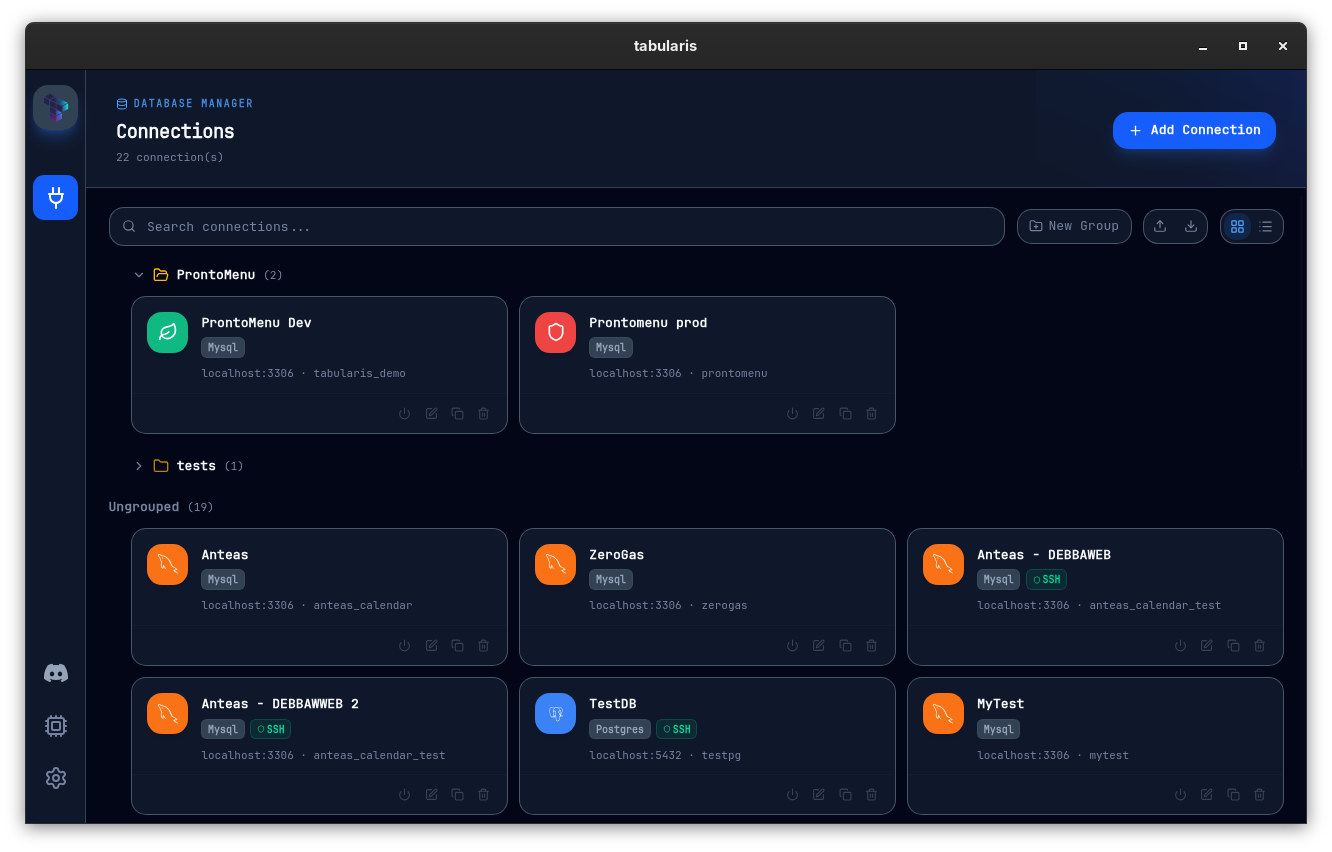
The New Connection modal grows an Appearance section at the bottom of the General tab with two pickers:
- Accent color — a 12-swatch curated palette plus a custom hex input.
- Icon — four mutually-exclusive tabs:
- Default keeps the driver's manifest icon.
- Pack is a curated set of 30 icons (cubes, clouds, layers, shields, leaves, branches…).
- Emoji takes a single emoji of your choice.
- Image uploads a PNG / JPG / WebP / SVG (max 512 KB). Uploads are scanned for the usual SVG nasties (
<script>,javascript:URLs,on*=event handlers).
Video unavailable
When no override is set, the resolvers fall back to the driver's default — so existing connections keep behaving exactly as before, and you never see a "blank" connection. The override is persisted alongside the rest of the profile in connections.json and round-trips through Export / Import like every other field.
The custom accent and icon are wired into every place a connection appears today: the connection list on the Connections page, the sidebar entry once the connection is open, and the Visual Explain modal's connection chip. Tab headers and the status bar will pick up the same accent automatically once those components exist.
Full reference in the wiki: Connections → Per-Connection Appearance.
Foreign Keys: Now You Can Peek Without Leaving
v0.11.0 made foreign keys navigable — hover an FK cell, click the ↗, the referenced row opens in a tab pre-filtered with WHERE ref_col = value. That's the right pattern when you want to go to the related record. It's the wrong pattern when you just want to check what user_id = 123 resolves to before continuing to edit the row you're already on.
@m-tonon — new to the contributor list — closes #228 with PR #230 by adding the second affordance: an inline Related Records Panel that slides up from the bottom of the data grid.
Video unavailable
Click any FK value (or pick Show related record from the cell context menu) and the panel opens below the current grid, keeping the parent table visible and interactive above it. Clicking a different FK in the parent grid swaps the panel content in place — no close-then-reopen. The panel is drag-resizable, so a wide referenced row can claim the height it needs.
If you decide you do want to navigate after all, the panel has an Open in tab button that hands off to the existing FK navigation path — same WHERE clause, same tab-reuse behavior.
V1 keeps the same scope boundary as the navigation pattern: single-column foreign keys only. Composite constraints and cross-schema navigation are noted as follow-ups.
If you live in tables with FK-heavy schemas — orders → users → addresses, line items → products → categories — and you've been tab-hopping just to look at something, this is the upgrade.
Full reference in the wiki: Data Grid → Related Records Panel.
A SQL Splitter We Actually Own
The statement splitter is the bit of plumbing between "what's in the editor" and "what gets sent to the database". Up to v0.11.0 we delegated it to an external library, which has served well enough — but the cycle landed two reports that pointed at the same root cause. #223 was the visible one: a SELECT preceded by a -- header comment block showed up in the run-selection dropdown as multiple entries — the comment lines and the SELECT each got their own row, even though only the SELECT was executable.
@ymadd replaces the lot with a first-party splitter in PR #225. What it handles natively:
- String literals —
'...',\'escapes,E'...'extended, dollar-quoted PostgreSQL strings ($tag$...$tag$), MySQL backticks, MSSQL bracket identifiers. - Comments —
--line,/* */block (with PostgreSQL nested-comment support), and the MySQL conditional/*! ... */form — which is emitted as its own statement somysqldumpoutput (with version-gatedSETstatements wrapped in conditional comments) executes correctly when pasted into the editor. - Delimiters —
;, theDELIMITERdirective for MySQL stored routines, andGOfor MSSQL.
A new per-driver dialect field flows from the connection straight into every run-query, explain, and dropdown path in the editor, so MySQL backticks, MSSQL [...], and PostgreSQL dollar-quoting are each parsed by the rules the driver actually uses.
The comment-fold behavior also changes what you see in the dropdown: a header -- block followed by a SELECT is now a single entry, and a trailing comment after a statement folds back into that statement. The dropdown only shows runnable statements.
Oracle's / block terminator, Firebird PSQL BEGIN...END, and MSSQL's adaptive GO split are explicitly out of scope for v1 and noted as follow-ups.
This is the kind of work — invisible until you look at the dropdown — that you only realize was sitting under everything else once it's gone.
Snappier Queries, Right Out of the Gate
@thomaswasle ships PR #216, which is the kind of fix that doesn't show up in a screenshot but shows up in your hands.
Two independent issues were adding latency to every single query execution. First, every query was re-reading the connections file from disk to look up which database it was talking to — fast, but it adds up over a working day, and over a remote keychain on a laptop you can feel it. The new connection cache reads the file once on first use and serves every subsequent lookup from memory. Any time you save or edit a connection, the cache is dropped so the next read picks up the change. There's no behavior to learn — queries just feel less laggy.
Second, the result grid was waiting on column and foreign-key metadata before showing the rows. After each query returned, the grid stayed blank until two extra metadata round-trips finished — sometimes adding 100–500 ms of perceived latency on top of a query that was actually already done. The result now renders the moment the data arrives; metadata loads in the background and the FK indicators light up a beat later.
If you've ever run a fast SELECT and watched the grid sit blank for half a second, this is the upgrade.
The same cycle also ships PR #239 — the sidebar now refreshes after CREATE TABLE, so a freshly created table actually shows up where you expect it without a manual refresh.
BIGINT Precision: Stop Losing Snowflake IDs
@NewtTheWolf closes #210 with PR #220, and it's the kind of fix that's only obvious in retrospect.
BIGINT values bigger than about 9 quadrillion — which includes every snowflake ID, every Discord ID, and most Twitter/X IDs — were silently losing their last digits on read. So 844197938335842304 came back from the database as 844197938335842300. The grid then sent that rounded value back on UPDATE / DELETE, which either matched the wrong row or matched nothing at all.
The fix preserves the exact value end-to-end on read and on write-back. Wired through:
- MySQL —
BIGINTandBIGINT UNSIGNED. - PostgreSQL —
BIGINT(INT8),XID8, andMONEY. - SQLite —
INTEGER.
Sort and filter are unaffected because both run server-side against the native BIGINT column. Small IDs (anything that fits in JavaScript's safe range) are handled exactly as before — no change in the common case, no impact on row counts.
The same PR adds a bigint_demo seed table to the MySQL and Postgres init scripts in the Docker Compose demo, mirroring the text_demo / json_demo pattern from v0.11.0. Point Tabularis at the demo and you have something to reproduce the original bug against (before this fix) and confirm it's gone (after).
If you've been editing rows in a Discord-style table and watching the wrong ones change, this is the upgrade.
PostgreSQL TLS Modes, Aligned with libpq
#209 was a precise report: Tabularis' PostgreSQL SSL modes (disable, allow, prefer, require) all behaved like they demanded a valid CA — which broke connection to AWS RDS instances with self-signed certs that work fine in psql and DBeaver with sslmode=require. The expected behavior, the one every other Postgres client ships, is:
require— force encryption, but do not require certificate validation.verify-ca— encryption plus validate the CA.verify-full— encryption plus validate the CA plus verify the hostname.
@VincentZhangy — new to the contributor list — lands the alignment in PR #211.
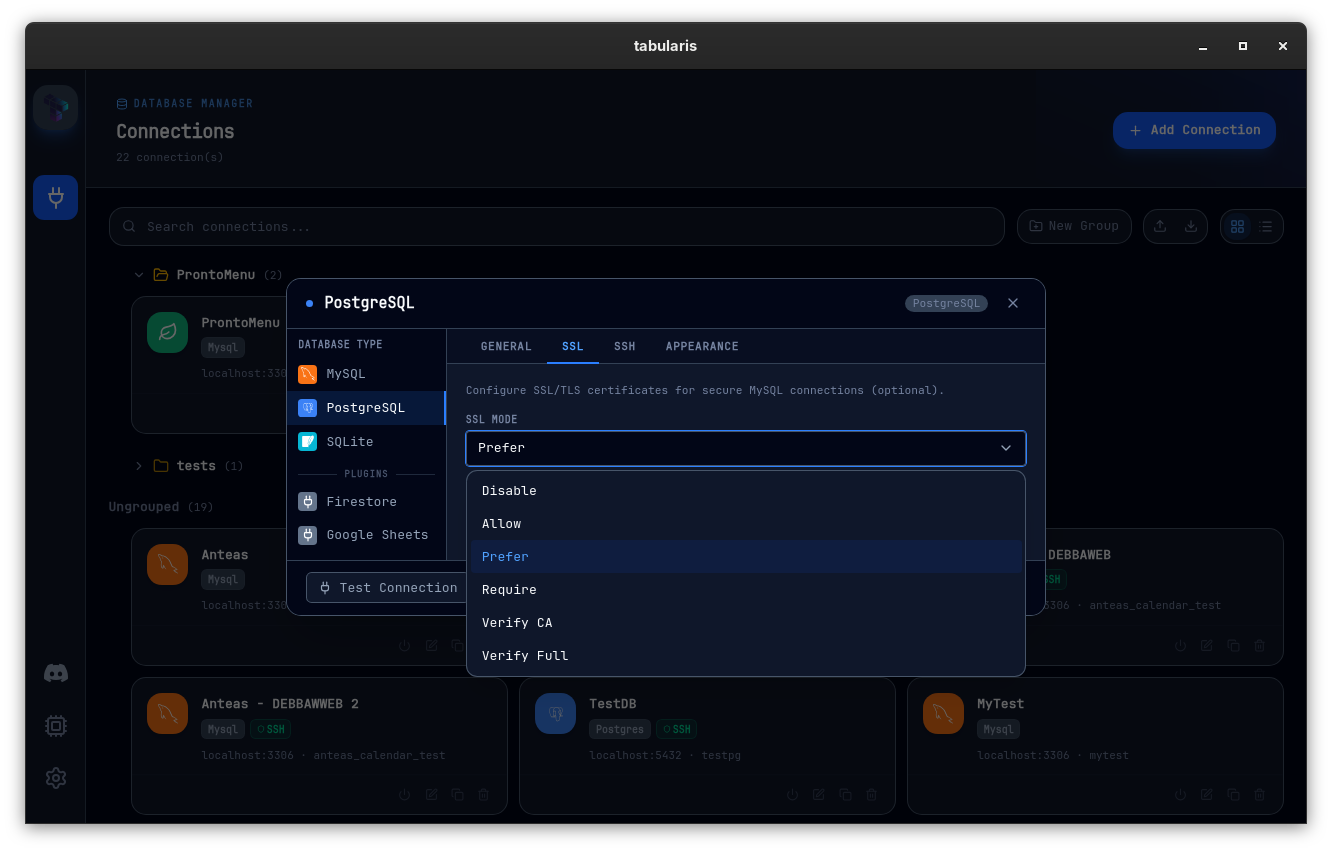
require no longer demands a CA. The clear security progression — require → verify-ca → verify-full — that other PostgreSQL clients ship is now what Tabularis ships too.
If you've been pointing Tabularis at RDS with a self-signed cert and bouncing off "needs CA certificate", this is the upgrade.
Full reference in the wiki: Connections → TLS & CA Certificates.
Delete Rows with the Delete or Backspace Key
@thomaswasle closes #218 with PR #221. Pressing Delete or Backspace with one or more rows selected now marks them for deletion — the same behavior already available from the right-click context menu, just reachable from the keyboard.
Video unavailable
The shortcut fires only when rows are selected, no cell is being edited, and the grid is not read-only — so Backspace inside an active cell editor still does what Backspace should do.
Русский
PR #229 from @verbaux — new to the contributor list — adds Russian as the eighth supported UI language. Русский is registered in the language picker and surfaces in Settings → Appearance → Language.
The locale list is now English, Italian, Spanish, French, German, Chinese, Japanese, and Russian.
The same PR also fixes a long-standing pluralization bug in the tab switcher. The English UI used to render "1 tabs" for a single tab because the count was concatenated outside the translation call. Counts are now passed into the translation, with proper plural forms per language — including Russian's four CLDR forms (1 → вкладка, 2–4 → вкладки, 5–20 → вкладок).
A handful of UI surfaces remain not-yet-wired-to-i18n and render in English: the Visual Query Builder canvas, the AI Query modal, and the mini result grid. All noted in the PR; an opportunity for a follow-up contribution.
Finding Tabularis useful? Star it on GitHub — it takes a second and helps more developers discover the project. Star on GitHub
A New macOS Dock Icon

The old macOS dock icon was a bare isometric cube on a transparent background. On modern macOS (Tahoe and friends) that looked out of place next to system apps that all sit inside a proper squircle — the cube floated, had no glass treatment, and on light wallpapers the dark edges fought the dock.
PR #217 replaces icon.icns with a Tahoe-style design: a proper Apple squircle, a light glass background with a top sheen, very subtle teal and violet auroras in opposite corners picking up the cube's own gradient colors, and the cube logo centered with a soft drop shadow.
Windows .ico and Linux PNGs are untouched; iOS / Android folders unchanged.
Smaller Things
A long tail of papercuts gets cleaned up in this cycle:
Ctrl+Enterruns the active tab, not the last opened one (@thomaswasle, PR #240) — with multiple Console tabs open,Ctrl+Enterused to always execute the query in whichever tab was opened most recently, regardless of which one was actually focused. It now fires the query in the active tab, as it always should have.- Pagination works on SELECTs with leading SQL comments (@ymadd, PR #213) — a SELECT preceded by a
-- headerblock silently lost its pagination bar, so 500-row results looked like a fixed slice with no way to advance. - PostgreSQL filters honor case-sensitive column names (@m-tonon, PR #232) — a column named
userIdwas getting lowercased touseridby the filter bar, and the filter silently matched nothing. PostgreSQL columns now get properly quoted; MySQL/SQLite paths are unchanged. - Save Query modal doesn't override the editor theme (@debba, PR #248) — opening the Save Query modal silently swapped the theme of every SQL editor in the app to the UI theme. Only visible if you'd picked a different editor theme in Settings → Appearance, which is exactly the configuration that setting exists for.
- Settings toggle knob centered (@verbaux, PR #219) — the knob in the Settings toggles was landing slightly below the center of the track on macOS. Same size, colors, and keyboard behavior, just visually correct now.
- CI: manual prereleases from fork PRs (@NewtTheWolf, PR #206) — the release workflow now accepts a PR number, tag name, and prerelease flag as manual inputs, so a maintainer can build a prerelease directly from a fork PR without merging it. Tags containing a
-automatically flag the release as prerelease, and AUR / Snap / Winget downstream workflows skip prereleases so beta channels stay out of system package managers.
Thanks
Six external contributors land in v0.12.0. Three of them are new — Matheus, Nikolay, and vlor — and three continue the streak from v0.11.0.
@NewtTheWolf (Dominik Spitzli) ships three PRs this cycle: the per-connection appearance feature (#241) — a real piece of vertical work spanning the modal, the four-tab icon picker, the upload pipeline with SVG sanitization, and the wiring into every place a connection appears — the BIGINT precision fix (#220) that catches a class of silent corruption nobody had named yet but everyone had hit, and the CI workflow change (#206) that makes building prereleases from fork PRs a one-click maintainer action. Three substantial PRs in one tag, all merged without changes.
@thomaswasle (Thomas Müller-Wasle) also ships three: the per-query latency fix (#216) which lifts a real ms-level cost out of every command and unblocks the grid from waiting on metadata, the Delete / Backspace keyboard shortcut for row deletion (#221), and the Ctrl+Enter active-tab fix (#240) — a precisely-traced bug through how editor commands get bound. Thomas has now shipped triggers in v0.11.0, SQL INSERT export + cell selection in v0.10.2, and three more in v0.12.0; the diagnoses keep getting sharper.
@ymadd lands the first-party SQL splitter (#225) — a properly substantial replacement of the parsing layer with per-driver dialect support — and the leading-comment pagination fix (#213). Together with the multi-statement batch fix in v0.11.0, ymadd has now rewritten large parts of how Tabularis decides "is this one statement or many" — twice over.
@m-tonon (Matheus Tonon) is new to the contributor list and lands two PRs the same cycle. The Related Records Panel (#230) is the kind of feature you only build if you've used the tool enough to know that "navigate to it" and "look at it" are different verbs; the Postgres case-sensitive filter fix (#232) is the kind of bug you only diagnose if you've actually been hit by it on your own database. Welcome.
@verbaux (Nikolay Zhuravlev) is also new, and ships the Russian translation (#229) — full parity with the English locale, a Russian README, and a properly thorough fix to the tab-counter pluralization that was rendering "1 tabs" in English. The same PR also notices the SettingToggle knob being off-center on macOS and fixes it in #219 — exactly the kind of cross-cutting "while I'm here" attention that turns a translation PR into something more.
@VincentZhangy (vlor) rounds out the contributor list with PR #211, aligning the PostgreSQL SSL modes with the behavior psql and DBeaver users already expect.
If you want to tell two MySQL connections apart at a glance, peek at the row behind a foreign key without leaving the one you're on, paste a mysqldump output and see one statement per /*! ... */ block, run a query and see the grid the instant the data arrives, edit by a snowflake ID without losing the last three digits, connect to RDS with sslmode=require and have it work, hit Delete on a selected row, or read the UI in Русский — this is the upgrade.


v0.12.0 is available now. Update via the in-app updater, or download from the releases page.