
v0.13.4: Unlock Everything — Hardware Keys, Free-Floating Results, and a Sharper Editor

v0.13.4 follows v0.13.3, which was about making the app feel like yours. This one is about the moments where the app has to get out of your way: an SSH tunnel that can finally ask you for a PIN instead of failing silently, query results that pop into their own window when one screen isn't enough, and an editor that completes, formats, and confirms what you typed. It's another release carried by the community — nine external contributors land in this tag, including a wave of new database drivers.
SSH That Knows How to Ask
Until now an SSH tunnel could only authenticate non-interactively — a key on disk, an agent, a password you'd stored. If your key lived on a hardware security token (a YubiKey or any FIDO/PKCS#11 device) that wants a PIN or a touch, or your private key was passphrase-protected and not in an agent, the connection just couldn't get off the ground. v0.13.4 fixes that by letting SSH prompt.
@robertpenz contributed the core support for security-key authentication in PR #262: when the token needs a PIN to unlock, Tabularis now surfaces that request instead of giving up (tested against a hardware key on Fedora 43). To make the prompt safe and native rather than a terminal popup, the maintainer built a small in-app askpass service around it — an isolated askpass server and protocol that intercepts SSH's credential requests and serves them through a proper in-app modal, with forced interactive auth so passphrase- and PIN-protected keys are actually usable.
The result: when a tunnel needs a passphrase, a security-key PIN, or a password mid-connect, you get a clean modal asking for exactly that, and the secret goes straight to SSH without touching disk. A per-connection "allow interactive prompts" toggle in the connection modals keeps the behavior opt-in, and the prompt strings are localized across all eight languages. If you've been stuck unable to use a YubiKey-backed jump host, this is the release that unblocks you.
Video unavailable
Detach Your Results Into Their Own Window
The query results panel had a single chevron to collapse it and not much else. PR #369 turns its header into the familiar set of window controls — and lets you pop results out entirely.
The right side of the results bar now carries Minimize, Maximize, Detach, and Close. Minimize and Close collapse the panel without losing data — the existing "Show Results" button brings it back. Maximize hides the editor so results take the full height, and clicking it again restores the split. Manual drag-to-resize is untouched. The new one is Detach: it pops the active tab's results into a separate OS window, so you can keep the grid on a second monitor while you keep editing SQL on the first. The detached window stays in sync with the tab it came from, and closing it folds the results back into the main layout.
Video unavailable
A Smarter SQL Editor
Three changes converge to make the editor read your intent better.
Autocomplete, rebuilt. @m-tonon (Matheus Tonon) reworked how SQL autocomplete is wired up in PR #267: a shared useSqlAutocompleteRegistration hook now manages the Monaco completion provider for both the editor and the notebook, so there are no more stale or duplicated providers when you switch connections or open a new cell. The same work fixes aliased PostgreSQL columns — SELECT u."FirstName" FROM users u now completes u. against the real quoted column names — and @NewtTheWolf folded in a fix so accepting a completion for an already-quoted identifier no longer doubles the quotes.
Beautify in the view editor. @danielnuld added a one-click Beautify button to the view editor (create and edit) in PR #372. Databases hand back view definitions as a single dense line — MySQL stores SELECT c.id,c.name,... with no whitespace at all. The button runs the definition through sql-formatter with the active driver's dialect, so it's actually readable before you start editing.
Success feedback for non-SELECT statements. Also from @danielnuld, PR #391 replaces the misleading "0 rows retrieved" empty grid you'd get after an INSERT/UPDATE/DELETE or a DDL statement with an explicit success panel — a check icon, "Query executed successfully", the affected-row count when there is one, and the execution time. It works for both single statements and multi-statement batches.
Video unavailable
Collapse Notebook Sections Individually
Video unavailable
Notebook cells could only be collapsed as a whole. PR #399 adds independent collapse for the three areas inside an SQL cell — the query editor, the results grid, and the chart — on top of the existing master cell collapse. Each area gets a thin labelled header with a chevron, the chart section appears only when the result is chartable, and the collapsed state of every section is saved with the notebook so it sticks across reloads. Chart visibility is persisted too now — it used to reset on every reload — defaulting to whether a chart config already exists, so older notebooks keep showing their charts exactly as before.
A Startup Script Per Connection
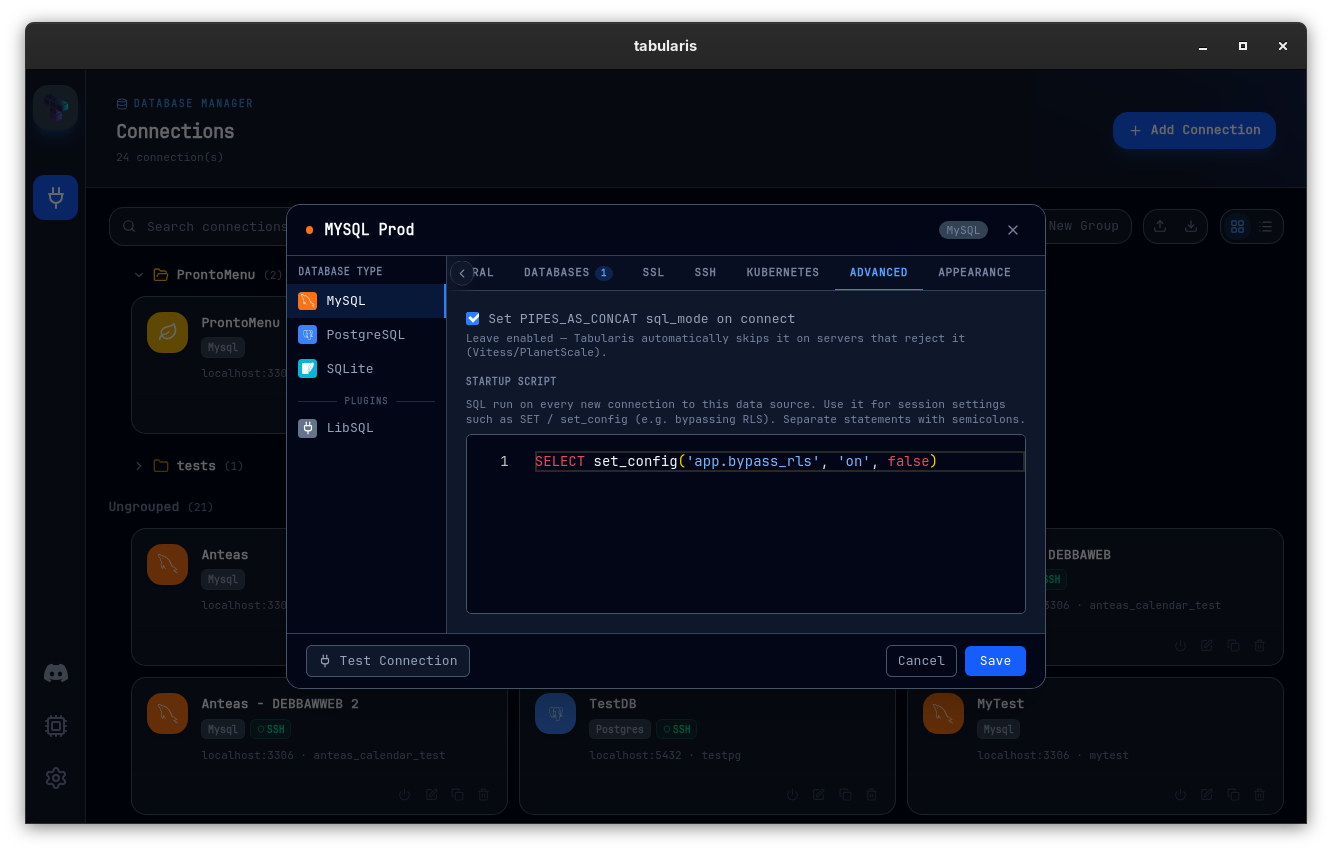
@boredland added an optional startup script to a connection in PR #352 (closes #350). It's SQL that runs on every new pooled connection, so session-level settings stick across the whole pool no matter which physical connection serves a given query — the DataGrip-style behavior people asked for. The motivating case is RLS-bypass-in-dev: a SELECT set_config('app.bypass_rls', 'on', false); (or any SET) now applies to every query instead of randomly depending on which pooled connection you landed on. It's executed per physical connection — MySQL/SQLite via sqlx after_connect, Postgres via deadpool post_create — blank scripts are skipped, and the script is stored with the connection as non-secret config.
Three New Community Drivers
The plugin ecosystem keeps growing. Three drivers join the registry this cycle, all community-built and installable from Settings → Plugins:
- MongoDB by @danielnuld (#368) — connects to MongoDB 6.0+ via the official Rust driver (rustls, no system dependencies). Multi-database browsing, schema inference by sampling, native shell queries (
db.coll.find/aggregate/...and CRUD), SQL grid-filter translation to MongoDB filters, index management, and ObjectId-aware inline editing. Ships for Windows, Linux (x64 + arm64), and Apple Silicon. Source. - Cloudflare D1 by @NewtTheWolf (#376) — browse and manage Cloudflare's D1 serverless SQLite databases. Linux and Windows builds in its v0.1.0 release.
- DM (Dameng) by @haos666 (#382) — the Dameng database driver, with macOS, Linux, and Windows assets. The Dameng JDBC driver jar stays user-provided.
That brings the community driver roster — alongside the built-in MySQL, Postgres, and SQLite — to a long and growing list, with Dameng also added to the README's supported-databases section.
Finding Tabularis useful? Star it on GitHub — it takes a second and helps more developers discover the project. Star on GitHubOracle and Dameng SQL Block Splitting
@haos666 extended the SQL splitter to understand Oracle- and DM-style blocks in PR #325 (a follow-up to the earlier splitter work). Behind the existing oracle dialect, it now treats a line-leading / as a statement terminator, folds PL/SQL-style source units instead of splitting on internal semicolons, understands Oracle q/nq-quoting so a ; or / inside a quoted literal doesn't split a statement, and recognizes DM-specific block openers (CREATE CLASS, CREATE CLASS BODY, CREATE JAVA CLASS). Every change is dialect-gated, so the other presets are structurally unchanged.
Correctness, Across the Board
A run of fixes that quietly make queries do the right thing:
- Composite primary keys in edits (@thomaswasle, PR #324) — editing or deleting a row in a table with a composite primary key used to send only the first PK column, so the
UPDATE/DELETEcould hit every row sharing that partial key. The frontend now carries the full PK as a map and every command and driver (MySQL, SQLite, Postgres) builds a compoundWHERE col1 = ? AND col2 = ? AND …clause. - Vitess / PlanetScale connections (@debba, PR #387, closes #383) — connecting failed immediately with
setting the PIPES_AS_CONCAT sql_mode is unsupportedbecause sqlx sets that mode on every connection and Vitess rejects it. Tabularis now auto-skipsPIPES_AS_CONCATandNO_ENGINE_SUBSTITUTIONso Vitess-backed databases connect. - MySQL pagination after semicolons (@Stiwar0098, PR #389, closes #388) — paginated SELECTs no longer leave
LIMIT/OFFSETstranded after a trailing semicolon or comment, with hardened scanning for MySQL/MariaDB comment and quoting syntax. - PostgreSQL < 11 routine introspection (@earmellin, PR #377, fixes #375) —
pg_proc.prokindonly exists from PG 11, so routine browsing threw42703on 9.x/10. Introspection now picks a version-appropriate query; tested against PostgreSQL 9.6. - UUID-shaped keys in varchar columns (@NewtTheWolf, PR #394) — a primary key that looks like a UUID but lives in a
varcharcolumn is now bound as text, so editing those rows no longer fails a type check.
Smaller Things
- Accessibility for screen readers (@arturbent0, PR #355, fixes #86) — Monaco's accessibility support is on so screen readers read typed text without focus jumping to suggestions, the Run button announces its shortcut, DataGrid headers gained
role/aria-sort/keyboard support, the connection-test result is anaria-liveregion, and sidebar expanders are real buttons. - Manual update check unblocked (@debba, PR #398) — "Check for Updates Now" kept reporting "You're up to date" after you'd dismissed an earlier update notification. A dismissed version no longer suppresses an explicit manual check.
- Export from plugin-driver connections (@danielnuld, PR #366) — Export as CSV/JSON used to fail with
Unsupported driver for exporton any external plugin driver. It now pages through the driver's ownexecute_queryso plugin-backed connections (Informix, MongoDB, …) can export too. - Informix 32-bit Windows build (@danielnuld, PR #367) — the Informix plugin ships its 32-bit build on the Windows slot.
- Plugin trigger capability docs aligned (@haos666, PR #317) — external-plugin trigger capability and metadata documentation now match the implementation.
Thanks
Nine external contributors land in v0.13.4 — once again, most of this release is community work.
@robertpenz contributed SSH security-key authentication (#262), the feature the whole interactive-prompt flow is built around.
@m-tonon (Matheus Tonon) rebuilt the SQL autocomplete registration and fixed aliased PostgreSQL column completion (#267), and @NewtTheWolf fixed quoted-identifier double-quoting, added the Cloudflare D1 driver (#376), and bound UUID-shaped varchar keys as text (#394).
@danielnuld landed the view-editor Beautify button (#372), non-SELECT success feedback (#391), plugin-driver export (#366), the Informix 32-bit build (#367), and the MongoDB driver (#368).
@haos666 extended the SQL splitter for Oracle/Dameng blocks (#325), aligned plugin trigger docs (#317), and added the DM (Dameng) driver (#382).
@boredland added per-connection startup scripts (#352), @thomaswasle fixed composite-PK edits (#324), @Stiwar0098 fixed MySQL pagination after semicolons (#389), @earmellin restored routine introspection on PostgreSQL < 11 (#377), and @arturbent0 improved screen-reader accessibility (#355).
If you authenticate over SSH with a hardware key, work across two monitors and want results on their own, lean on autocomplete, run against Vitess/PlanetScale or an older Postgres, or connect to MongoDB, Cloudflare D1, or Dameng — this is the upgrade.


v0.13.4 is available now. Update via the in-app updater, or download from the releases page.