


v0.18.0 follows v0.17.0 and moves the attention from reading a database to administering and reaching one. The headline is a full Users & Privileges view for MySQL and MariaDB — list accounts, create them, edit grants scope by scope — contributed from outside the core team. Around it, the connection modal stops failing with one truncated red line: it tests the SSH tunnel on its own, classifies what went wrong, streams the steps as they run, and hands you a copyable diagnostics report. A connection can now be saved with no database selected at all and browse whatever the server has. The data grid gains arrow-key navigation, discoverable select-all, and copy actions that are explicit about whether they cover the page or the whole result. The ER diagram exports to Mermaid and DBML and stops stacking wide tables on top of each other. And PostgreSQL learns to write hstore back.
Users & Privileges for MySQL and MariaDB
Tabularis could read your schema in detail and tell you nothing about who was allowed to read it. PR #478, from @pokertour, adds a Users & Privileges tab, opened from the Explorer sidebar on any connection whose driver declares the user_management capability — today MySQL and MariaDB.
- The account list shows every server account with its locked flag, and degrades gracefully: when
mysql.userisn't readable, it falls back toCURRENT_USERrather than showing an empty pane. - Create, change password, drop — creation can grant an initial set of privileges on a chosen scope in the same step, and dropping asks for confirmation first.
- The privilege editor renders one card per scope — global, database, table — with checkboxes reflecting the parsed output of
SHOW GRANTS. Checking grants, unchecking revokes, and the editor revokes before granting so narrowingALL PRIVILEGESdown to a subset actually works. - Nothing is hidden. Grants the editor can't model — roles, column-level privileges, proxy grants — are kept and shown as the raw
SHOW GRANTSoutput, so the UI never implies a privilege set it isn't representing.
Video unavailable
The SQL builders validate every privilege against a per-scope allow-list and escape literals according to the server's sql_mode; builders and the grant parser are unit-tested. Just as importantly, the design is extensible rather than MySQL-shaped: the privilege catalog comes from the driver, and all seven trait methods are forwarded over JSON-RPC, so an external plugin can opt in via capabilities.userManagement. PostgreSQL support is the planned follow-up.
The Connection Test Tells You Where It Failed
Connecting through a tunnel used to fail in the least useful way possible: one truncated red line in the modal footer, no indication whether the SSH hop, the port-forward or the database handshake was the thing that broke, and a 3-second auto-reset that raced you while you were still reading it. PR #570 rebuilds that whole path.
- Test SSH, on its own. A dedicated button in the SSH tab verifies host, credentials and tunnel without touching the database. The success state invalidates the moment you edit any SSH field, and a Stop button abandons a test that hangs. For a saved connection whose SSH secrets live in the keychain under the database connection id, the test resolves them correctly — unless you've edited the password field, in which case it tests exactly what you typed.
- Errors get a category. A new classifier maps raw backend strings onto
ssh-auth,ssh-unreachable,ssh,db-auth,networkanddb-not-found, each with a translated summary and an actionable recovery hint. Credentials embedded in raw error text are redacted. With a tunnel active, "connection refused" is attributed to the tunnel rather than blamed on the database host — which is the single most common misdiagnosis in this whole flow. - The steps stream live.
test_connectionnow emits progress events —sshTunnel→k8sForward→dbConnect, with start/ok/error per step and a per-run id so a superseded run's late events are discarded. The footer shows the current step, so a hanging test tells you where it hangs instead of just spinning. - A diagnostics modal opens on failure or on Stop: classified summary, recovery hint, timestamped step log, sanitized raw error, and a copy-to-clipboard report worth pasting into an issue. A "Show log" link reopens it.
Video unavailable
All new strings are translated across the eleven supported locales.
All-Databases Mode: Leave It Empty to Browse Everything
Until now a multi-database connection had to name its databases up front, and every new database on the server meant editing the connection. PR #572 makes an empty selection meaningful: the Databases tab gains a mode switch between All databases — the default for new connections — and Choose databases, and the "select at least one database" save block only applies to the explicit mode.
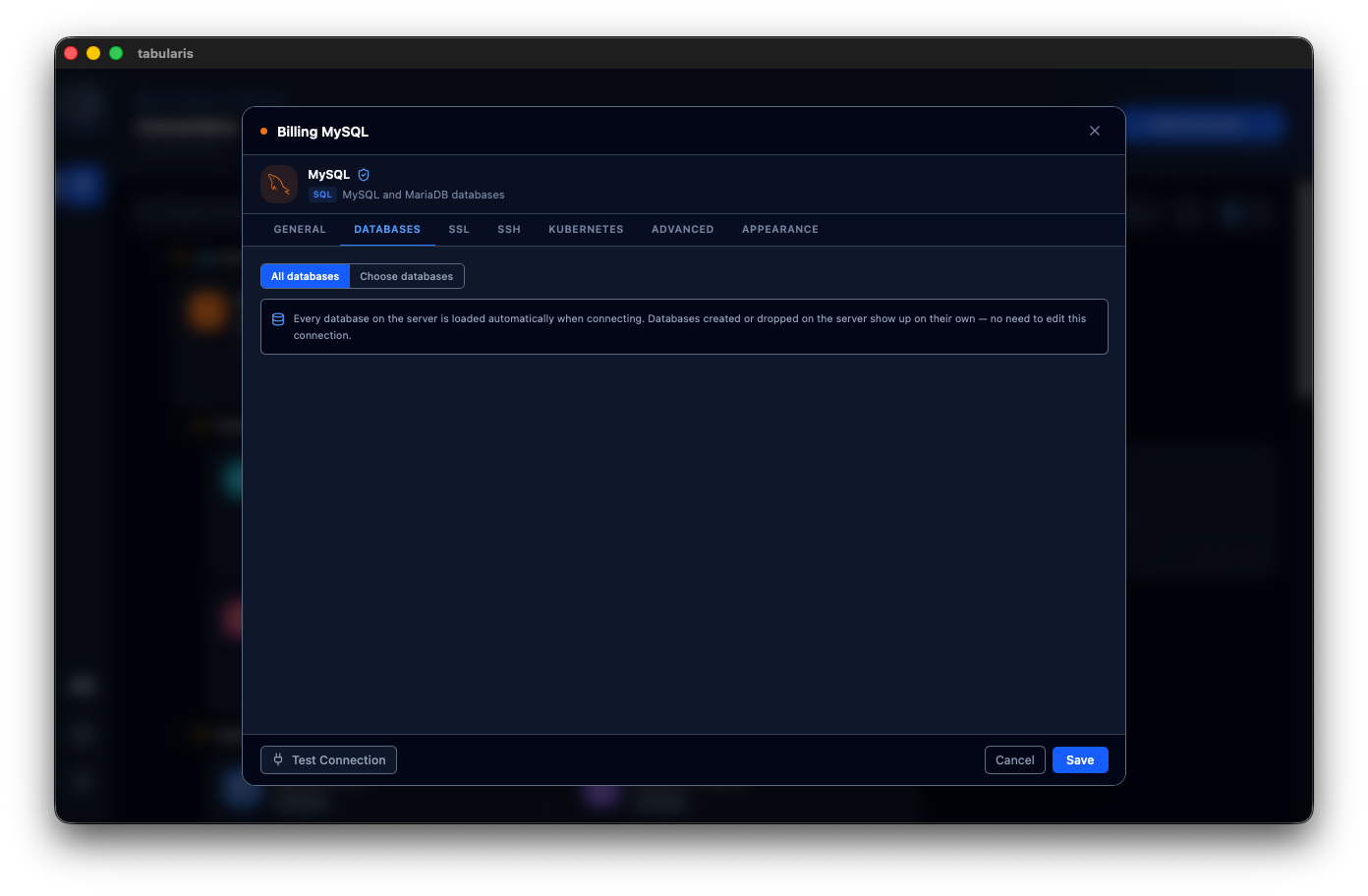
An all-databases connection persists an empty database param and resolves the real list at connect time through get_available_databases. New databases appear on their own, dropped ones disappear, and the sidebar refresh button re-syncs without persisting anything, toasting what was added and removed. Narrowing to a subset from the sidebar's manage popover persists that choice and exits the mode. Pasting a connection URI with no database in it switches to all-databases mode automatically.
Two smaller consequences worth naming. Editing an all-databases connection no longer auto-fetches the database list when the dialog opens — which could silently spawn an SSH or Kubernetes tunnel just because you clicked Edit. And the seven scattered selectedDatabases.length > 1 checks that decided whether to show the multi-database layout are replaced by one shared helper keyed on "is there a runtime selection at all", so a connection with a single database still issues database-qualified queries — it has no default schema — and a multi-database connection narrowed to one database keeps its tree and manage button instead of losing them.
The Data Grid Gets a Real Selection Model
Three pieces landed here, and together they change how the grid feels under the hands.
Select All becomes discoverable, and copying becomes explicit (@iamthenuggetman, PR #549, closes #546). Select-all already existed behind a click on the # header cell — undiscoverable, and it silently wrote to the clipboard. Now Cmd/Ctrl+A selects all loaded rows (guarded to the last-interacted grid, since a notebook mounts one grid per cell, and never inside a text input or an open cell editor), the row context menu carries a Select All / Deselect All entry, and selection is cleanly separated from copying. Copy Selected (N) and Copy All (M) sit next to each other as a pair, and Copy All re-runs the query unpaginated with the tab's total-limit clause stripped, preserving the on-screen sort order — so "all" means all. Every copy path toasts its row count, and a page-only copy of a larger result says "Copied N of M", so a partial copy is never silent.
Selection extends past whole rows. The same PR adds DBeaver-style multi-column selection — Cmd/Ctrl+click a header to toggle, Shift+click to range-select, plain click still sorts — and cell range selection via Shift+click, which highlights a rectangle and offers a Copy Range (R×C) entry. Row, column and cell-range selections are mutually exclusive, so what Cmd/Ctrl+C copies is never ambiguous.
Video unavailable
Arrow keys move the focused cell (@ymadd, PR #552, closes #551). The grid has tracked a focused cell for a while, but only a click could ever move it. Now the arrow keys move one cell clamped at the edges, Home/End jump to the first and last column of the row, PageUp/PageDown move a viewport of rows, and Enter/F2 open the focused cell for editing through the same path as a double-click. The first keypress in a grid with no focused cell enters at the top-left. The handler is bound to the scroll container rather than to document — otherwise every mounted grid in a notebook would move at once — and keys are left alone for anything that handles them itself: text inputs, the FK and BLOB buttons inside cells, and the sortable column headers.
The Run Button Says What It Will Run
With no selection, Run and Cmd/Ctrl+Enter execute only the statement under the cursor. The button said "Run" regardless, so pasting a multi-statement script and pressing Run executed one statement and skipped the rest — no error, no warning, nothing in the UI admitting it. @ymadd hit this against a production database: a 21-statement script where only the statement the caret landed in ran, surfacing later as a foreign key violation because the parent rows the rest of the script depended on were never inserted.
PR #532 labels the button with its actual target: Run Selection when text is selected, Run Statement when the buffer holds several statements and nothing is selected, plain Run otherwise. Behaviour is untouched — this only makes it visible before you commit to it. And when the button would run one statement out of several, the tooltip surfaces Run All (Cmd/Ctrl+Shift+Enter), a shortcut that was already bound and mentioned nowhere. The decision lives in one pure function, resolveRunTarget, so the label can't drift from the behaviour it describes.
Video unavailable
Editor Tabs Reorder by Drag
PR #517, from @maximumbreak, makes the editor tab bar draggable. Console, table, query-builder and notebook tabs all share one flat tabs array, so any tab type can be dragged — no console-only restriction — and reordering is scoped to the active connection: dragging reshuffles only that connection's tabs and leaves everyone else's slots alone. It reuses the native HTML5 drag-and-drop pattern already behind notebook cell reordering, down to the edge auto-scroll and the insertion-line indicator, and needs no new persistence code, because the existing tab-save effect already writes to preferences.json whenever the tabs array changes.
A follow-up fix renders editor panes in a stable order, so a reorder can't shuffle which pane is which.
Video unavailable
The ER Diagram Exports, and Stops Overlapping
Export to Mermaid or DBML (@gcapellib, PR #521) — the ER diagram had no export at all. An Export button now generates two text formats from the schema data already in memory, no new dependency. Mermaid (erDiagram) renders natively on GitHub, GitLab and most docs tools, so the output pastes straight into a README, at the cost of entity-level relationships where the FK column is only a label. DBML keeps relationships at column level (Ref: orders.client_id > clients.id) and round-trips through dbdiagram.io and dbml-to-sql, with composite primary keys expressed via an Indexes block. The same PR fixes a permissions bug that made every permission-gated call fail in the ER diagram window: the capability allow-list named the literal window er-diagram, while the window is actually created as er-diagram:{connectionId}:{database}:{schema}.
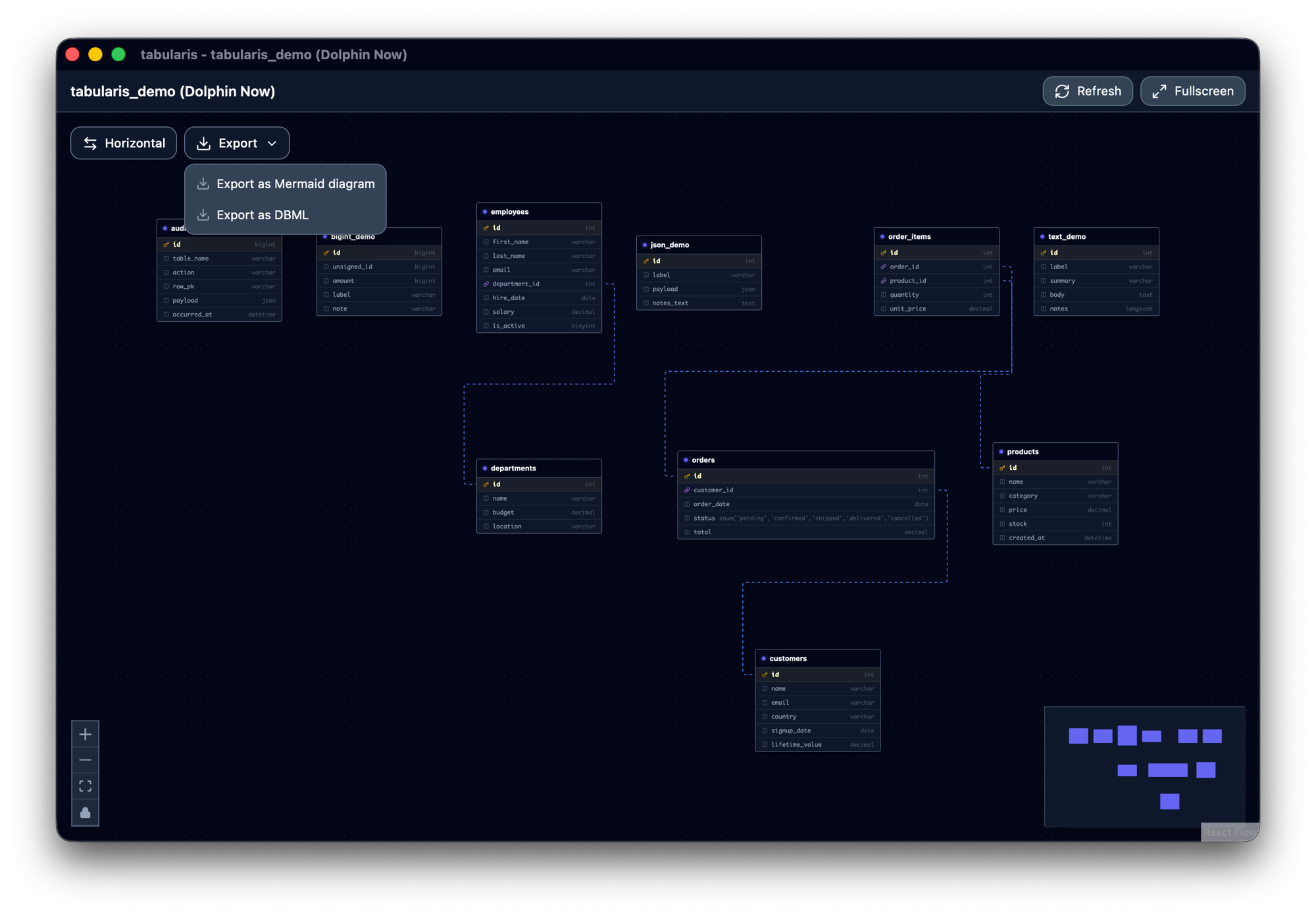
Nodes stop landing on top of each other (PR #558) — the dagre layout was fed a fixed 240px width for every node, but the table node only has a minimum width and grows with its content, so a table with a wide enum(...) column overlapped its neighbours. Node width and height are now estimated from the actual content, the real width is used when centering, and node separation gets a little more room. The same PR adds a lock toggle for pinning a node where you dragged it.
PostgreSQL: Editable hstore, Expression Indexes, Catalog-Based Keys
Four PostgreSQL fixes land this cycle, three of them from outside the core team.
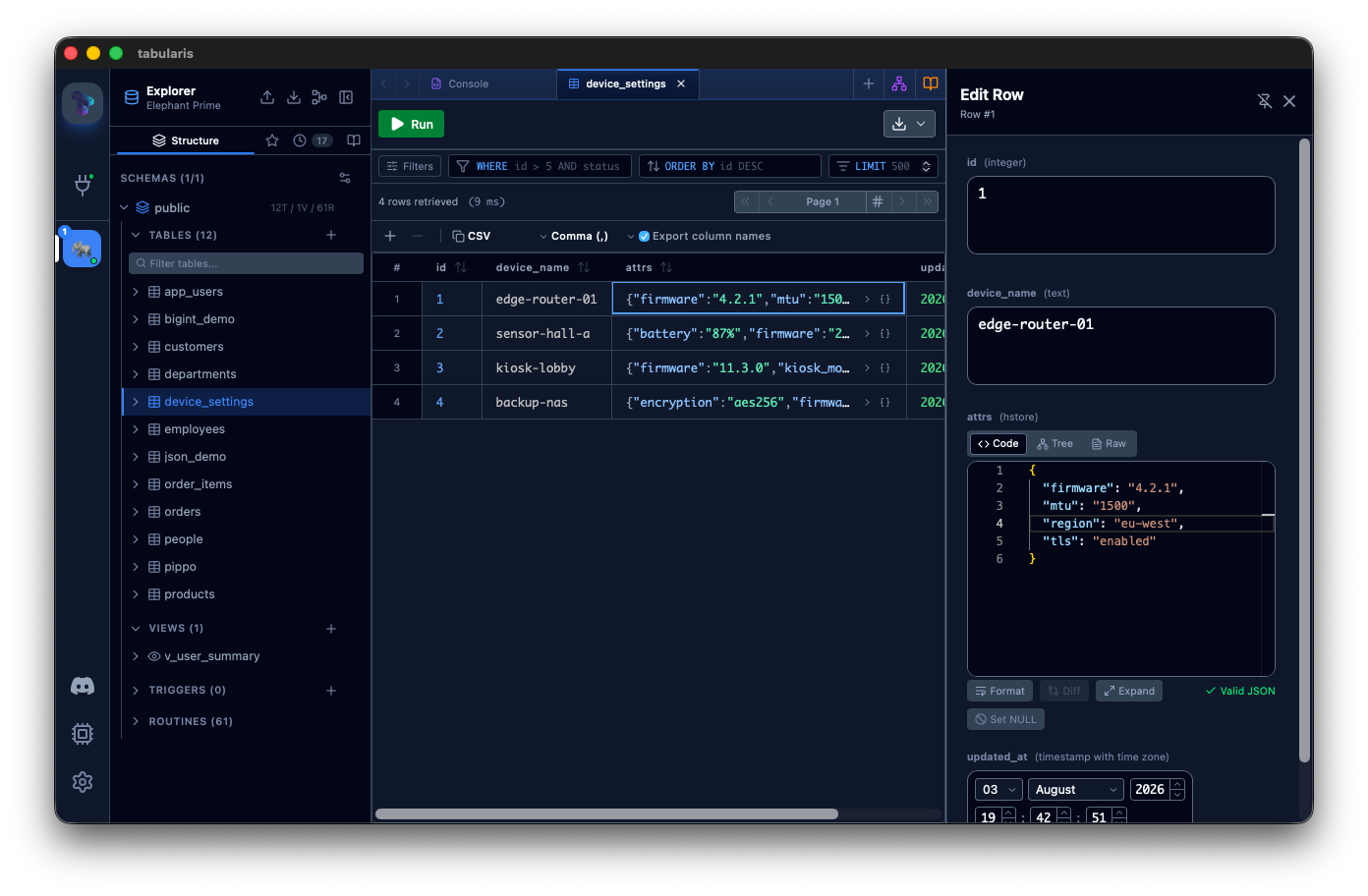
hstore columns are editable (@arturbent0, PR #427, closes #395) — reading worked, writing failed with "Cannot bind a JSON object to a non-JSON column", because hstore has no fixed OID and information_schema reports it as a generic USER-DEFINED. The driver now resolves the real per-column hstore OID through pg_type before binding and binds JSON objects as a string map, which the client encodes natively. udt_name is exposed on the column metadata so the frontend can identify hstore precisely — data_type can't, since every extension type shares it — and hstore columns route through the JSON editor in the row-editor sidebar. As a bonus, the inline cell editor stops showing [object Object] for any object-valued cell.
Functional and expression indexes render (@Davydhh, PR #499) — an index like CREATE INDEX ON users (lower(email)) was invisible. Every driver dropped expression columns for its own reason: Postgres joined pg_attribute on an attnum that expression columns don't have, MySQL and SQLite only read plain column names. Mixed indexes lost their expression columns and all-expression indexes vanished from the sidebar entirely. The expression text is now recovered per driver — pg_get_indexdef, information_schema.STATISTICS.EXPRESSION, and SQLite's CREATE INDEX DDL — with an is_expression flag so DDL export emits the expression raw instead of identifier-quoting it. MySQL's EXPRESSION column only exists from 8.0.13, so the driver probes for it and falls back on MariaDB and older MySQL.
Key metadata survives a read-only user (@DhruvShah-Dev, PR #543) — primary-key detection read information_schema.table_constraints, which returns nothing for users who can nonetheless see pg_constraint. Detection moves to a pg_catalog query, reused across single-table, batch-table and view column loading.
The Visual Query Builder quotes reserved identifiers (@DhruvShah-Dev, PR #553) — generated SQL emitted raw table and column references, so a perfectly legal table named user or order produced a query PostgreSQL rejected. The generator now takes the active driver and quotes identifiers when the dialect requires it.
Create a SQLite Database from Inside the App
PR #523, from @Jishnu-Prasad888, addresses #131: you can now create a SQLite database without leaving Tabularis. New SQLite Database… appears in the Connections menu and empty state, and the SQLite file picker in the connection modal gains a + New button. The quick-create flow auto-names the file and opens it; the modal flow just fills in the path and leaves the usual Test/Save alone.
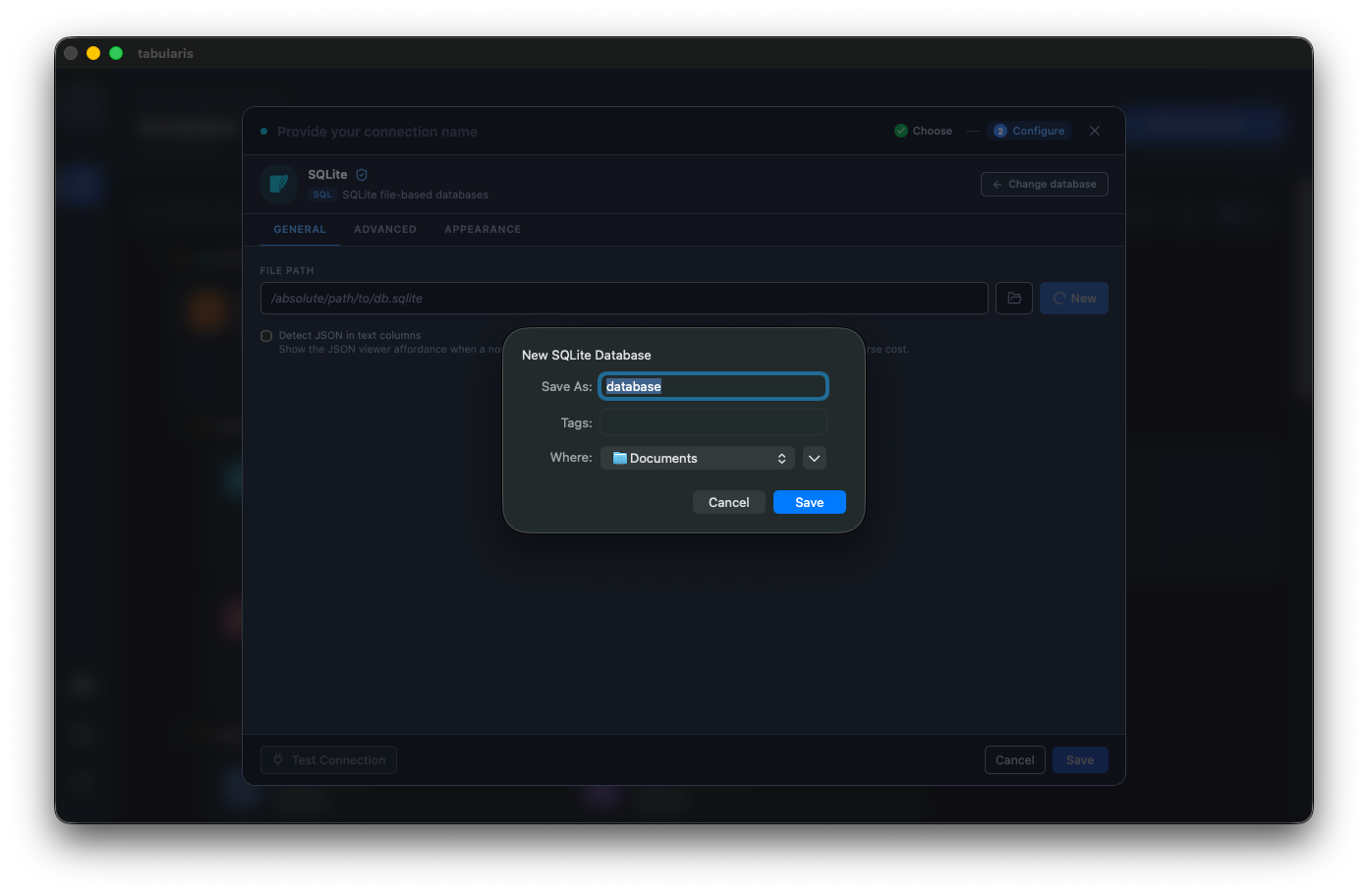
The safety rules are the interesting part: existing files are never overwritten, create_if_missing stays disabled so a typo in a path can't silently conjure an empty database, failed quick-creates clean up after themselves, and duplicate connections are prevented.
Notebook SQL Generation, Hardened
PR #559 started as a README correction and turned into a security pass on how notebooks generate SQL.
- Parameter values are inserted literally. They were passed as the replacement string to
String.replace, so a value containing$&,$'or$$was expanded as a replacement pattern — quietly producing SQL that differed from what you were shown. - Cell-reference CTEs escape their identifiers. Column names were interpolated into quoted identifiers without doubling embedded quotes, so a crafted column alias in a referenced cell could break out of the identifier and inject arbitrary SQL into the generated CTE.
- MySQL and MariaDB string values escape backslashes, not just single quotes.
The README also described a notebook syntax that never existed. The real syntax is {{cell_N}}, expanded to a CTE at run time, and @paramName — documented correctly now, closing the documentation half of #550.
DynamoDB in the Plugin Registry
@fuleinist registered tabularis-dynamodb-plugin in the official registry (PR #574) and shipped it to v0.1.3 within the same cycle (PR #589). The two fixes in between are the kind you only find against a real account: get_tables issued its DescribeTable calls serially, so an account with hundreds of tables took over a minute and blew the GUI's connection timeout — describes now run with bounded concurrency and results are re-sorted to preserve ListTables ordering. And execute_query responses now carry a complete pagination object instead of only a next_token, which the app was rejecting outright.
Install it from the connection catalogue when creating a new connection; it requires Tabularis 0.15.0 or newer and ships builds for Linux and macOS on both x64 and arm64, plus Windows x64.
Smaller Things
- MariaDB temporal tables appear in the tree (@gustavomelo-dotgroup, PR #568) — the MySQL driver filtered
information_schema.tablesontable_type = 'BASE TABLE', but MariaDB reports tables createdWITH SYSTEM VERSIONINGasSYSTEM VERSIONED. They were silently excluded from the explorer with no error anywhere, making it look like the tables didn't exist. Both types are now accepted. - Raw connection URIs reach plugin drivers (@Robbyfuu, PR #495, closes #494) — pasting a real MongoDB Atlas connection string failed on the import path, starting with the protocol being rejected outright because the protocol registry only derived protocols from two per-driver sources. Plugin drivers now receive the URI as given,
mongodb+srv://included. - Array cells open the JSON editor (@Davydhh, PR #489) — double-clicking a
text[]oruuid[]cell opened the inline textarea, which rendersString(array)and crams the values into a comma-joined string in a 120px box. Array cells already rendered as JSON; now they edit that way too, in the same dedicated viewer windowjson/jsonbcolumns use. - DML submits against the right schema (@DhruvShah-Dev, PR #542) — inserts, updates and deletes now use the table tab's schema on schema-capable drivers, while multi-database drivers keep receiving the tab value as the database.
- The connection modal keeps a stable height (@DhruvShah-Dev, PR #538, fixes #462) — the dialog is bounded to the viewport and driver-specific form content scrolls inside it, so switching between MySQL, PostgreSQL and SQLite no longer resizes the whole modal under your cursor.
- Sidebar accordion actions stop crowding the scrollbar (@DhruvShah-Dev, PR #539, fixes #310) — section headers reserve a padded action lane, so long titles truncate instead of squeezing the refresh and add buttons.
- The MCP approval modal stops blanking the window (PR #567, fixes #566) — the preflight stored the driver's raw explain output verbatim, and the approval modal cast it straight to a parsed plan. The object is truthy, so the plan view rendered and then walked an undefined root: black window, approval impossible, MCP request timing out after 120s — and a crash loop on restart, since the pending approval was replayed. The payload now goes through the same client-side resolver everything else uses.
- MiniMax regional endpoints (@octo-patch, PR #498) — the current OpenAI- and Anthropic-compatible endpoints are defined for both the global and
cn_zhregions, and model listing tries both official regional endpoints so mainland China API keys work. - JetBrains Mono ExtraBold, bundled (@GabrielMalava, PR #547) — two more weights of a typeface already in the font picker, shipped locally rather than fetched. Selecting a freshly bundled font also forces Monaco to re-measure its glyph widths: it measures once and never re-measures when a webfont finishes loading, so the editor used to render the new font with stale fallback metrics.
- Third-party GitHub Actions pinned to commit SHAs (@jeffersongoncalves, PR #540) — every third-party action reference is pinned to a full 40-character SHA with the resolved tag kept as a comment. A tag-pinned action can be silently re-pointed at malicious code by a compromised maintainer, which is exactly what happened to
tj-actions/changed-filesin March 2025. Adependabot.ymlnow keeps those pins moving, and the first four bumps (#554, #555, #556, #557) landed in this release. - Nightly version numbers make sense again (PR #585) — the counter after the dash was
github.run_number, monotonic per workflow and never reset, so the first nightly after v0.17.0 was0.17.1-18and gaps appeared on runs where the gate decided no build was due. It's now derived from the highest suffix already published for the current version base.
Thanks
Fifteen external contributors land in v0.18.0.
@pokertour built the release's headline feature: user and privilege management for MySQL and MariaDB (#478), designed from the start so plugin drivers can opt in. @iamthenuggetman gave the data grid a real selection model — discoverable select-all, explicit copy scopes, multi-column and cell-range selection (#549). @ymadd contributed both keyboard navigation in the grid (#552) and the Run button that admits what it's about to run (#532), the latter written up from a production incident.
@DhruvShah-Dev landed four fixes: PostgreSQL key metadata from pg_catalog (#543), Visual Query Builder identifier quoting (#553), DML schema selection (#542), and the connection modal and sidebar accordion layout fixes (#538, #539). @gcapellib added ER diagram export to Mermaid and DBML and fixed the window permissions bug behind it (#521). @Davydhh made functional and expression indexes visible across every driver (#499) and routed array cells to the JSON editor (#489).
@arturbent0 made PostgreSQL hstore columns editable (#427). @maximumbreak made editor tabs draggable (#517). @Jishnu-Prasad888 added SQLite database creation (#523). @gustavomelo-dotgroup found the table_type filter hiding MariaDB temporal tables (#568). @Robbyfuu got raw connection URIs through to plugin drivers (#495). @jeffersongoncalves pinned every third-party action to a commit SHA (#540), @octo-patch fixed MiniMax regional endpoints (#498), @GabrielMalava bundled two more JetBrains Mono weights (#547), and @fuleinist registered and hardened the DynamoDB plugin (#574, #589).
If you've ever had a connection through a tunnel fail with one unreadable red line, wanted to grant a colleague SELECT without opening a terminal, or pressed Run on a 20-statement script and watched one statement execute — this is the upgrade.


v0.18.0 is available now. Update via the in-app updater, or download from the releases page.