


v0.17.0 follows v0.16.0 and is the release where the tools around your SQL get smarter about what your SQL is actually doing. Visual EXPLAIN stops ranking plan nodes by figures that always point at the root and starts computing what each node itself costs — then tells you, in plain findings, which nodes deserve your attention. The editor learns which clause your cursor is in and suggests accordingly, formats your SQL on Shift+Alt+F with a style you configure, and stops mistaking 'x:y' inside a string for a query parameter. Around that core: the row editor becomes a proper right sidebar that follows your selection, split view grows to four panes, updates gain an opt-in nightly channel, PostgreSQL learns pgvector, the sidebar reacts to DROP DATABASE the moment it happens, and Tabularis speaks Brazilian Portuguese.
Visual EXPLAIN: Exclusive Metrics, Findings, and Two New Views
The plan views used to rank and colour nodes by the figures the database reports directly. Those figures are inclusive of children, and Postgres' Actual Total Time is an average per loop — so the plan root was the "slowest step" in essentially every plan, the heat colour was a gradient by depth rather than by work done, and a node executed 50,000 times at 0.2 ms each looked cheap next to a node that ran once for 20 ms. PR #529 rebuilds the whole thing.
- Exclusive (self) metrics. Every node's figures are restated once per plan before any view renders: inclusive time becomes
Actual Total Time × Actual Loops(a total, not a per-loop average), exclusive time subtracts the children's inclusive time, and the same treatment applies to cost, rows and buffers. Graph nodes, the table view and the overview bar now rank and colour on these values — by exclusive time when the plan ran with ANALYZE, by exclusive cost otherwise. InitPlan/SubPlan children are excluded from the subtraction, and exclusive values clamp at zero for the drivers and text dumps that don't satisfyparent ≥ Σ children. - Per-node findings. Ten diagnostic checks run on every node — hotspot (≥ 25% of plan time), row estimates off by 4x/10x, sorts that spilled to disk, filters discarding ≥ 90% of rows, large sequential scans, heavy heap fetches, fewer parallel workers than planned, nodes executed thousands of times, block accesses missing shared buffers, and never-executed nodes. Findings render as labelled chips on the graph, as icons in the table and diagram rows, and with a one-line explanation in the node details panel.
- A diagram view — one row per node in plan order with a bar proportional to the selected metric (time, rows, cost or buffers; only metrics the plan actually carries are offered). Selection is shared with the graph, so a node picked in one view stays picked in the other.
- A stats view — plan-wide aggregates: node counts and depth, time by operation, relations accessed with rows and self time, and indexes used with scan counts.
Video unavailable
Underneath, the explain core moved out of the app into a standalone npm package (#531, #536) — the how and why of that extraction has its own write-up: Visual EXPLAIN beyond the app.
The Row Editor Becomes a Sidebar That Follows You
The row editor used to open as a fixed overlay: it covered your results, stayed pinned to the row you opened it on, and had to be reopened from the context menu for every other row. PR #510, from @aesslinger, replaces it with a right sidebar that behaves like the Explorer on the left — a first-class layout citizen that pushes content aside instead of covering it, resizes with a drag handle (width persisted), toggles with Cmd/Ctrl+Shift+B, and follows your row selection by default. A pin button locks it to a specific row when you want the old behaviour, and the underlying panel system is generic, so future panels get the same treatment for free.
Video unavailable
A Polished Rail, and Split View Grows to Four
The rail on the far left got a matching polish in PR #511: active items are marked by a pill indicator that follows the current view, connection badges grew so the driver logo is actually readable, and split view now holds up to four connections instead of two — join a group from the context menu or by dragging a connection onto the group badge, swap panes by dragging the icons, remove one with a right click.
Video unavailable
SQL Formatting, Your Way
A request as old as the repo — issue #23 — lands in this release. PR #500, from @aesslinger, adds Format SQL to the editor: Shift+Alt+F (Shift+Option+F on macOS), a toolbar button, and a right-click entry. Select text first to format only the selection, the dialect follows the active connection (PostgreSQL, MySQL, SQLite, T-SQL, PL/SQL), and formatting pushes to the undo stack so Cmd+Z reverses it.
The follow-up PR #504 makes the style configurable in Settings: keyword and function case, indent style and width, tabs vs. spaces, blank lines between queries, dense operators. Settings apply on the next format action, no restart.
Video unavailable
The Editor Knows Where Your Cursor Is
Two changes teach the editor to actually parse what's around the cursor instead of pattern-matching the whole buffer.
Clause-aware autocomplete (PR #505) replaces the offer-everything-everywhere completion with a context analyzer that classifies the cursor into one of 29 clause contexts. After FROM or JOIN you get tables, after WHERE or ON or inside function arguments you get columns, inside an INSERT INTO t (...) column list you get columns only, and inside a string literal or comment you get nothing at all. The analyzer handles subqueries (clause scoped per parenthesis frame), CTEs, nested CASE … END, quoted identifiers and escape sequences — and degrades to the old behaviour on anything it doesn't recognize, so a miss can never hide valid suggestions.
Video unavailable
Query parameters stop firing inside strings (@ymadd, PR #519, fixes #458) — WHERE value = 'x:y' no longer pops the parameter modal for :y, and filling in a value no longer rewrites the inside of your string literal. The detection now reuses the dialect-aware tokenizer that already powers the statement splitter, so URLs, timestamps and JSON-in-text stop being mistaken for parameters.
An Opt-In Nightly Channel in the Updater
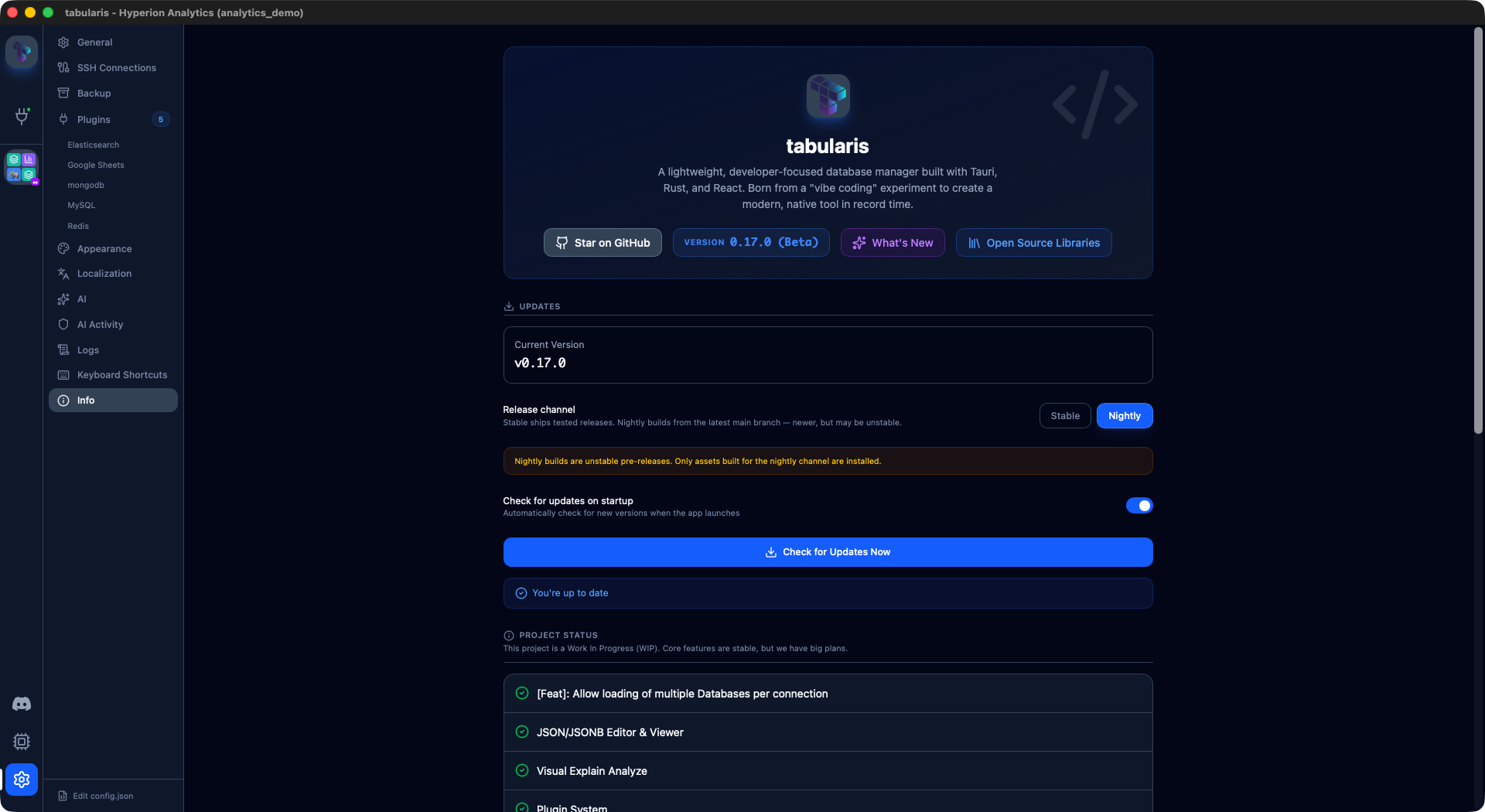
Signed nightly builds have existed since v0.16.0 — but installing one meant finding it on GitHub. PR #497, from @NewtTheWolf, wires them into the app: a release channel selector in Settings switches the updater between stable and nightly, and the update check resolves the newest nightly and installs it in place.
The versioning under it is carefully boring: a nightly is stamped as the next patch with a prerelease suffix, so it always supersedes the current stable, any real release supersedes the nightly, and comparisons run through semver so nightly users can always come back to stable when a release ships. If you want to see where Tabularis is going a few weeks early, this is the switch — and if you don't touch it, nothing changes.
PostgreSQL Learns pgvector
If your tables hold embeddings, they stopped rendering as USER-DEFINED columns full of nulls. PR #450, from @jonatannietoa, teaches the PostgreSQL driver the three pgvector types — vector, halfvec and sparsevec: values decode from their binary send formats to canonical text, column metadata reports the real type name (in tables and views), and editing works — vector literals are inlined with a strict validation allow-list, since pgvector registers no text cast for bound parameters. In the grid, vector columns render as expandable long-text previews instead of a bare ellipsis.
The Sidebar Notices When a Database Disappears
Three changes in this cycle close the same gap from different sides: a database dropped mid-session used to stay in the sidebar until you disconnected.
- Dropped databases are pruned on connect (PR #524) — reconnecting reconciles the saved selection against what the server actually has.
- A manual refresh button (@gcapellib, PR #530) runs that same reconciliation on demand, next to "Manage databases" — with an in-flight lock and a cooldown so rapid clicks don't stack toasts.
DROP DATABASEinside the app is detected as it happens (@gcapellib, PR #535, fixes #525) — a small dedicated parser recognizes a successfully executedDROP DATABASE/DROP SCHEMA(failing closed on anything ambiguous), and the sidebar clears the database and notifies you the moment the statement succeeds. Dropping a database that wasn't selected stays silent.
Video unavailable
Tabularis Fala Português
@jeffersongoncalves contributed a complete Brazilian Portuguese (pt-BR) locale in PR #537, plus a translated README linked from every language switcher. That makes eleven UI languages — and the same PR fixed a resolution bug where any region-coded locale (pt-BR → pt) was silently stripped before matching and fell back to English.
Fittingly, the language picker itself stopped scaling: a button group doesn't survive eleven entries, so it's now a searchable select showing each language's native name alongside its label in your current UI language.
Smaller Things
- Copy column values as a list or an
INclause (@pokertour, PR #482, closes #459) — the grid's cell and column-header menus gain two entries: newline-separated values, or a ready-to-paste SQL list with numbers raw, strings quoted and escaped, andNULLfor nulls. - PostgreSQL
ssl_modehonored everywhere (@darkrideroffate, PR #378) — the connection-test path ignored the SSL mode and attempted TLS even when set to Disable, so Load Databases succeeded while connecting failed with "bad protocol version" against servers like CloudNativePG. Both paths now agree. - Cut and Copy work in the editor's context menu again (@gcapellib, PR #520) — Monaco's built-ins go through
document.execCommand, which fails on WebKitGTK/Wayland; both actions now use the Tauri clipboard API, the same treatment Paste already had. - SQL file import runs once, against the right database (@gcapellib, PR #513, fixes #512) — Run SQL file on a right-clicked database imported into the connection's primary database instead, and a re-firing effect executed the whole dump twice.
- Load Databases no longer requires a username (PR #533, fixes #528) — Redis authenticates with a password only, so the button could never enable and the connection could never be saved.
- Scrolling stays where it belongs (@verbaux, PR #493) — document-level scrolling and overscroll are disabled, nested lists stop propagating scroll gestures to their parents, and the phantom empty area at the right edge of data grids is gone.
- Modal borders are visible again (PR #509) — modals get a visible border and properly clipped rounded corners.
Thanks
Nine external contributors land in v0.17.0.
@aesslinger built two of the release's headline features: the row editor right sidebar (#510) and SQL formatting with configurable style (#500, #504). @gcapellib closed the dropped-database gap with the manual refresh (#530) and live DROP DATABASE detection (#535), fixed editor Cut/Copy on WebKitGTK (#520) and the double-executing, wrong-target SQL import (#513).
@NewtTheWolf wired the nightly channel into the updater (#497). @jonatannietoa brought pgvector support to PostgreSQL (#450). @jeffersongoncalves translated the entire app into Brazilian Portuguese (#537).
@ymadd stopped query-parameter detection from reaching into string literals (#519), @pokertour added column-values copy as list and IN clause (#482), @verbaux contained scrolling and grid overflow (#493), and @darkrideroffate made the PostgreSQL connection test honor ssl_mode (#378).
If you've ever stared at an EXPLAIN graph wondering which node is actually the problem, wanted your SQL formatted the way you format it, or wished the row editor would just follow your selection — this is the upgrade.


v0.17.0 is available now. Update via the in-app updater, or download from the releases page.