

v0.21.0 follows v0.20.0 and is a release about the two surfaces you spend the whole day in: the editor and the results bar. Long scripts can now be folded one statement at a time, and a collapsed statement shows you what it contains when you hover it. The pagination bar gets a rows-per-page selector that applies to that tab only, so raising the limit for one result no longer means changing a global setting and putting it back. Underneath, PostgreSQL connections with a client certificate and key finally present them to the server, plugin installs can be cancelled without leaving a half-extracted directory behind, and the two safety guards (destructive query and production write) are unified so you see one warning instead of two. The rest is a long tail of community fixes: multi-statement exports, hidden SQLite virtual-table columns, database-qualified tables in grid editing, a manual TablePlus import path, and a Snap that appears in the launcher.
Fold Statements, Preview Them on Hover
Long migration scripts and seed files are mostly noise around the one statement you care about. PR #674 teaches the Monaco editor to fold SQL per statement: every multiline statement gets its own folding range, computed with the same dialect-aware splitter that already powers run-at-cursor, so a $$ body or a DELIMITER block folds as one unit rather than at the first stray semicolon. Fold controls stay visible in the gutter instead of appearing only on hover.
The part that makes folding usable rather than merely available is the preview. Hover a collapsed statement and a syntax-highlighted popup shows what's inside; you can move the pointer into it and scroll it without expanding the fold. Previews are scoped to the main query editor, so the small SQL fields elsewhere in the app don't grow tooltips they don't need.
Video unavailable
Rows Per Page, Per Tab
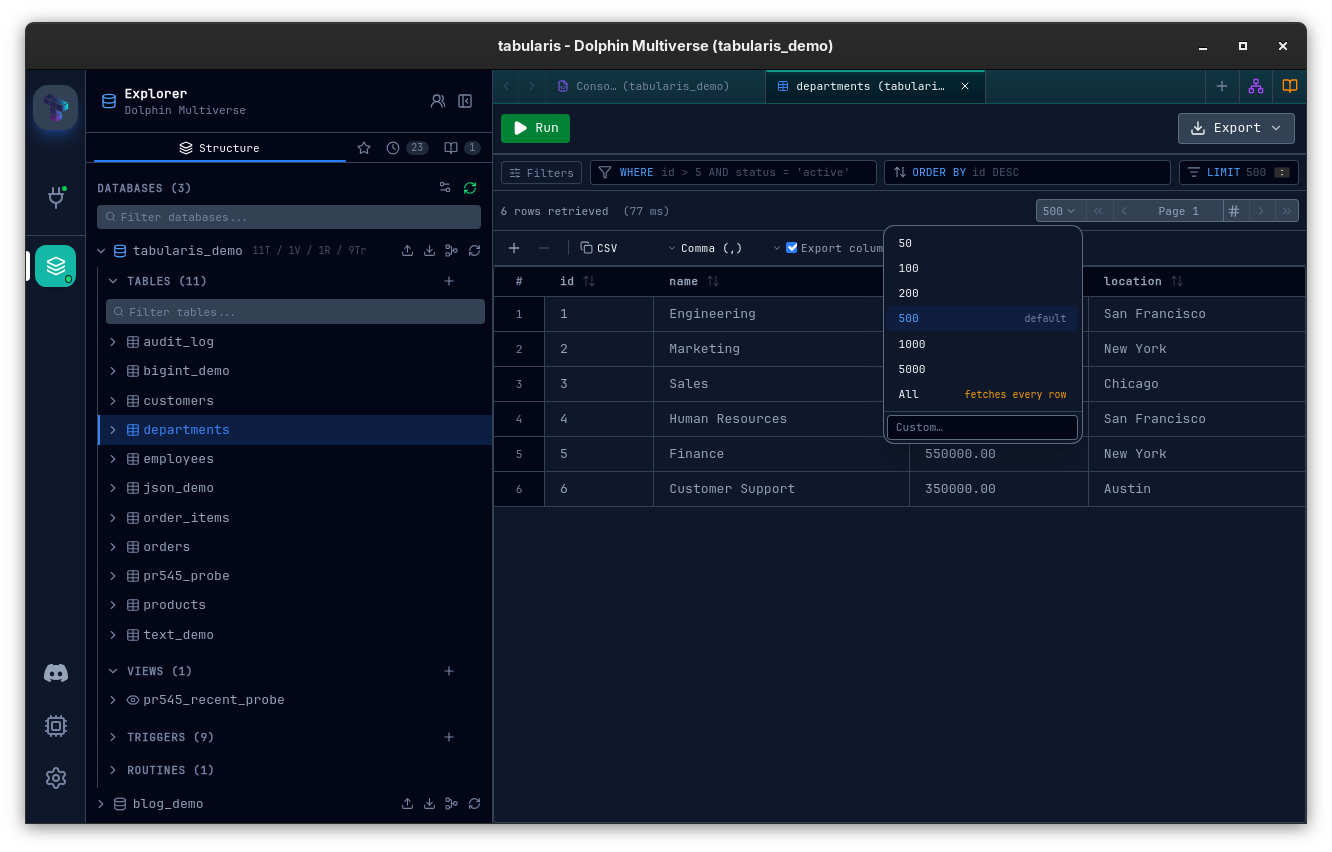
The Result Page Size setting has always been global. Issue #672 put its finger on the consequence: with a global page size of 50, a query ending in LIMIT 51 came back as two pages, 50 and 1, and the only way around it was to go to Settings and change the value for every tab. PR #675 adds a rows-per-page selector to the results pagination bar. Whatever you pick there overrides the global setting for the current tab only; other tabs and new tabs keep the default. This is the same model DataGrip uses: the setting is the default, the control on the grid wins for the view you're looking at.
The selector offers presets from 50 to 5000 (the global value is marked as default and slotted in if it isn't already a preset), a custom value input, and an All option that turns pagination off for the tab. All works because execute_query already accepted an optional limit and simply runs the statement unpaginated when none is sent. The override lives on the tab and is persisted with it, so it survives a restart. Changing the page size recomputes the page number so the first visible row stays in view instead of jumping. Editor runs, multi-statement batches and result-panel paging all resolve the effective size through one helper: tab value first, then the global setting, then the historical fallback of 100.
PostgreSQL Client Certificates (mTLS)
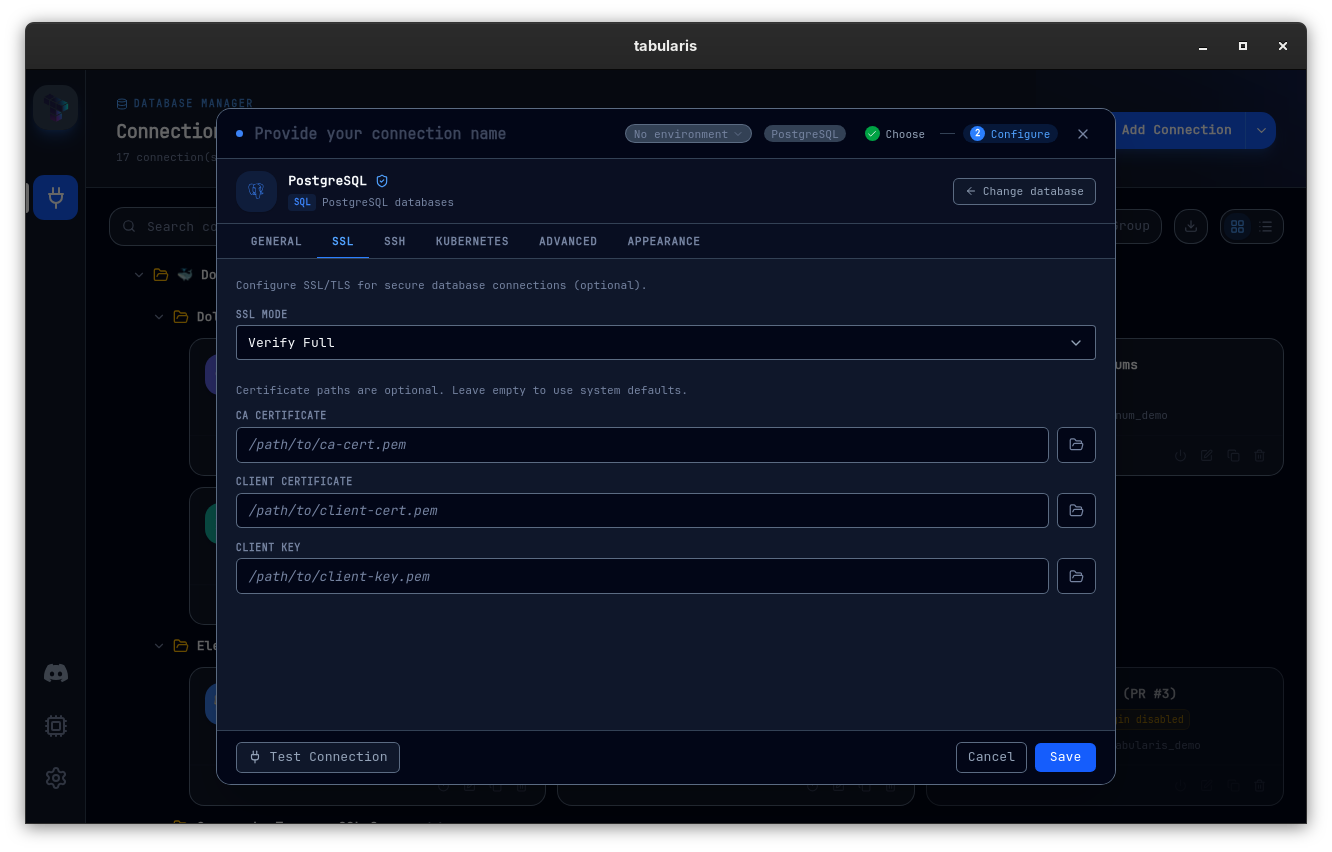
The connection form has had Client Certificate and Client Key fields for a while. The TLS connector never used them: build_postgres_tls_connector called .with_no_client_auth() in every SSL mode, so a server that requires client authentication, Google Cloud SQL with mTLS enabled being the canonical case, rejected every connection with connection requires a valid client certificate. PR #666, from @adisusilayasa, loads the certificate and private key from PEM via rustls_pemfile and attaches them with .with_client_auth_cert(...) whenever both ssl_cert and ssl_key are supplied. Client auth is skipped when ssl_mode is disabled, and the pool key now includes both paths, so editing the certificate on a connection can never reuse a pool built without it. Unit tests cover PEM loading, connector configuration and the pool-key change.
Cancellable Plugin Installs
A plugin download that stalls used to be a wait-it-out situation. PR #665 turns the install button into a Cancel button while a plugin is downloading. Cancelling aborts the active request and the extraction, then removes the staged files. The ordering matters for updates: an existing plugin stays active until its replacement is fully verified and ready, so cancelling an update leaves you with the version you had, not with nothing. The registry cards were reworked alongside to show the download, extraction and cancellation states clearly.
Video unavailable
One Safety Guard Instead of Two
v0.19.0 introduced the production write guard and it stacked on top of the older destructive-query guard, which meant a DELETE without a WHERE on a production connection produced two modals in a row, and the destructive one still made you sit through its five-second countdown. PR #667 unifies them:
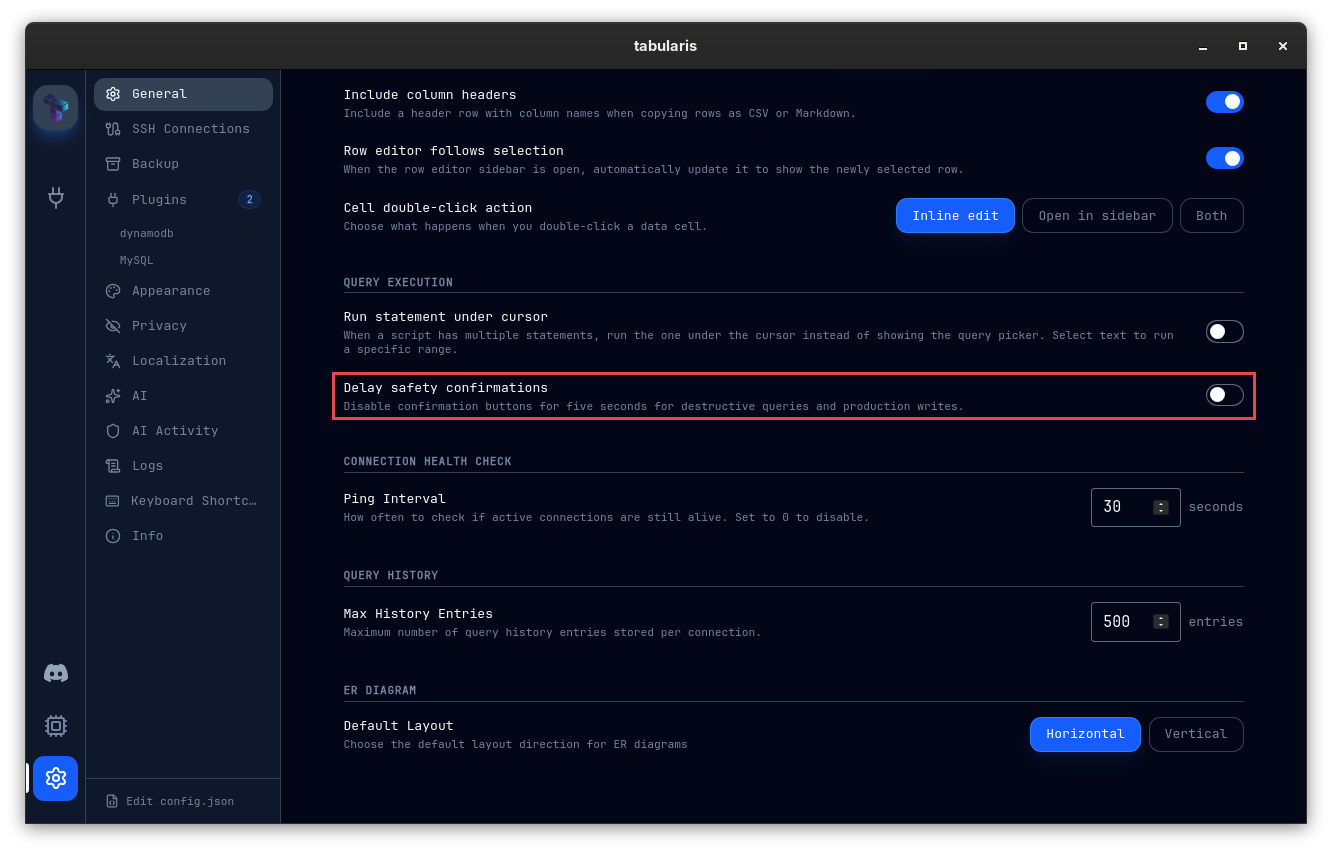
- The five-second countdown is now opt-in. It's off by default and lives under Settings → General as Delay safety confirmations, persisted in
config.jsonassafetyConfirmationDelayEnabled. When enabled it applies to both destructive-query and production-write confirmations. - On a production connection, the production warning is the only one shown; the standard dangerous-query modal is suppressed, since the production one already covers it.
- Production guards run before dangerous-query guards on every execution path: editor, batch, notebook cells and AI-generated queries. A dedicated query-guard pipeline test pins the ordering.
The related banner fix in PR #677 keeps the red production banner on the connection editor only, so it no longer follows you into Settings.
The SSL-Mode Migration Reaches the MCP Server
v0.20.0 shipped a migration that rewrites stale MySQL-style ssl_mode spellings on PostgreSQL-dialect connections. It ran from the two GUI commands that load connections, and nowhere else. The standalone tabularis --mcp process reads the same connections.json and uses ssl_mode directly to open real database connections, so a connection saved with the stale value stayed silently cleartext over MCP for as long as nobody reopened it in the GUI. Issue #639, fixed by @aesslinger in PR #643.
The fix is four small commits and the middle one is the interesting part. Running the migration from MCP makes that process a writer of connections.json for the first time, and MCP clients spawn it as an independent subprocess that can run alongside the GUI, with no file locking anywhere in the persistence layer. Rather than bolt locking onto ~20 write sites, the migration got a content-based compare-and-swap: it re-reads the file immediately before writing and skips its write for this run if anything changed since its initial read. That's safe because the migration is idempotent and self-terminating; the next process to load connections retries. Content rather than mtime, because coarse filesystem timestamps can't tell two writes in the same second apart. The migration logic moved into its own connection_migrations module with no AppHandle dependency along the way, and a redundant file read found in review was removed by teaching persistence to parse content it already has. The migrate_ssh_connections path has the same gap and is explicitly left as a follow-up: it touches a second file and the OS keychain.
Smaller Things
- Multi-statement result exports (@DhruvShah-Dev, PR #628, fixes #627): the export button is enabled for the active tab of a multi-statement result, and it exports the loaded rows directly instead of re-running the script on a fresh connection, which is what made temp-table scripts impossible to save. After a batch run the first result-bearing statement is selected automatically. Because the export uses what's loaded, the progress modal now warns when only N of M total rows were exported and suggests paging or narrowing the query. CSV, JSON and Markdown formatters are covered by tests.
- Hidden SQLite virtual-table columns stay hidden (@DhruvShah-Dev, PR #624, fixes #622): the move to
PRAGMA table_xinfoin v0.20.0 surfacedhidden = 1rows, FTS5 internals for instance, as ordinary writable columns in the New Row modal. Those are filtered out;hidden = 2and3still map to generated columns. - Manual TablePlus import path (@DhruvShah-Dev, PR #625, fixes #620): if TablePlus keeps its data somewhere other than the default Application Support location, the importer used to report the source as unavailable. You can now point it at the TablePlus
Datadirectory (or a plist inside it) when auto-discovery fails. - Database-qualified tables in grid editing and autocomplete (PR #660, closes #659):
SELECT * FROM Ops.Addressesused to make the grid look up the primary key of a table calledOps. The extractor resolvesAddresseswhen the qualifier matches the active database; a mismatched qualifier keeps the result read-only so a write can never target a same-named table in the wrong database. Autocomplete keeps each loaded table's database, so typingOps.suggests tables fromOpswhileOps.Addresses.and aliases still suggest columns. - Query errors you can select and copy (@DhruvShah-Dev, PR #613, closes #591, #608, #610): the error text in the result panel is selectable and gets an explicit Copy button. The same PR renders MySQL/MariaDB JSON updates as JSON text instead of
CAST(... AS JSON), which MariaDB rejects, and aligns the object palette's multi-database branch with the sidebar's live selection. - Run-at-cursor for tabs that weren't active on first render (@GabrielMalava, PR #603): editors in background tabs never registered themselves, so Execute fell back to running the whole script instead of the statement under the cursor.
- Single-database connections keep their controls (@gcapellib, PR #635): selecting exactly one database switched the sidebar to a layout that hid Manage databases and Refresh. The multi-database layout now stays on from one database up, and the lone database is set active and expanded so its tables are one click closer, not one click further.
- The Snap shows up in your launcher (@janpetto, PR #670, refs #669): the published snap exported no desktop entry, so after
snap install tabularisthe app could only be started from a terminal. A hand-writtensnap/gui/tabularis.desktopfixes that, and fixes what the.deb's copy got wrong on the way: a lowercase name, empty categories, an icon that doesn't resolve under confinement, and atabularis://scheme handler that was invoked without the URL. - Release notes link to the announcement post: the release workflow now reads
src/data/changelog.tson the tagged commit and prepends the blog post link to the GitHub release body, above the auto-generated "What's Changed" list.tauri-actionwas bumped to 1.0.0 via Dependabot (#601).
Thanks
Six external contributors land in v0.21.0.
@DhruvShah-Dev is everywhere in this one: multi-statement exports with the truncation warning (#628), hidden SQLite virtual-table columns (#624), the manual TablePlus import path (#625), and copyable query errors plus the MariaDB JSON fix (#613). @adisusilayasa made PostgreSQL client-certificate authentication work (#666). @aesslinger closed the SSL-mode migration gap in the MCP process with a race guard that's worth reading (#643).
@GabrielMalava fixed run-at-cursor for background tabs (#603), @gcapellib kept the database controls visible for single-database selections (#635), and @janpetto gave the Snap a launcher entry, with a verification writeup precise enough to be a template (#670).
If you've scrolled past two hundred lines of seed data to find the one UPDATE you meant to edit, changed the global page size just to see 51 rows on one screen, or watched Cloud SQL reject a connection whose certificate fields you had filled in correctly, this is the upgrade.


v0.21.0 is available now. Update via the in-app updater, or download from the releases page.