


v0.23.0 follows v0.22.0 and is a release about where things live. Visual EXPLAIN gained a parser registry that plugins fill at runtime, which is the piece the SQL Server plugin was waiting for: its 1.0.0-beta.1 is in the registry for macOS, Linux and Windows. The SQL editor learns to open .sql files from disk, edit them and save them back, without running them. The data folder that holds connections, settings, saved queries, themes and notebooks can be moved anywhere, an iCloud Drive or Dropbox folder included, so a second machine picks up the same connections. The built-in PostgreSQL driver is now deprecated: the PostgreSQL plugin installs itself when you have a PostgreSQL connection, every place the old driver shows up carries a Deprecated badge, and a migration flow moves connections over one at a time or in bulk, tests them, and offers Undo when the result is not what you expected. Two long-standing bugs that ate typed characters in the editor are gone. The tail is a set of community fixes: dump files that round-trip JSON columns, a connections.json that no longer loses fields it does not understand, a configurable PostgreSQL pool size, and shortcuts that stay out of the way while an input method is composing.
Plugins Ship Their Own EXPLAIN Parsers, and the SQL Server Plugin Lands
Last week's post told the story of this change in full; this is the release it ships in. PR #688 takes @tabularis/explain from 0.1.0 to 0.2.0 with a parser registry: registerExplainParser, unregisterExplainParser, getExplainParser and listExplainParsers, with the built-in PostgreSQL, MySQL and SQLite parsers registered through the same path, so detection and parsing dispatch by format instead of a hard-coded switch. Registering an existing format replaces it, which is what a plugin upgrade needs; unregistering restores detection order deterministically.
Video unavailable
On the plugin side, a driver can now answer explain_query with a raw payload tagged with an engine and a format, and declare an explain_parsers array in its .tabularium manifest pointing at a TypeScript bundle for that format. The desktop reads each declared module once, evaluates it the way UI extension bundles are evaluated, matches the export by exact engine and format and registers it. Bundles that fail to read or evaluate are logged and skipped per plugin; a parser that throws during actual parsing surfaces through Visual EXPLAIN's normal error handling. Disabling and re-enabling a plugin unregisters and reloads its formats, so the cycle is deterministic. Plugins that keep returning the parsed plan shape are unaffected.
Two supporting pieces landed with it. The Raw tab of Visual EXPLAIN detects XML from the leading tag, switches Monaco to the XML language and indents a single-line document one node per line, keeping attribute values containing > intact; SQL Server SHOWPLAN arrives as one line, so without this the raw view was a wrapped paragraph. And the host now enforces a plugin's min_runtime_version at install and load time: an older Tabularis refuses the plugin with a message naming both versions, at install even when the archive came from a URL or a local file, instead of failing later inside Visual EXPLAIN. Comparison follows semver precedence, so a prerelease host does not satisfy a 0.23.0 floor. Development builds load the plugin anyway and show the mismatch as a bottom-right warning toast, so a plugin declaring the next release as its floor stays testable.
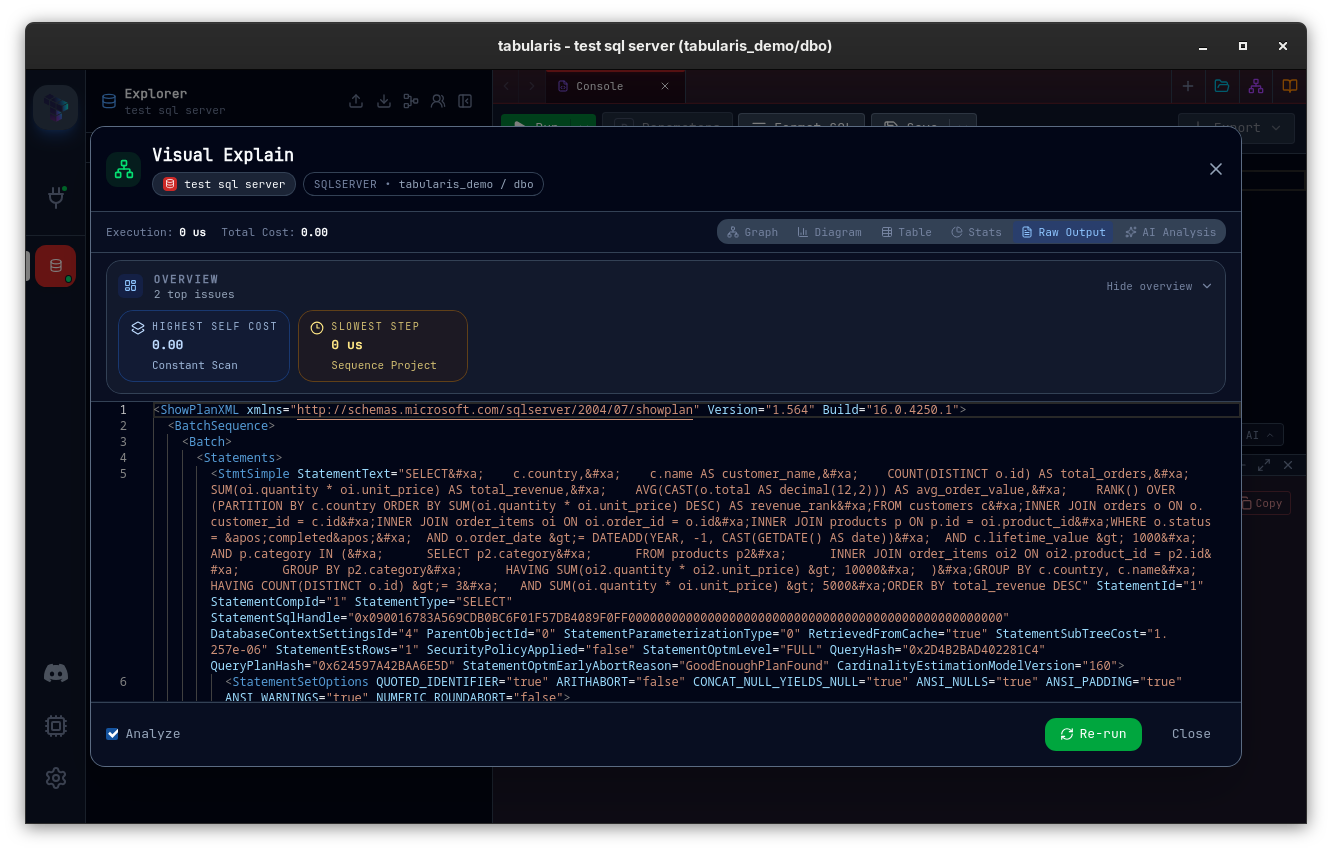
The first plugin to use all of this is the SQL Server plugin. Its 1.0.0-beta.1 is in the registry with builds for macOS, Linux and Windows, declares min_runtime_version 0.23.0, and ships a sqlserver-showplan-xml parser as its explain bundle. Its manifest declares schemas, views, routines and routine management, triggers, user management, table management, connection strings, TLS and EXPLAIN. It is a beta, and it needs this release: on v0.22.0 the catalogue filters it out, and a manual install is refused with the version message described above.
Open, Edit and Save SQL Files in Editor Tabs
The editor has always worked on text that lives in the app. PR #706 adds a folder icon to the tab strip that opens a native file picker filtered on .sql, .psql and .pgsql. The file becomes a new console tab titled with its name and bound to its path, and nothing is executed on open. On a multi-database connection the tab inherits the currently selected database.
Saving writes the editor text back to that path; Save As asks for a new one, rebinds the tab and renames it. Ctrl/Cmd+S on a file-backed console saves the file, and keeps its previous meaning, submitting pending grid changes, on every other tab. The toolbar gets a compact save split button in the style of the other controls: the main action saves, or opens Save As when the console is not bound to a file yet, and is disabled when there is nothing to save; a small amber dot next to the icon marks unsaved changes; the chevron opens a menu with Save, Save As and Add to Saved Queries, which opens the existing saved-query modal prefilled with the current SQL. The same Save and Save As entries sit at the top of the tab's right-click menu, the tab title gets a bullet while the file is dirty, and its tooltip shows the full path.
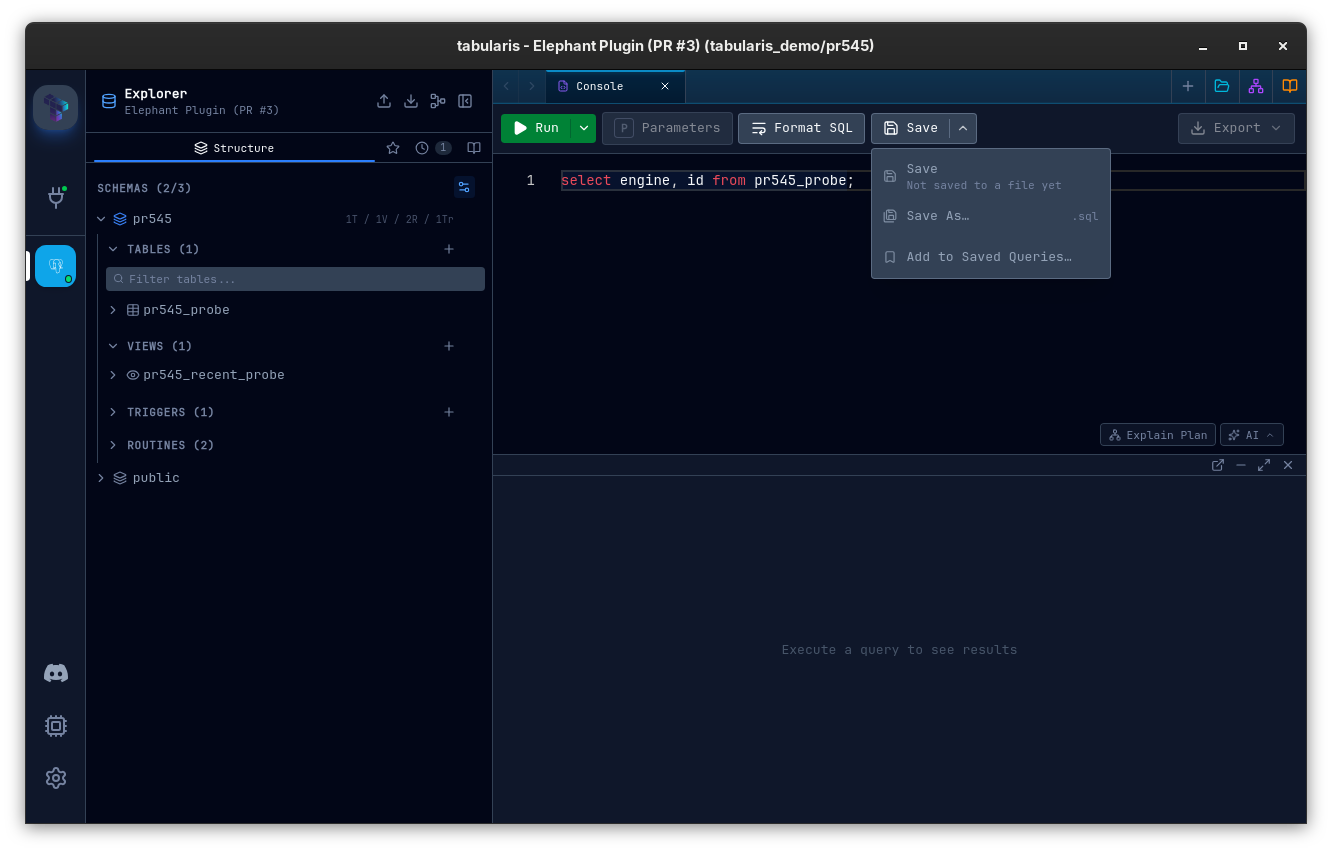
Dirty tracking is a real comparison rather than a flag. The tab stores the content last read from or written to disk and compares the editor text against it, so typing a character and deleting it again leaves the file clean, and an edit made while a write is in flight keeps the tab dirty. That stored content is persisted with the tab, so a file tab restored after a restart can still be saved to the same path and still knows whether it changed. Close, Close Others, Close to the Right, Close to the Left and Close All all check whether any tab about to go has unsaved file changes and ask before discarding them.
The file IO goes through two small Tauri commands in Rust instead of the JS filesystem plugin. The earlier attempt failed with a forbidden path error for anything outside the app data directory, and the runtime scope the dialog plugin grants for a picked path does not survive a restart, so saving a restored tab could never have worked that way. The commands validate the path, cap reads at 50 MB and run the blocking IO off the main thread, the same approach result exports already use.
Move the Data Folder Anywhere, and Sync It
Issue #702 from @jschuur asked for connections that follow you across machines. PR #707 answers with a Settings → Storage tab and one setting: the root folder where Tabularis keeps its data. Connections, config.json, saved queries, themes, notebooks, query history and custom connection icons all live under it. Installed plugins are the one exception and always stay in the platform data directory, since they are per-platform binaries. TablePlus does this with one path per file; a single root is simpler and covers the case people actually have, a folder in iCloud Drive or Dropbox.
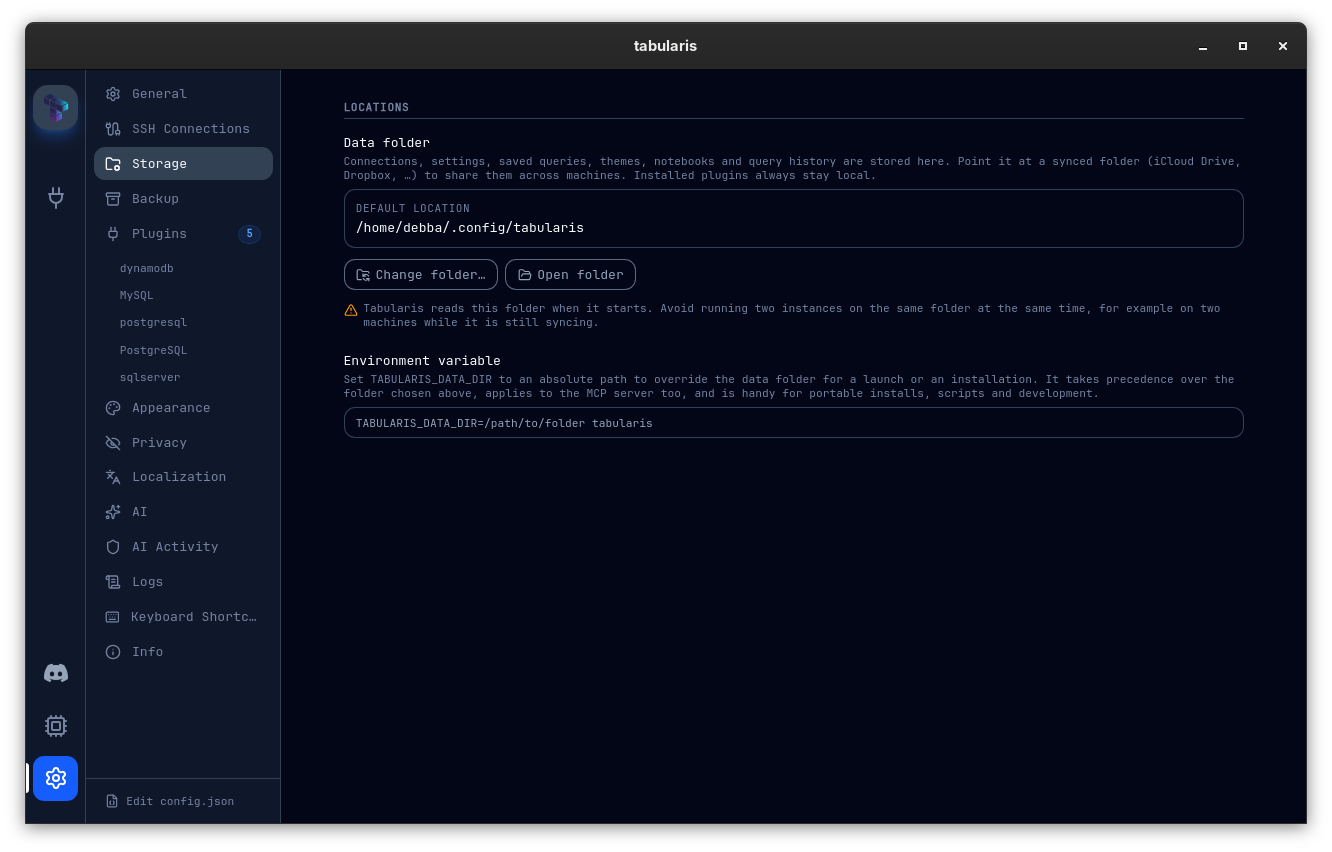
When you pick a new folder the backend inspects it first. If it already holds Tabularis data, synced from another machine say, the default is to use it as is. Otherwise you choose between copying your current data into it, with existing files never overwritten, or starting empty. The current folder, anything nested inside it or containing it, relative paths and plain files are rejected. The choice is written to storage-location.json in the default config directory, so the app finds it before loading anything else, and it is resolved once per process and cached; the GUI and the tabularis --mcp subprocess read the same pointer and always agree. That is also why a change needs a restart, and the tab shows a banner with a Restart now button until you do. The tab carries a warning worth repeating: Tabularis reads the folder at startup, so avoid running two instances on the same folder at the same time, for example on two machines while it is still syncing.
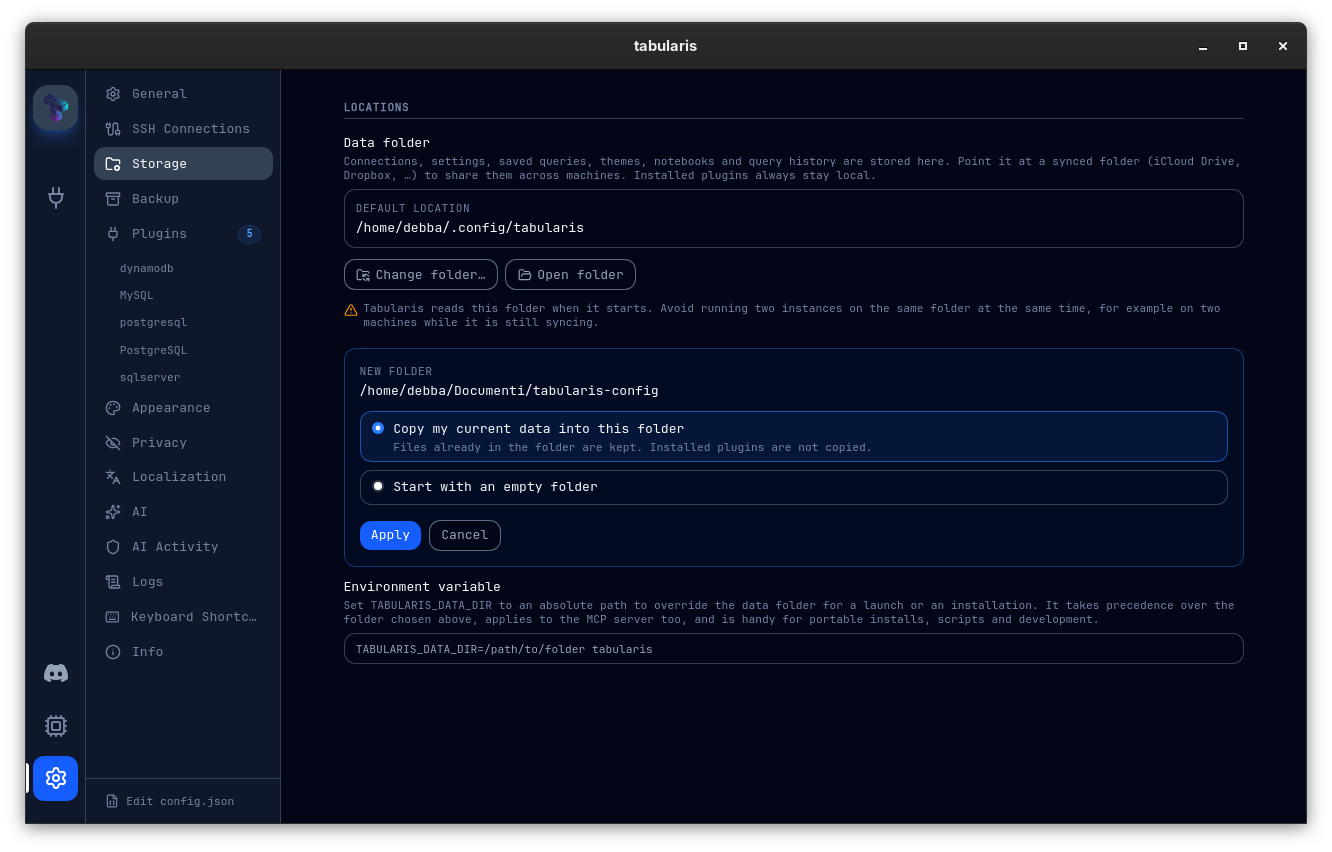
The TABULARIS_DATA_DIR environment variable overrides the pointer file. When it is set the tab shows the folder read-only and explains why, and a note documents the variable with a copy-ready example. It applies to the MCP server too and is the right tool for portable installs, scripts and development. Every remaining direct call to the platform config and data directories now goes through one path module, so nothing is left behind in the old folder, and the asset protocol scope is extended at startup so custom connection icons load from the new location.
The Built-in PostgreSQL Driver Is Deprecated, and the Plugin Migration Is Reversible
The PostgreSQL plugin has been catching up with the built-in driver since spring, and it reached 1.0.0-rc.1 last week. From this release on it is the driver PostgreSQL connections are supposed to use, and the built-in postgres driver is deprecated with a tentative removal date of 2026-10-05. The flow that gets you from one to the other is the work of @aesslinger in PR #685, designed first in a planning document and then built in five reviewed chunks.
It starts before you do anything. At launch, if at least one saved connection uses the built-in postgres driver and a compatible plugin release exists in the registry, Tabularis installs and activates the postgresql plugin in the background. This re-triggers on every launch, so uninstalling the plugin while a built-in PostgreSQL connection still exists gets it reinstalled next time; there is no opt-out for this release, and the PR says so rather than leaving it to be discovered. Once the plugin is ready, three things appear:
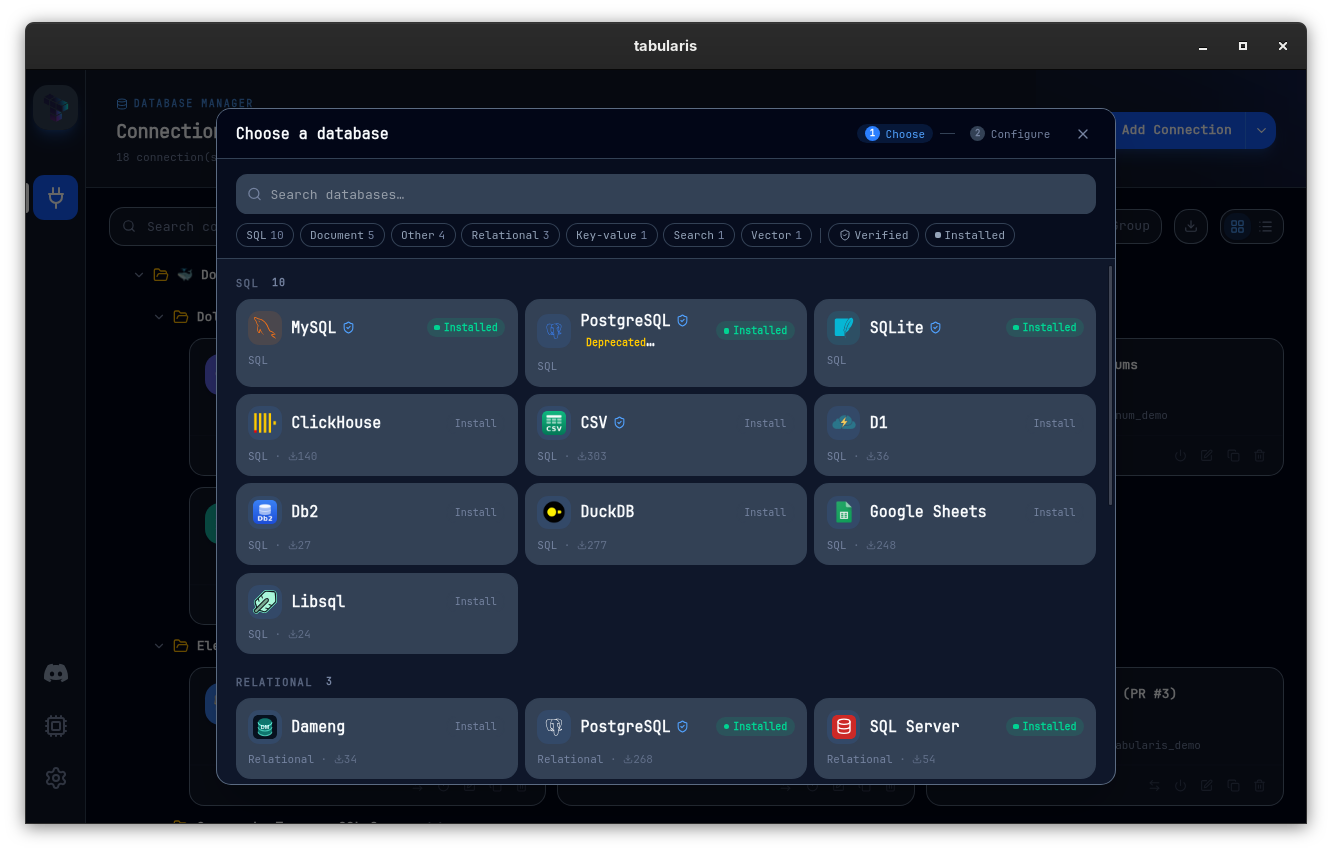
- A Deprecated badge, with a tooltip naming the replacement and the removal date, on the built-in entry in the connection catalogue, on its card under Settings → Plugins, and on every connection row that still uses it. The plugin's own catalogue entry sorts ahead of the built-in one.
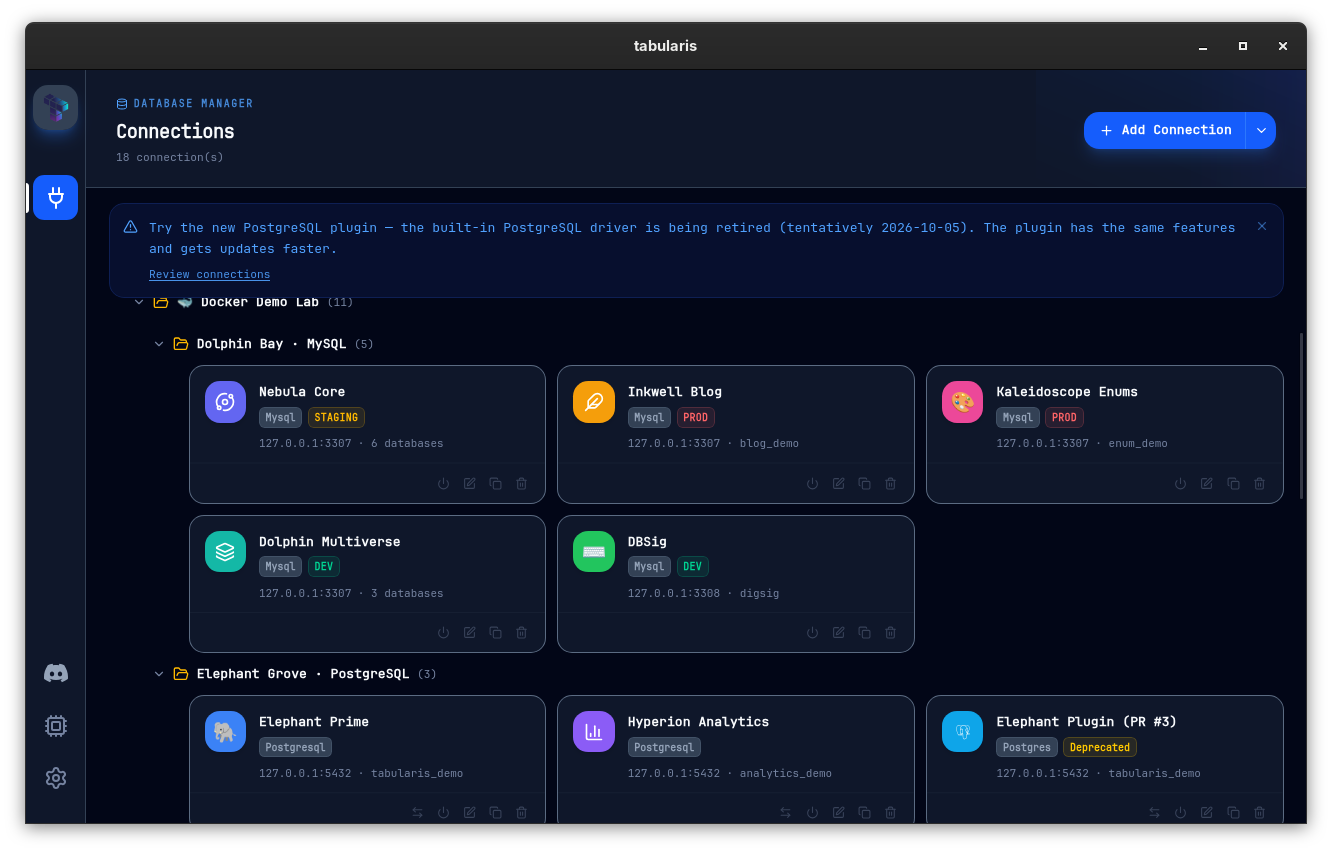
- A dismissible banner on the Connections page. It reads Try the new PostgreSQL plugin when the plugin is installed, and couldn't be downloaded, we'll retry on the next launch when the registry was unreachable. Dismissing it hides it for the connections that existed at that moment; a new built-in connection brings it back.
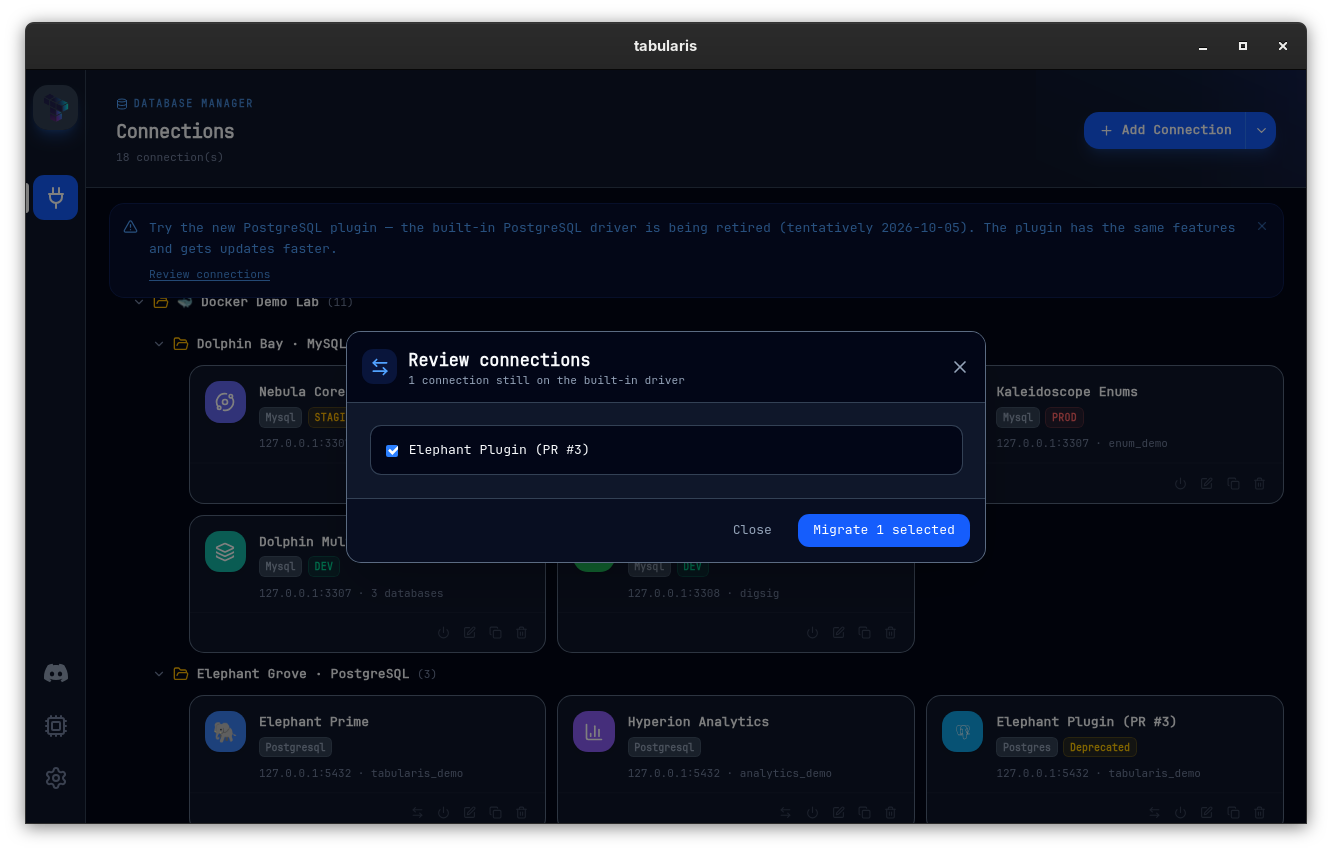
- A Switch to plugin action on each built-in PostgreSQL connection, as a button on the card and in the context menu, plus a Review connections link on the banner that opens a bulk checklist.
Switching a single connection asks for confirmation, flips the driver to postgresql, reconnects it if it was open, and runs a connection test. The toast that follows reports success or the exact failure, and always carries Undo, which flips the driver back and reconnects again. A failure that is not the plugin's fault is labelled as such: if the connection also fails on the built-in driver, the toast says so and keeps the switch. If the plugin process itself did not start, the toast says no connection was attempted. Undo can fail too, for instance when the connection was deleted underneath it, and that surfaces as its own error toast instead of an unhandled rejection. Every one of these outcomes also has a Report an issue action that opens a pre-filled GitHub Issue Form in the plugin repository with the plugin and app versions, OS and error already in place, and it works even when the registry API is unreachable thanks to a static fallback URL for the first-party plugin.
The bulk checklist is where the capability check lives. Each connection is compared against the capabilities the installed plugin declares in its manifest. A connection that uses something the plugin does not declare, SSL or connection strings are the two the code knows about, is listed unchecked with the specific gap named inline and a Report this gap action; once you have filed it, the row shows Reported instead. A connection whose connection string is stored in the keychain is unchecked as well, with a note that the secret will not carry over and needs to be re-entered after migrating, because the plugin cannot read the built-in driver's keychain entry. Everything else defaults to checked. Migrate N selected then works through the rows sequentially with per-row status, one failure does not abort the rest, and migration continues if you close the modal. Every migration is recorded in a persisted history so the state survives a restart.
Two details for later. The whole thing is parameterized by a (builtinId, pluginId) pair, with ("postgres", "postgresql") as the only entry today, so the MySQL and SQLite deprecations that are expected to follow are an additional pair rather than a redesign. And a migrationModeByDriver setting is staged for a future switch to forced migration; for v0.23.0 every driver is opt-in, and nothing moves unless you click.
Two Bugs That Ate Keystrokes in the SQL Editor
Issue #731, reported by @aesslinger against the PostgreSQL plugin before it was traced to the app, described a character disappearing right after a Shift+Home selection. PR #732 found two independent bugs behind the symptom.
The first is WebKit-only, which is why it never showed on Windows. Monaco falls back to a hidden textarea for keyboard input wherever the EditContext API is missing, which is every WebKit build (WebKitGTK on Linux, WKWebView on macOS) and Firefox. For a backward selection, Shift+Home, Shift+Left or Shift+Up, it mirrors the selection into that textarea as a reversed range, browsers collapse such a range to the smaller offset, the next typed character lands before the mirrored text, and Monaco deduces a one-character composition over a non-empty selection and discards it. A small app-side patch collapses the reversed range at the anchor for Monaco's input textarea only; Monaco 0.56.0 and current VS Code main still carry the same code, so the fix stays in Tabularis for now.
The second affected every platform. The editor wrapper debounces onChange by 300 ms and separately re-syncs Monaco from the initialValue prop whenever the two differ. The flush re-renders the page asynchronously, so a keystroke typed between the flush and that effect was already in the editor but not yet in the prop, and the effect wrote the stale value back. Typing at roughly the debounce interval lost every third character: abcd typed at 0.30 to 0.32 s intervals came out as abd. The wrapper now remembers the values it handed to onChange until the consumer echoes them back and never re-applies an echo; a genuinely external change, a saved query loaded into the tab for instance, still wins and cancels any pending flush. Both fixes were verified in the real Tauri app on WebKitGTK 2.52.6, driving the console with xdotool and reading the editor state through the remote inspector.
The same PR stops @monaco-editor/react from fetching Monaco from the jsDelivr CDN at runtime while a full copy sat unused in the bundle. The loader now points at the bundled package and registers the editor and JSON workers itself, so the editor works offline and ships the version pinned in package.json.
Smaller Things
- Tables first in the quick navigator (PR #703): a PostgreSQL schema with about 300 tables showed 1.6k entries because PostGIS alone adds over a thousand functions to
public, and typing a table name did not filter them away. Objects now carry a relevance weight (tables 20, views 10, routines and triggers 0), so tables come first on an empty query and a table containing the text ranks above functions, while typing the exact name of a function still puts that function first. The fuzzy threshold drops from 0.4 to 0.3, one typo every four characters, which also applies to the command palette since both share the same search. The palette renders at most 100 rows; the footer still shows the total match count. - Dump files round-trip JSON columns and backslashes (@soliloquist, PR #720, fixes #717): the dumper applied two different escaping rules inside one file. Text columns doubled backslashes, correct for MySQL and wrong for PostgreSQL and SQLite, where the dump re-imported
a\basa\\b. JSON columns went through a fallback that only escaped quotes, so on MySQL\"became"(error 3140 on import) and\uXXXXbecameuXXXX, valid JSON with all non-ASCII text silently destroyed. One dialect-aware string escaper now handles every literal, JSON and JSONB columns are written as JSON literals with UTF-8 emitted as-is, and unit tests cover both dialects, NUL, nested values and JSON scalars. Behaviour change for PostgreSQL and SQLite text columns: backslashes are no longer doubled. connections.jsonkeeps the fields it does not understand (@atirna, PR #708, fixes #668): an older binary saving the file used to drop every field it did not recognize, which became a real problem once the MCP process started writing it alongside a possibly newer GUI. Unknown fields are now preserved on write.- PostgreSQL pool size is a setting (@DhruvShah-Dev, PR #681, refs #71): the built-in PostgreSQL driver gains a Pool Max Size setting under Settings → Plugins, used when the pool is created. The default stays at 10, oversized values are capped at 64, and invalid or zero values fall back to the default. Useful behind pgBouncer, where a pool of ten per connection is more than you want.
- Shortcuts stay quiet during text composition (@DhruvShah-Dev, PR #656, fixes #655): dead keys and IME composition produce keydown events that look like shortcuts before the final character is committed. A shared guard recognizes them (
isComposing,Dead,Process,Unidentified, keycode 229) and both the global shortcut handler and the Monaco interception skip them, so the character reaches the editor instead of stealing focus. - Storage globals bound to jsdom in the test suite (@be-student, PR #719, fixes #713): Node 26's native Web Storage globals kept Vitest from installing jsdom's, and 40 tests failed at
localStorage.clear(). Shared setup now bindslocalStorageandsessionStorageto the worker's jsdom window before test modules load, with regression cases and a note in the testing rules. - Preview builds for pull requests (PR #705): a maintainer adds the
previewlabel to a PR and CI builds it for macOS (arm64 and x64), Linux and Windows, uploads the installable bundles as run artifacts kept for 14 days, rebuilds on every push while the label stays, and maintains one sticky comment with a download link per platform. PRs from branches of the repository come out signed and notarized; PRs from forks come out unsigned, and the comment says which case applies. Release mode now fails explicitly when signing secrets are missing instead of publishing unsigned bundles. If you reported a bug and get pointed at one of these, it is the fastest way to confirm the fix before a nightly. - CI dependencies: Dependabot bumped
actions/checkoutto 7.0.1,actions/cacheto 6,actions/upload-artifactto 7 andswatinem/rust-cacheto 2.9.2 (#661, #662, #663, #664).
Thanks
Five external contributors land in v0.23.0.
@aesslinger built the release's headline feature end to end, from the planning document to the on-demand install, the deprecation badges, the per-connection and bulk migration flows, the capability-gap detection and the reversible outcome toasts, and kept every review follow-up as its own commit (#685). The same author reported the lost-keystroke bug in #731, the connections.json field loss in #668 and the flaky storage tests in #713, which is three fixes in this release that started as precise reports.
@DhruvShah-Dev made the PostgreSQL pool size configurable (#681) and kept shortcuts from consuming IME composition events (#656). @soliloquist found, reproduced and fixed the dump escaping bug, with a reproduction table and a verification against MySQL 8.0 that left nothing to guess (#720). @atirna made connections.json writes preserve unknown fields (#708), and @be-student fixed the test harness under Node 26 (#719). Thanks also to @jschuur for asking for synced connections in #702, to @mccuskk for the focus-stealing report in #655, and to @ealvesss for the pool-size report that PR #681 refers to.
If you have a dozen PostgreSQL connections and want the plugin without retyping them, keep your migration scripts in files the app could not open, or carry the same connections on two machines and have been exporting and importing them by hand, this is the upgrade.


v0.23.0 is available now. Update via the in-app updater, or download from the releases page.