


v0.32.0 follows v0.31.0 with tools for moving a table, reading its rows and working on SQL. Export one table to SQL and import it into a connection using the same driver; color cells or rows by rules; save snippets with tab stops; and compare an execution plan to a saved baseline. PostgreSQL also gets opt-in diagnostics for a subset of SELECT queries.
Move One Table Between Connections
The table context menu now offers Export table to SQL, and the database menu offers Import table from SQL. The file holds one table's structure, indexes and rows; the target must use the same driver. The import dialog previews the source and structure before writing and offers fail, drop and recreate, or append when the table exists. An export writes to a temporary file until complete. @shu-chen-dot-ca built this in #1361, closing #709.
Video unavailable
Color Rows and Cells by Rule
Choose Conditional formatting from a table column's header menu to define a condition, a color and whether it applies to the cell or the row. Rules are saved per connection, schema and table, and work in the normal and transposed layouts. The first matching rule wins; pending edits keep their own styling. Rule names are available to screen readers as well as visually. @shu-chen-dot-ca contributed #1392.
Video unavailable
Reuse SQL Snippets
The new Snippets settings tab lets you create and edit personal snippets with a trigger prefix, dialect and tab-stop placeholders. Snippets appear in editor completion; Tab and Shift+Tab move between placeholders. Four built-in examples cover SELECT, JOIN, INSERT and a CTE. The dialect picker reflects enabled drivers, including plugins, and a plugin-scoped snippet is offered for that driver. The editor and list previews highlight SQL; Oracle and other dialects without a dedicated Monaco grammar use general SQL highlighting (#1458). @markankamaransheogarat-sys added them in #1432.
Video unavailable
Compare Plans to a Baseline
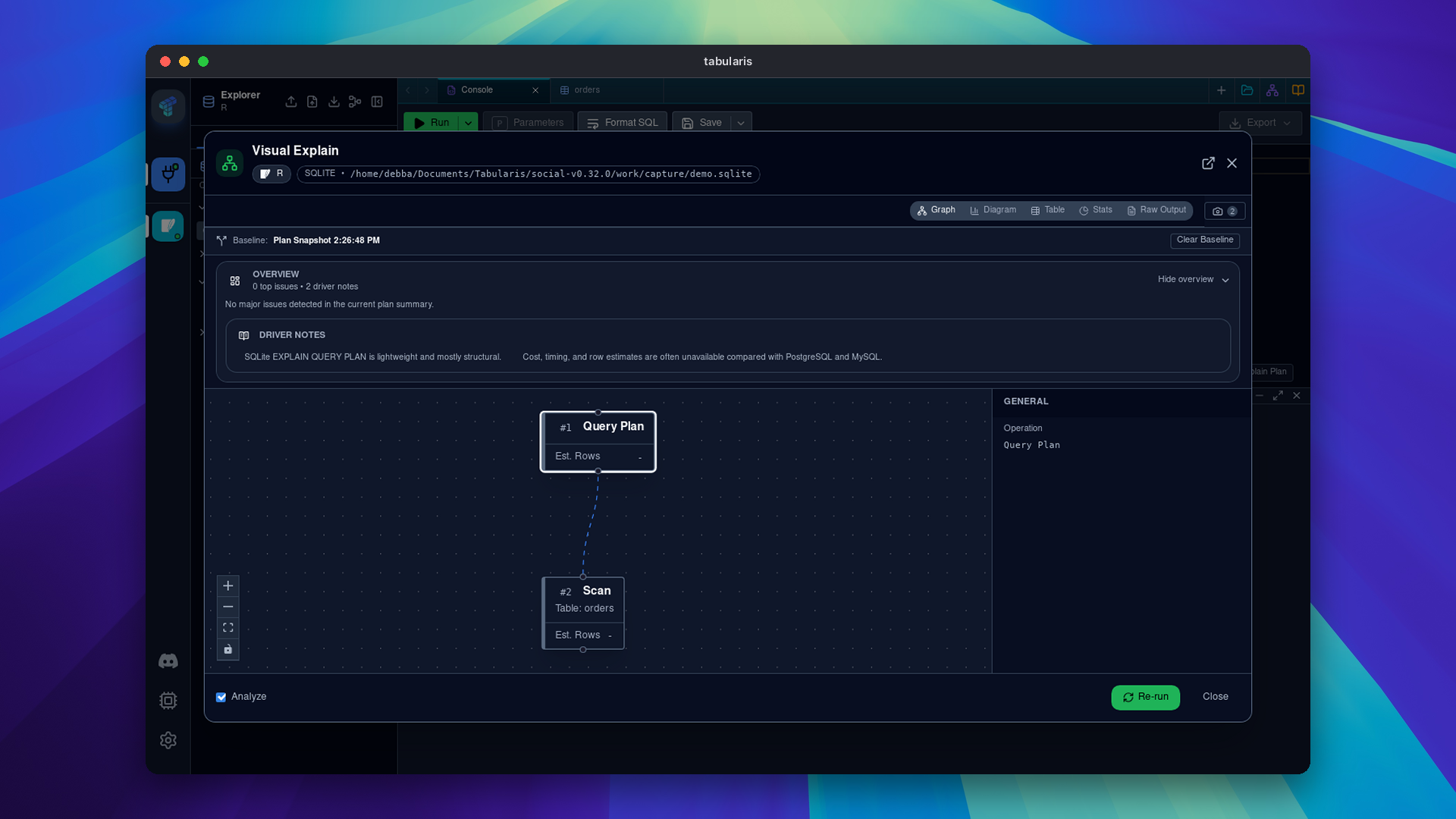
Visual EXPLAIN can save a snapshot of a plan and compare a later plan with it. The comparison shows available cost and execution-time changes and operator differences. Snapshots can be pinned or deleted, and comparisons require the same database engine; estimated and analyzed plans are flagged when mixed. @markankamaransheogarat-sys contributed #1431.
PostgreSQL Diagnostics While You Write
Enable SQL diagnostics in Settings → Appearance to mark unresolved names and ambiguous columns for a supported subset of PostgreSQL SELECT queries. The analysis uses available connection metadata, does not execute or rewrite SQL, and is off by default. Missing or incomplete metadata limits what it can report; the database remains authoritative. @Asymtode712 added it in #1447.
Video unavailable
Plugin UI Isolation
Plugin UI extensions and EXPLAIN parsers now run in sandboxed frames with a restricted content security policy. The host mediates access through explicit APIs. @1-DARK and @harshbhx built the isolation in #981.
Around the Ecosystem
CockroachDB 0.1.0-alpha.2 adds schema management for tables, columns, indexes, foreign keys and views. It remains an alpha: EXPLAIN and ER diagrams are among the documented gaps. Trino 0.1.12 adds external OAuth2, access-token and SSL verification options. Both are by @1-DARK.
SurrealDB 0.1.3 by @itsmunzir avoids repeating writes hidden inside SELECT when paging, removes credentials from connection errors and checks namespace/database selection. Google Sheets 0.3.1 routes OAuth through the sandbox host API and requires Tabularis 0.32.
Smaller Things
- Clipboard filters: filter a column by a single clipboard value or a list (@zzx04-cool, #1112).
- PostgreSQL timeout: set a per-connection query timeout with server-side cancellation (@Detoy, #1381).
- Explorer: create databases and schemas from the sidebar and restore tree expansion and editor panel height (@lejyfps, #1442, #1389).
- Notebook: clear outputs and export SQL cell source to a
.sqlfile (@WhitePepperLambSoup, #1429; @shu-chen-dot-ca, #1438). - Editor and history: see cursor position and selection size, and filter history by minimum duration (@DevShoaib78, #1436, #1435).
- SQLite and column editing: preserve infinite and NaN REAL values during row extraction (@markankamaransheogarat-sys, #1440); renaming a column retains its length, default and ON UPDATE attributes (@shu-chen-dot-ca, #1419).
- More viewers: export the loaded ER diagram schema as Markdown, sort read-only JSON object keys, and see character, line and UTF-8 byte counts in the text viewer (@MuhammadHaroonRashid, #1420; @parthchilwerwar, #1427; @maxteneff, #1425).
- Data and connections: pasted spreadsheet cells retain leading zeros and quoting, connection strings tolerate a literal
%, and SQLite trigger bodies stay together when splitting SQL (@Xnadir, #1390, #1391, #1382). Plugin connection names and defaults are corrected, and multi-database plugins can accept a database on the Databases tab (@itsmunzir, #1387, #1386, #1393). Run All pages the rows captured during the batch (@vivekyarra, #1378).
Thanks
Thanks to @shu-chen-dot-ca for table transfer and grid rules; @markankamaransheogarat-sys for snippets and plan snapshots; @Asymtode712 for diagnostics; @1-DARK for plugin isolation and the CockroachDB and Trino releases; and @itsmunzir for connection fixes and SurrealDB. Thanks also to @zzx04-cool, @Detoy, @lejyfps, @WhitePepperLambSoup, @DevShoaib78, @MuhammadHaroonRashid, @parthchilwerwar, @maxteneff, @Xnadir, @vivekyarra and @CreedTech for the changes above and explorer fixes. Thanks also to @harshbhx for plugin sandbox implementation and compatibility work.
If you move tables or revisit a query plan, this is the upgrade.


Download the latest published version from the download page. Release notes and packages are available on GitHub Releases.