

In January I had to choose how to build Tabularis. Electron was the obvious option. Three native applications were the romantic option. Tauri looked like the compromise.
Six months and 64 releases later, I still think it was the right choice. But not for the reason usually printed at the top of Tauri comparison pages.
Yes, the Windows installer is 12 MB. This is nice. It is also the least interesting part.
The sentence that decided the architecture was this:
A database client is a systems program with a UI problem, not a web app with a database problem.
That sentence explains why I chose Tauri. It does not explain the bill. This post is about both.
The program behind the pixels
Below the data grid, Tabularis speaks MySQL, PostgreSQL and SQLite through SQLx. It opens SSH tunnels, asks the OS keychain for credentials, invokes kubectl for port forwarding, encrypts connection backups, and starts plugin drivers as subprocesses speaking JSON-RPC over stdin and stdout.
You can build all of this in Electron. Of course you can. But then I would either implement the backend in JavaScript, maintain native Node modules for every target, or add a Rust sidecar and recreate the same architectural split while still shipping Chromium. Electron's own documentation says native modules usually need to be rebuilt after an Electron upgrade. I did not want the database engine of the application to depend on how well node-gyp felt that morning.
With Tauri, the backend is an ordinary Rust program. SQLx, Tokio, rustls, keyring, AES-GCM: they are normal Rust dependencies, with normal Rust types between them. The backend is not a helper attached to the product. It is the product.
Then the frontend gets the part web technology is genuinely good at: Monaco, a virtualized data grid, forms, diagrams, themes. This separation felt natural to me. More importantly, it was a separation I could maintain alone.
There is also a security argument, but it is easy to exaggerate it.
Code in a Tauri webview has normal web capabilities, including network requests. What it does not get by default is Node.js or arbitrary access to the operating system. Privileged work crosses a defined IPC boundary through Tauri commands and plugin capabilities. In Tabularis I can inspect the command registration and capability files and see what the frontend is allowed to ask for.
This does not make a Tauri application secure by magic. A bad command is still a bad command. A loose capability is still loose, XSS still matters, and the Rust and npm dependency trees are still part of the attack surface. But for an application holding production credentials, I prefer starting from an explicit privilege boundary instead of adding one later.
And then there is size.
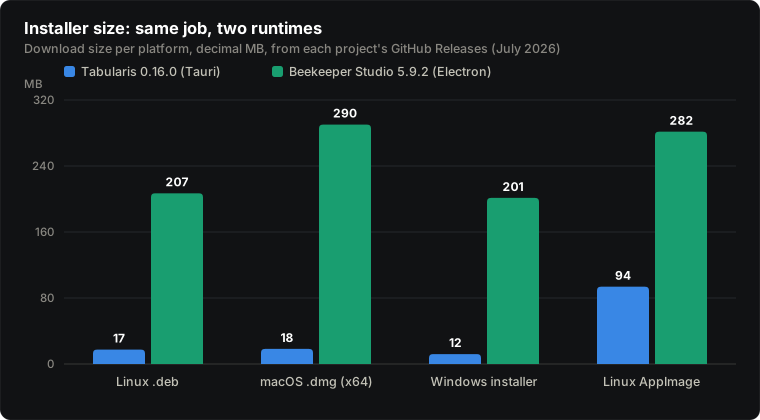
These are decimal megabytes from the Tabularis 0.16.0 and Beekeeper Studio 5.9.2 release assets. Beekeeper is a good database client. Its package sizes are not a failure of Beekeeper; they are the price of shipping Chromium, and shipping Chromium also buys you consistency.
Still, a 12 MB Windows installer for a database IDE makes me smile.
The harder comparison is native
Electron is the easy comparison. Native applications are the ones that made me hesitate.
An AppKit application does not care which WebKitGTK version Arch happens to ship. Native controls can offer better input latency, scrolling, text rendering and platform integration. Tauri does not ship a browser engine on most targets, but it certainly runs one, and the webview's memory does not disappear because the installer is small.
Size is not even a native-versus-Tauri argument. Sequel Ace is small too. The small-package story is mostly an anti-bundled-Chromium story.
So why not native? Because native to what?
Sequel Ace gives the honest answer: macOS. It is a focused application and a very good one. TablePlus began on macOS; when its small team built the Windows version, it rewrote the application in C# and C/C++. That is not a criticism. It is what “native on two platforms” actually means.
For Tabularis, native meant three user interfaces: three grids, three editors, three settings screens, three sets of bugs. A cross-platform widget toolkit would move the compromise somewhere else, not remove it.
The web has a component economy that is hard to ignore. Tabularis uses Monaco, the editor inside VS Code. I get multi-cursor editing, folding, search and the keyboard behavior developers already know. I can render an ER diagram and a visual EXPLAIN plan with the DOM. Reproducing that experience with native widgets on three platforms would not be a side quest for me. It would become the project.
When Tabularis started, one person was working on it: me. Yet it had to run on Linux, macOS and Windows, and it now ships in ten languages. Native might win the benchmark while losing the more important test: whether I could actually ship the application and keep it moving.
This is the trade I eventually wrote down:
Electron charges you for the runtime. Native charges you for the platforms. Tauri charges you for the seams.
Now for the seams.
You do not ship a browser. You inherit three.
Tauri uses the webview already available on the platform: WKWebView on macOS, WebKitGTK on Linux and WebView2 on Windows. WebView2 is based on Chromium. The other two are WebKit, but that does not make them identical. Tauri maintains a useful webview version guide; the Linux table alone explains why “works in my browser” is not a test plan.
So I do not ship a rendering engine, but I answer for three of them.
WebKitGTK has its own graphics path and is distributed on the cadence of each Linux distribution. WKWebView comes with the OS. WebView2 updates independently and is usually the least surprising because most frontend work is tested in Chromium first.
The differences are not always impressive technical failures. Sometimes macOS simply decides it is an editor. A user typed a straight quote in a table filter, the system changed it to a curly quote, and the resulting SQL stopped parsing. The fix in PR #439 normalizes typographic quotes before the clause reaches the database.
An Electron developer targets one rendering engine. I target three webview implementations that can disagree about CSS, input and GPU compositing. The small installer is partly financed by this work.
The Linux webview lottery
Most of the reports where Tabularis opens a broken window, or no useful window at all, have come from the Linux webview and graphics stack. A short history:
- #9: a Wayland protocol error on Arch, very early in the project.
- #45:
libEGL fatal: did not find extension DRI_Mesa. The Snap package failed; the.debworked. - #54: a blank AppImage window. Preloading the host's
libwayland-client.somade it render. - #423: an AppImage WebKit process abort on Solus. It is still open while I write this.
The workaround in #54 deserves to be read twice. The portable bundle worked after it was forced to use a library from the system it was supposed to be portable across.
Electron applications have Linux and Wayland bugs too. What they generally do not have is the question “which WebKitGTK did this distribution compile, and how does it interact with this compositor?” Bundling Chromium removes that variable. This is a real advantage, not marketing.
It is also the structural weakness of Tauri's shared-webview bet. Anybody describing Tauri as a free lunch has not shipped an AppImage to enough Linux users.
The 94 MB exception
The first chart contains the whole story if you look at the last pair of bars.
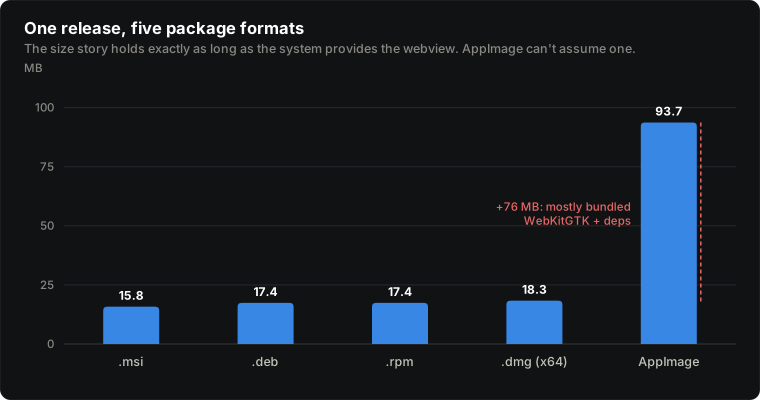
Same release, five representative x64 package formats. Four are between 15.8 and 18.3 MB. The AppImage is 93.7 MB.
An AppImage cannot assume that the target distribution provides the dependencies it needs, so Tabularis's portable build carries WebKitGTK and much of its dependency closure. Tauri's own documentation warns that an AppImage can take an application from a few megabytes to 70 MB or more.
The size advantage came from borrowing the webview from the operating system. When the package cannot safely borrow it, part of the advantage goes away. Tabularis is still much smaller than the Electron AppImage in the chart, but the clean “12 MB versus 200 MB” story is gone.
Flatpak has a better model for this particular problem: common runtimes can be shared between applications. The less pleasant part is publishing on Flathub. Source-available submissions are normally built from source without network access, so every Cargo and npm dependency must be described ahead of the build. This is solvable, and work on #326 is ongoing. It is not a one-line manifest.
You own the glibc floor
I learned another Linux lesson in the traditional way: by shipping the bug.
At one point the Linux release ran directly on GitHub's ubuntu-24.04 runner and linked against glibc 2.39. The binary then refused to start on Ubuntu 22.04, which has glibc 2.35 and was still in standard support.
The fix was to build inside an ubuntu:22.04 container. The container pins the compatibility floor even when GitHub eventually changes or removes its runner images. This is also what the Tauri AppImage guide recommends: build on the oldest base system you intend to support.
Electron largely chooses this baseline for you through its prebuilt runtime. Native Node modules can still reintroduce the same problem, but if your Electron application is pure JavaScript, a decade of packaging knowledge is already encoded in the toolchain.
When you compile a native Rust backend, you own its system compatibility. Rust gives you systems programming, including the systems.
Every result page pays the IPC tax
The most important seam is not packaging. It is in the architecture.
The Rust core and the React UI live on opposite sides of Tauri's IPC boundary. Today a query result in Tabularis is a Rust QueryResult containing rows of serde_json::Value. Tauri serializes the response, the webview receives JavaScript values, and only then can React render the grid.
For a settings screen this cost is noise. For query results it shapes the product.
The UI asks for paged results, 500 rows by default, instead of moving an unbounded result set into the webview. Large exports stay on the Rust side and stream from the database to a file, avoiding the UI bridge altogether. The virtualized grid matters not only because the DOM is expensive, but because moving and retaining data is expensive too.
Electron has an IPC boundary in its secure default architecture as well. You can put a native module in an unsandboxed renderer and avoid some of it, but Electron's documentation is explicit that this disables an important security boundary. The shortcut exists. It is not free.
This is the same fence seen from two sides. Keeping credentials and database access out of the webview is a security benefit. Serializing every visible row across that fence is a performance cost. I want both facts in the same paragraph because they come from the same decision.
Would I choose Tauri again?
Yes.
Not because Tauri is “Electron without the bloat.” That description is too small, and on Linux AppImage it is not even particularly convincing.
I would choose it again because the hard part of Tabularis is where I want it: database protocols, TLS, tunnels, credentials, encryption, plugins and exports are Rust. The editor, grid, diagrams and interaction design change much faster, and web technology fits them well. The boundary between the two costs real work, but it is a boundary I understand and want.
Some costs can be paid once: pin the build container, drop a broken package, add the right workaround. Others recur forever. I will keep testing three webviews. New compositors and distro combinations will produce bugs I cannot reproduce. Every page of rows will still cross IPC.
That is acceptable to me. What would not be acceptable is maintaining three interfaces, or wishing the database core were not JavaScript after the application had already grown around it.
If your desktop application is mostly a frontend for HTTP APIs, Electron may be the simpler and better choice. If you support one platform and care deeply about native behavior, build native. If you need identical rendering everywhere, shipping Chromium is a feature. And if your application is a systems program that needs a rich cross-platform interface, Tauri is a very interesting compromise.
Just budget for the seams.
The AppImage users may now open an issue.