

v0.27.0 follows v0.26.0. That release was about the editor session; this one is a shorter cycle about the places you look at all day. The data grid gets a filter built from the cell under your mouse, optional zebra stripes, and column widths that no longer change as you scroll. The SQL editor names result tabs from a leading comment, turns a pasted column into an IN (...) list, and tells same-name tables from different schemas apart. SQL Server scripts run as one batch, split only on GO. Two fixes close holes where Tabularis executed a statement the user expected to review first: Visual Explain's Analyze default, and the Run… dialog for stored routines. Almost all of it comes from community pull requests, many of them picked up from issues we opened as starting points. Around the release, tabularis.dev itself was rebuilt and the wiki was checked page by page against the app.
Filter by This Value
@M4Y4NK-V3RM4 adds quick filters to the cell context menu in PR #908, closing #853. Right-click a cell in a table tab and the menu offers Filter: col = this value and Filter: col <> this value, or IS NULL / IS NOT NULL when the cell is NULL. The condition is added to the tab's current filter with AND, the existing filter is wrapped in parentheses so an a OR b keeps its meaning, and the grid reloads from page 1 with the new clause visible in the WHERE input, where you can edit it.
Video unavailable
The value is formatted per column type, not per appearance: 42 in an integer column is unquoted, '42' in a varchar column stays a string, booleans become TRUE/FALSE, and O'Brien is escaped. Identifiers are quoted for the active driver, so MySQL gets backticks and PostgreSQL and SQLite double quotes. The items are not offered on BLOB and JSON cells, unsaved insertion rows or ad-hoc query results, which have no table to filter. A follow-up commit keeps masked cells out of it: a cell hidden by column masking only offers IS NULL / IS NOT NULL, so the real value never ends up in the filter text.
Columns That Stay Where They Are
The result grid is virtualized: only the rows on screen are in the DOM. With an automatic table layout, every scroll step let the browser size the columns again from whichever rows happened to be rendered, so columns widened as long values came into view and narrowed again on the way back, and on a wide result the columns visible on screen kept changing. @noone-silent reported it in #844.
PR #847 keeps the first paint as it was, sized to the header and the first visible rows, then measures the header cells and locks those widths. From then on scrolling never reflows the columns; longer values are truncated with an ellipsis and remain available in the tooltip and the cell expander. Widths are measured again only when the column set changes, another query or another table, or when rows first arrive in a result that was empty. Paging and refreshing keep the current widths, and a grid hidden in an inactive tab waits until it is visible before measuring.
Video unavailable
Manual column resizing is not part of this release. Locked widths make it a natural next step, since there is now one place where widths are applied.
Zebra Stripes, and Settings That Survive a Restart
Also from @M4Y4NK-V3RM4, PR #882 closes #854 with Settings → Appearance → Data Grid → Alternating row background: every other row gets a light tint so a row is easier to follow across a wide table. It is off by default, uses theme tokens only, so it follows light, dark and installed themes, and applies to table tabs and query results alike. Selected, inserted and pending-delete rows keep their own colors, and edited cells keep their state styling on top of the stripe.
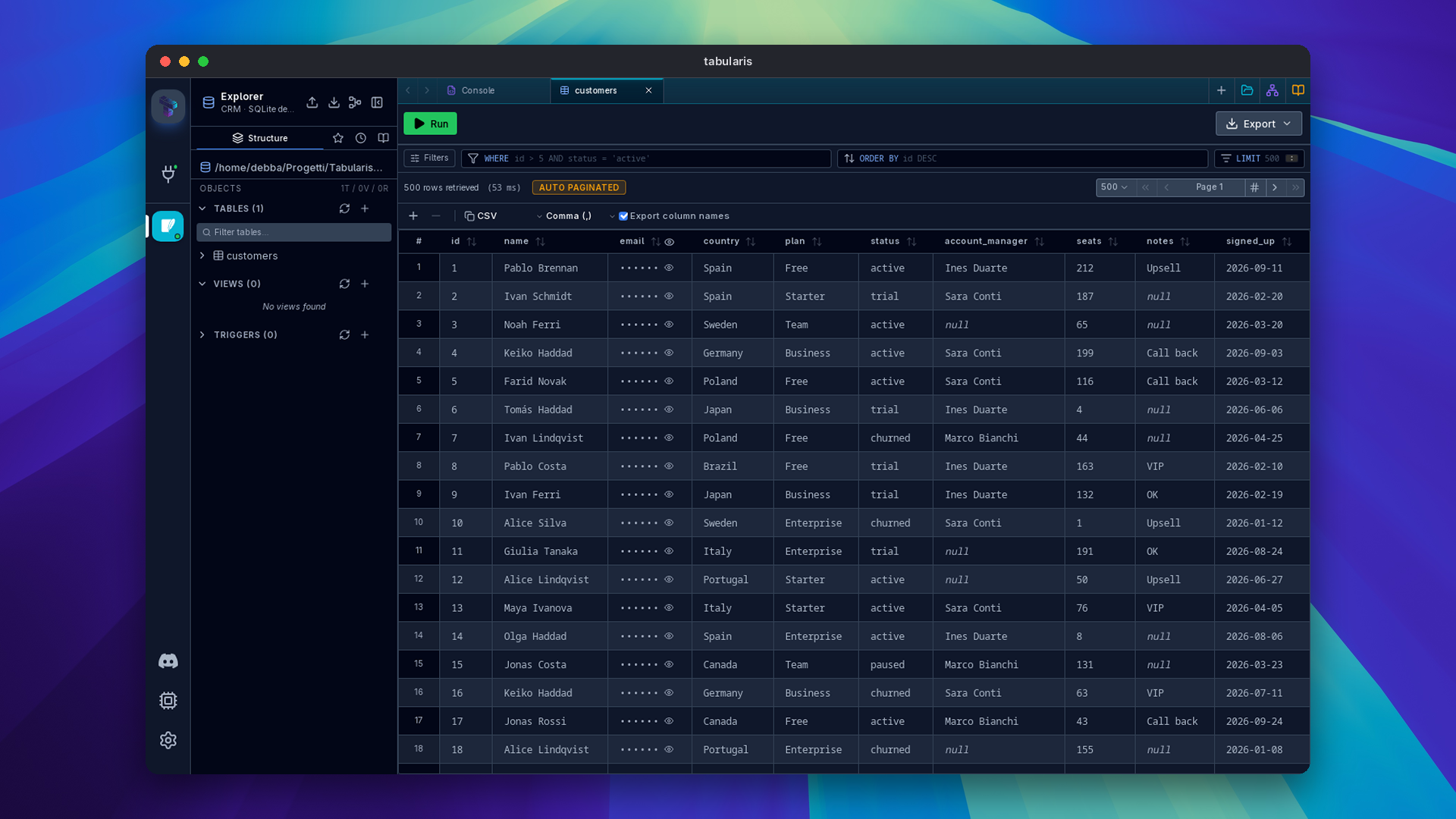
While wiring it in, the same contributor found that the stripes setting and the existing Sticky column headers toggle were not part of the persisted app config, so both were reset by a restart. Both are now saved to config.json (resultZebraStripes, stickyColumnHeaders).
T-SQL Scripts Run as One Batch
SQL Server scopes DECLARE @var, temporary tables and SET options to the batch. Tabularis split every script on ; and sent each statement as its own batch, so this failed on the second line with "Must declare the scalar variable":
DECLARE @id UNIQUEIDENTIFIER = '...';
SELECT * FROM a WHERE id = @id;
SELECT * FROM b WHERE id = @id;
PR #799 by @egertaia does what SSMS does. For dialects with a batch separator, which today means T-SQL and its GO, scripts are split only on GO and the semicolons stay inside the batch; every other dialect is split per statement exactly as before. All execution paths use the new splitter: the Run button, Run All, a selection, Execute Selection, the run dropdown and auto-run. On SQL Server, running at the cursor now runs the whole batch under it, up to the surrounding GO, and the Run button's label and the highlighted region count batches, so what the button says and what it sends cannot drift apart. The script above runs once and returns one result tab per SELECT, through the SQL Server plugin's existing support for additional result sets; no plugin update is needed. Add GO where you want separate batches.
Grouping statements into one batch must not let a dangerous statement hide behind a harmless one, so the destructive query check still looks at each statement inside the batch: a DELETE without WHERE after a SELECT still asks for confirmation, and so does one inside a CREATE PROCEDURE body, as before.
Nothing Runs Before You Have Seen It
Two fixes for actions that executed SQL the user had reason to think was only being prepared.
Visual Explain no longer turns on Analyze for writes it did not recognize. EXPLAIN ANALYZE really executes the statement, so Analyze defaults off, with a warning, for data-modifying statements. The check only looked at the first keyword for six statement types, so REPLACE, MERGE, data-modifying CTEs such as WITH d AS (DELETE … RETURNING *) SELECT …, and any write preceded by a comment opened with Analyze on and no warning, and fetching the plan changed data. @TonyWu2333 fixes it in PR #900, closing #884. The first keyword is now read after leading comments and parentheses and checked against INSERT, UPDATE, DELETE, MERGE, REPLACE, UPSERT, TRUNCATE, CREATE, DROP, ALTER, GRANT, REVOKE, CALL, EXEC and EXECUTE. A WITH statement is scanned for a write keyword outside strings and comments, with the masking applied under every SQL dialect Tabularis knows, so an apostrophe inside a PostgreSQL dollar-quoted string or a T-SQL bracket identifier cannot hide the DELETE that follows it. SELECT … INTO counts as a write too, since it creates a table. The scan errs towards caution: a read-only CTE with FOR UPDATE now also opens with Analyze off, and you can still tick it. Side-effecting functions called from a SELECT are not detected. This applies to the Visual Explain window and to notebook cells.
Run… on a stored routine opens the call for review. The dialog says "Provide the parameter values, then review the generated SQL in the editor", but submitting it ran the generated CALL or SELECT fn(...) straight away, which for a procedure that modifies data skipped the review it promised. @tosinxt fixes it in PR #899, closing #887: the SQL now opens in a new console without running, like Edit and the SQL template actions, and the dialog's button reads Open in Editor.
Editor Conveniences
Result tabs named from a comment (@w3lld1, PR #874, closes #855): when you run several statements, a leading
-- Active customersor/* Active customers */comment becomes that result's tab name. Whitespace is collapsed and the label is capped at 80 characters; statements without a comment keep the numbered name, and renaming a tab by hand still wins.Video unavailable
Convert Selection to SQL List (@Xnadir, PR #880, closes #870): select values in the editor, for example a column pasted from a spreadsheet, and the context-menu action turns them into
'alice@example.com', 'bob@example.com', ready forIN (...). It splits on newlines, tabs and commas, skips blanks and doubles embedded quotes. Purely numeric input stays unquoted, but values with a leading zero or+are treated as text, so IDs and phone numbers are not silently turned into numbers. Multi-cursor selections are converted in one undo step.Video unavailable
Schema names on same-name table tabs (@benedettoraviotta, PR #877): with
mira.clubsandmira_dev.clubsopen on one connection, both tabs used to readclubs. While the names collide, each tab readsschema.tablein the tab bar and the tab switcher; close one and the other goes back to the plain name. Only the label changes, and custom tab titles are left alone.
Around the Release
Not everything that happened this week shipped in the app.
A new tabularis.dev. The redesigned site you are reading this on went live this week. @wajrock rebuilt it page by page, from the landing page and the wiki to downloads, plugins and the blog, and tells the story in When the Project Outgrows the Site. It also adds a brand page with the logos, icons, fonts and colors, for anyone writing about Tabularis. The plugins page now lists every kind of package in the registry, with a badge on each card and its own page per kind: drivers and themes. The GitHub star and download counters, which often stayed blank because the browser hit GitHub's anonymous rate limit, are now part of the build.
The wiki, checked against the app. Every wiki page was audited against v0.26.0, and the claims that no longer matched, from config keys and UI labels to plugin protocol shapes, were corrected. Screenshots and videos were refreshed across the wiki. The plugin docs were split into Installing Plugins, Plugin System, Plugin Protocol, Building Your First Plugin, UI Extensions and Publishing Plugins, which gains a pre-submit checklist and the common submit failures, plus a new Plugin Kinds page generated from the registry's own schema.
Claude for Startups. Tabularis is now part of Anthropic's program for early-stage companies; the announcement explains what that includes and what it changes for a small open-source project.
SQL Server plugin. @egertaia fixed schema introspection on databases running below compatibility level 110, where it failed with error 195 because of TRY_CONVERT (plugin PR #34). The fix is merged and ships with the next SQL Server plugin release.
Smaller Things
- Reorder connections by drag (@benedettoraviotta, PR #878): on the Connections page, in grid and list view, dropping a connection onto another one in the same group moves it into that slot, with a dashed outline on the target. The order is saved and survives a restart. Dropping onto a different group still moves the connection there, now at the end of that group, and new, duplicated or imported connections sort after the ordered ones.
- Several connection string examples per plugin (@DhruvShah-Dev, PR #851, closes #849): a driver plugin can declare
connection_string_examples, a list of labelled presets with an optional description, and the New Connection form shows them in a selector beside the import field. It came from a user connecting to H2 through a JDBC plugin, where in-memory, file and TCP URLs all look different; opaque passthrough URIs such asjdbc:h2:mem:testare now accepted as they are. Existing manifests and the driver RPC are unchanged. See the plugin manifest reference. - Plugins scaffolded with
create-pluginreach the host fallbacks (@tosinxt, PR #898, closes #890): therust-drivertemplate answered unimplemented methods withmethod '<name>' is not implemented by this plugin yet, which the host's optional-method fallbacks, matching onMethod not found, did not recognize. The template and the example in the plugin guide now returnMethod not found: <method>with code-32601. Plugins scaffolded earlier should change their catch-all message the same way. - Flatpak updates within minutes (@jing2uo, PR #846, closes #326): publishing a stable release now notifies FlatPark, so the Flatpak update opens right away instead of on the next daily poll. Prereleases and nightlies are skipped.
- A new README (@wajrock, PR #850): the README and its translations have a new layout with localized light and dark banners, plugin tables and a sponsors table, and the roadmap is synced with what has shipped: the command palette, SQL Server and the plugin registry are marked done.
Thanks
Ten external contributors land in this release. @M4Y4NK-V3RM4 added filter-by-value and zebra stripes, and fixed persistence for the sticky header setting along the way (#908, #882). @egertaia made T-SQL scripts run as one batch without weakening the destructive query check (#799), and fixed SQL Server plugin introspection on older compatibility levels. @TonyWu2333 stopped Visual Explain from analyzing writes it did not recognize (#900), and @tosinxt fixed the routine Run… dialog and the create-plugin template (#899, #898).
@benedettoraviotta added connection reordering and schema labels on colliding tabs (#878, #877), @w3lld1 named result tabs from comments (#874), @Xnadir wrote Convert Selection to SQL List (#880), @DhruvShah-Dev added connection string examples (#851), @jing2uo wired up FlatPark (#846), and @wajrock redesigned the README (#850) and rebuilt the website. Thanks also to @noone-silent for the report behind the column-width fix.
If you have ever lost a column off the right edge of the screen just by scrolling down, this is the upgrade.


Download the latest published version from the download page. Release notes and packages are available on GitHub Releases.