


v0.30.0 comes six days after v0.29.0, and it is a minor version bump for a reason. Until now Tabularis was a desktop application and nothing else. This release adds a second way to run it: tabularis web starts the same application as a server, and you use it from a browser, on your own machine or behind a reverse proxy on a server, with an official Docker image and a Helm chart to deploy it. It is the largest architectural change the project has had, and most of its 141 commits are about it. Around it, the editor can draw a query result as a chart, a database can be backed up every day on a schedule, the grid gets resizable and frozen columns, query history filters by database and date, and the proxy settings get a mode per traffic category. Fifteen external contributors are in this release.
Tabularis in the Browser
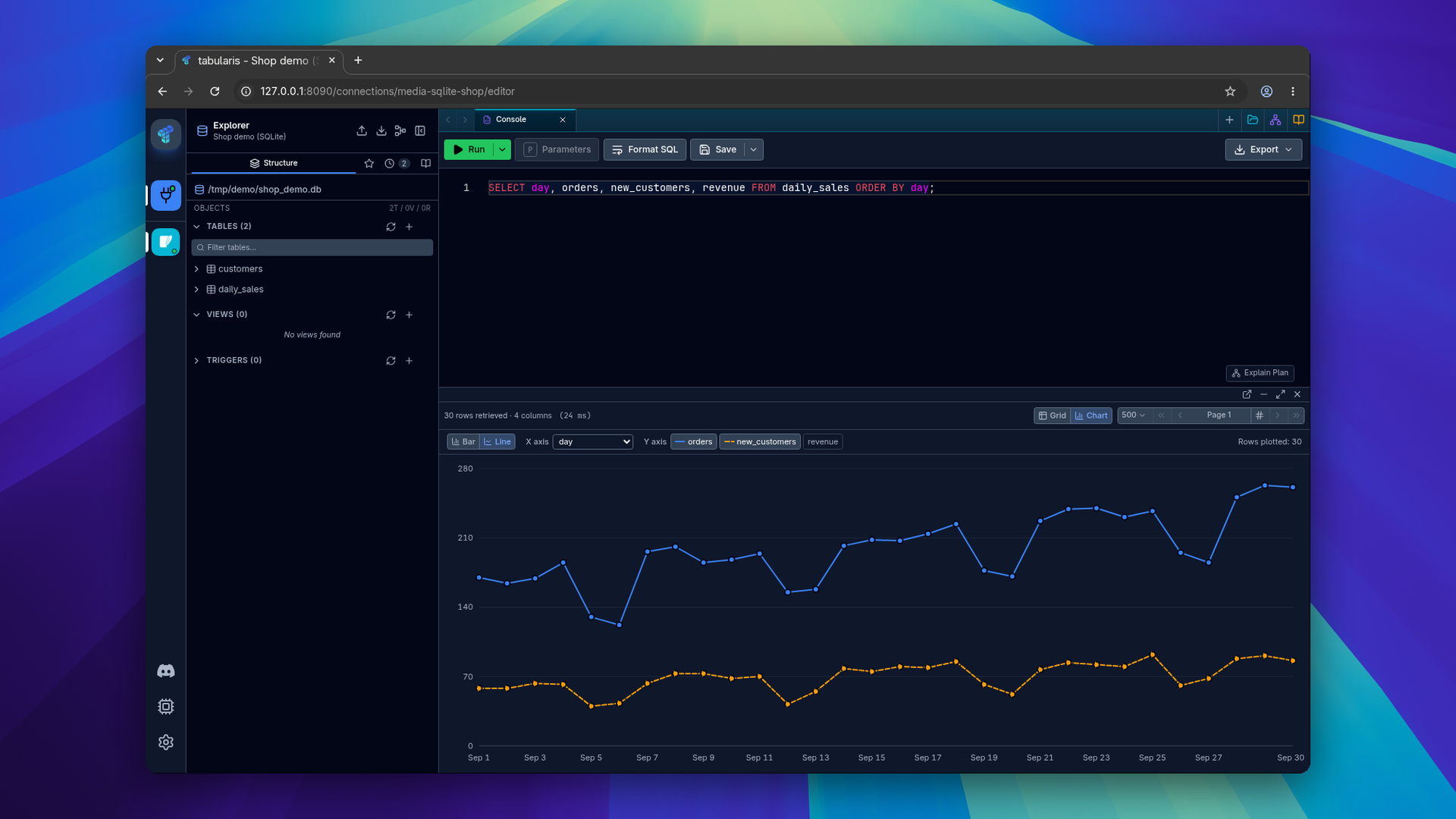
Tabularis was built on Tauri: a React interface in a native window, talking to a Rust backend through Tauri's IPC. That coupling meant the interface could only run inside the desktop window. PR #676 separates the two. The backend operations now live in a shared application layer, the interface talks to it through a typed client, and that client has two transports: Tauri IPC for the desktop app, and authenticated HTTP plus a WebSocket for the browser. The interface is the same React code in both.
Run it from an installed Tabularis:
tabularis web
# Tabularis Web is available at http://127.0.0.1:8080
Tabularis starts the server and opens your browser. Running tabularis without web still opens the desktop app, and both modes use the same configuration and data directories, so the connections, saved queries, settings and history you already have are there.
What works
The browser covers the main workflows: connections, groups and tags; SSH and Kubernetes tunnels, with their password prompts; the explorer, views, routines, triggers and users; the SQL editor with batches, EXPLAIN, cancellation and progress; data editing and BLOBs; notebooks, saved queries and history; imports, exports, dumps and backups; the AI features and the MCP approval dialog; the Plugin Center, plugin drivers and plugin UI extensions; logs and the task manager. Driver plugins keep running on the server, over the same JSON-RPC protocol.
Some things are adapted to what a browser allows. Files go through uploads and downloads with single-use, expiring tokens; the browser never sends a server path. Opening a SQLite file or a directory on the server goes through a server file picker that is off by default and only shows the roots you allow with --server-file-browser-root. Detached results and the ER diagram open in a browser tab instead of a native window. The clipboard asks for the browser's permission. Updates, ChatGPT sign-in and deep links remain desktop features.
Security
The local mode is authenticated even though it only listens on 127.0.0.1. At startup Tabularis creates a single-use token that expires after 60 seconds and opens the browser with it. The server trades it for an HttpOnly, SameSite=Strict session cookie, and checks Host, Origin and a CSRF token on every state-changing request. On a headless machine or over SSH, where no browser can be opened, the one-time URL is printed to the terminal instead. Tokens, credentials, SQL text and result payloads are kept out of the audit records.
Listening on any other address is refused until remote authentication is configured: a password (--auth password, from TABULARIS_WEB_PASSWORD) or an authenticating reverse proxy that passes the user in a header with a shared secret (--auth proxy). Remote mode needs an HTTPS public URL and an explicit list of allowed origins, and rate-limits failed logins per client. Forwarded client addresses are only trusted from the proxy networks you list with --trusted-proxy. A remote session can only work with databases by default; SSH, Kubernetes, AI keys, imports and exports, backups, plugin installs, host logs and global settings stay off until the operator passes --allow-high-risk. The MCP server is never exposed remotely.
Docker, Compose and Helm
@NewtTheWolf packaged it for servers (PR #1255). The image is ghcr.io/tabularisdb/tabularis, for amd64 and arm64, tagged latest, 0.30 and 0.30.0:
docker run -d --name tabularis \
  -p 127.0.0.1:8080:8080 \
  -v tabularis-data:/data \
  ghcr.io/tabularisdb/tabularis
docker logs tabularis   # prints the generated login password
The image is built without Tauri. A new desktop cargo feature, on by default, gates Tauri, GTK and every Tauri plugin, so cargo build --no-default-features produces a server that only runs tabularis web and tabularis --mcp. Without WebKitGTK the image went from 176 MB to 58 MB to pull. A container has no OS keychain, so it keeps the secrets the desktop app would put there (database and SSH passwords, connection URIs, plugin secrets, AI keys) in an encrypted file on the data volume, AES-256-GCM under a key derived from TABULARIS_SECRET_KEY with Argon2id.
The repository also has a compose.yaml, with a Caddy override that adds automatic HTTPS, and a Helm chart published at oci://ghcr.io/tabularisdb/charts/tabularis. The chart generates the login password and the secret key on the volume, so helm template renders the same output every time and works with Argo CD and Flux. The download page has the three commands, and the container guide covers the rest. The Tabularis Web wiki page collects the options.
One implementation
In the same PR, folding in #1257, NewtTheWolf moved every piece of Tauri code into one module, transport/desktop, and pointed about ninety desktop commands at the shared application layer instead of their own copy of the logic. Desktop and browser now run the same code, and CI fails if Tauri code shows up anywhere else. Some desktop behaviour was missing from the shared layer and got there first, so the browser gained it and the desktop app lost nothing. Deleting a connection group now also removes the secrets, plugin secrets, icon and history of every connection in it, which neither side did before.
For contributors: the frontend moved to packages/web-ui. A Prettier pass by @wajrock formatted the codebase, added the @/ import alias and moved the root documents into docs/ (PR #1247). Branches opened before this release will need a rebase.
Charts for Query Results
A query result can now be drawn as a chart. In PR #1193, closing #1168, @itsmunzir adds a Grid | Chart switch to the result status bar of query tabs, of the multi-result Tabs view and of the detached results window.
Video unavailable
The chart is a bar or a line, with one column on the X axis and one or more numeric columns on Y. The defaults come from the column types. If the result has a date column, it goes on X and the chart starts as a line; otherwise the first text column goes on X and it starts as bars. Y takes the first numeric column, skipping id and *_id columns when there is another choice. A column counts as numeric when its values are numbers or numeric strings, so a DECIMAL sent as a string works. NULL leaves a gap in the line instead of a drop to zero.
Only the loaded rows are drawn, up to 1,000 points, with no extra query. The toolbar says how many rows are plotted and whether more were not loaded. The choice is kept per tab and per result, switching back to the grid keeps its selection and pending edits, and a re-run that changes the columns falls back to sensible defaults. The colors come from the theme and were checked for the common forms of color blindness; lines after the first are dashed. It works the same on every driver, plugins included, because it only reads the result.
Scheduled Database Backups
Settings → Backup already wrote encrypted backups of your connection profiles. In PR #1207, closing #1169, @markankamaransheogarat-sys adds a second section, Scheduled Database Content Backups: a daily SQL dump of a database, built on the existing dump pipeline.
A plan has a connection, an optional database, a daily time in a timezone of your choice (or the local one), a destination folder, how many backups to keep, and whether to dump the structure, the data or both. The daily time is evaluated in the plan's timezone, daylight-saving changes included. A failed run is retried after 15 minutes, and a failed or cancelled run deletes its partial file and leaves the previous backups alone. Old backups are pruned only among files of that plan. The section shows the last run, its outcome and the next run, with Run now and Cancel buttons.
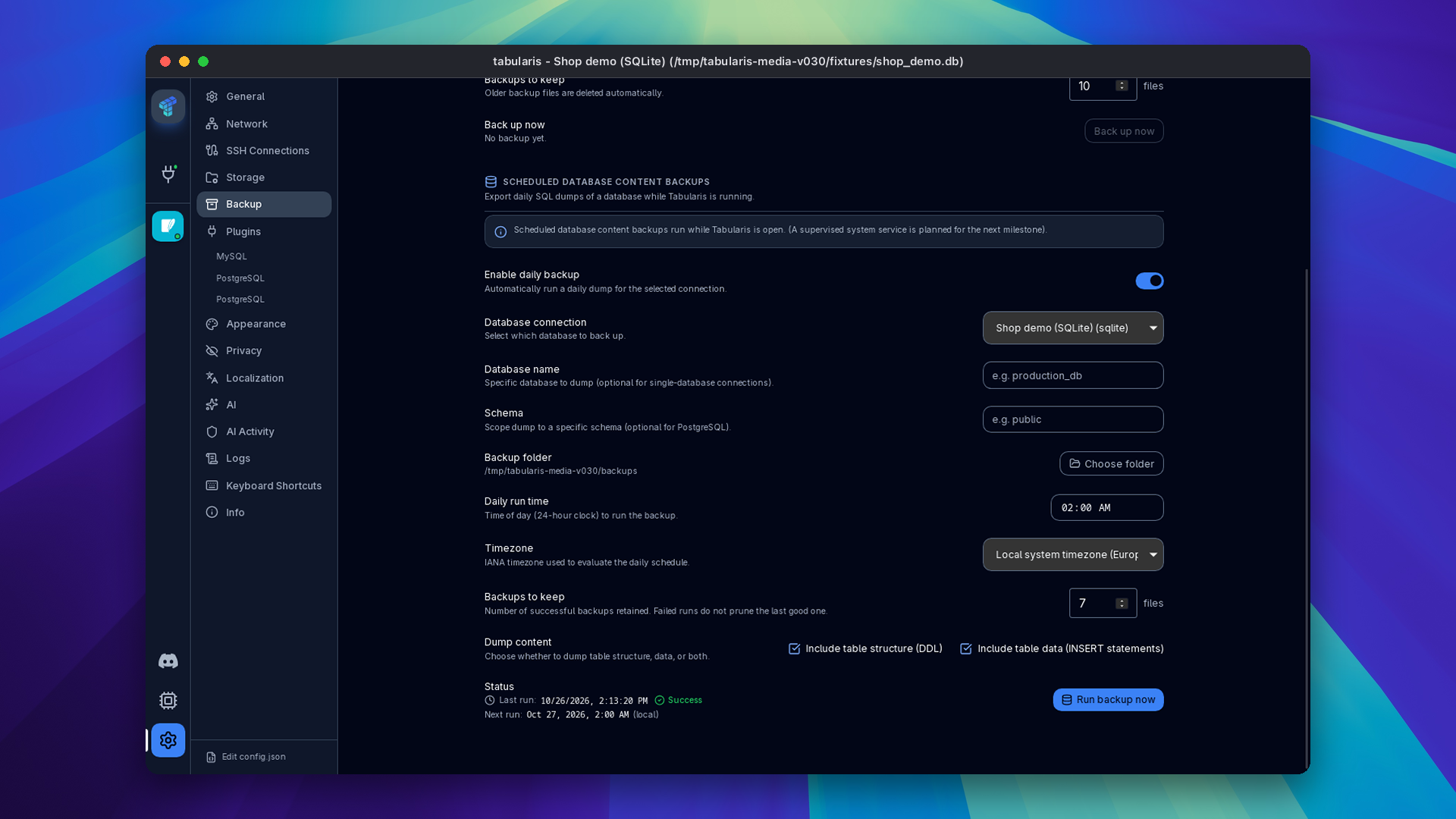
The schedule runs while Tabularis is open, and the section says so; a background worker that runs while the app is closed is planned for a later milestone. Plugin drivers get it when they declare a SQL dialect and are neither connectionless nor folder-based, the same rule as manual dumps. In tabularis web it uses the same code and needs local-administrator rights.
MCP: The Database Argument Stays Inside the Connection
v0.29.0 added an optional database argument to the MCP tools list_tables, describe_table and run_query, so an AI client could reach the second database of a multi-database connection. @fabricioartur reported that the argument was not checked (GHSA-9x4c-wq7x-5fjq, rated high). On a SQLite connection the database is a file path, so a tool call could open any SQLite file on the machine, read-only mode or not. On PostgreSQL and MySQL it could reach a database on the same server that the connection did not select. The threat model is the one in our security policy: an AI client steered by untrusted content controls the arguments it sends.
The argument now has to name exactly one of the databases selected on the connection, and it is refused on file-based, folder-based and single-database drivers. If you use the MCP server with v0.29.0, upgrade.
Two more MCP fixes. When an MCP client starts Tabularis without access to the keychain, the server used to drop the error and connect without the password, so the driver answered with an unrelated invalid configuration. It now returns the keychain error, names the secret and the connection, and suggests the workaround (@harshbhx, PR #1235, closes #1144). And plugin processes no longer outlive a killed Tabularis. On Windows every plugin joins a job object that the kernel closes when Tabularis exits, however it exits; the MCP server stops its plugins on SIGTERM, SIGHUP and SIGINT. Before, an MCP session killed by its AI client could leave behind a plugin that did not exit on its own, and on Windows the orphan's .exe blocked the next plugin update (@itsmunzir, PR #1284, closes #1280).
The Grid
Resize columns. Every column header has a handle on its right edge (@itsmunzir, PR #1222, closes #1151). Drag it to change that column only, between 48 and 2000 pixels; Escape during a drag puts the old width back. The handle is reachable with Tab: the arrow keys move it by 10 pixels, Shift+arrow by 50, Home and End jump to the limits. Dragging it never sorts or selects the column. Widths are kept while you scroll, page or refresh, and are not saved across sessions yet.
Freeze the first column. The column header menu has Freeze first column (@Detoy, PR #1234, closes #1152). On a wide result the identifier stays in view while you scroll right. Row tints, selections and pending edits stay correct under it, a frozen cell can be edited in place, and keyboard navigation stops the active cell to the right of the frozen column instead of under it. It works with resizing.
Video unavailable
Export selected rows. The row context menu has Export Selected (n)… as CSV or JSON, next to Copy Selected, for the same rows (@Lym308758, PR #1227, closes #1154). It writes the rows already loaded, through the same formatter as the full export, so quoting, the NULL marker and your CSV delimiter are identical.
Case-insensitive filters on PostgreSQL. On PostgreSQL connections, and on plugins with the PostgreSQL dialect, the contains, starts with and ends with filters get a Match case checkbox. Ticked, the default, it generates LIKE; unticked, ILIKE (@harshbhx, PR #1252, closes #1164).
Query History
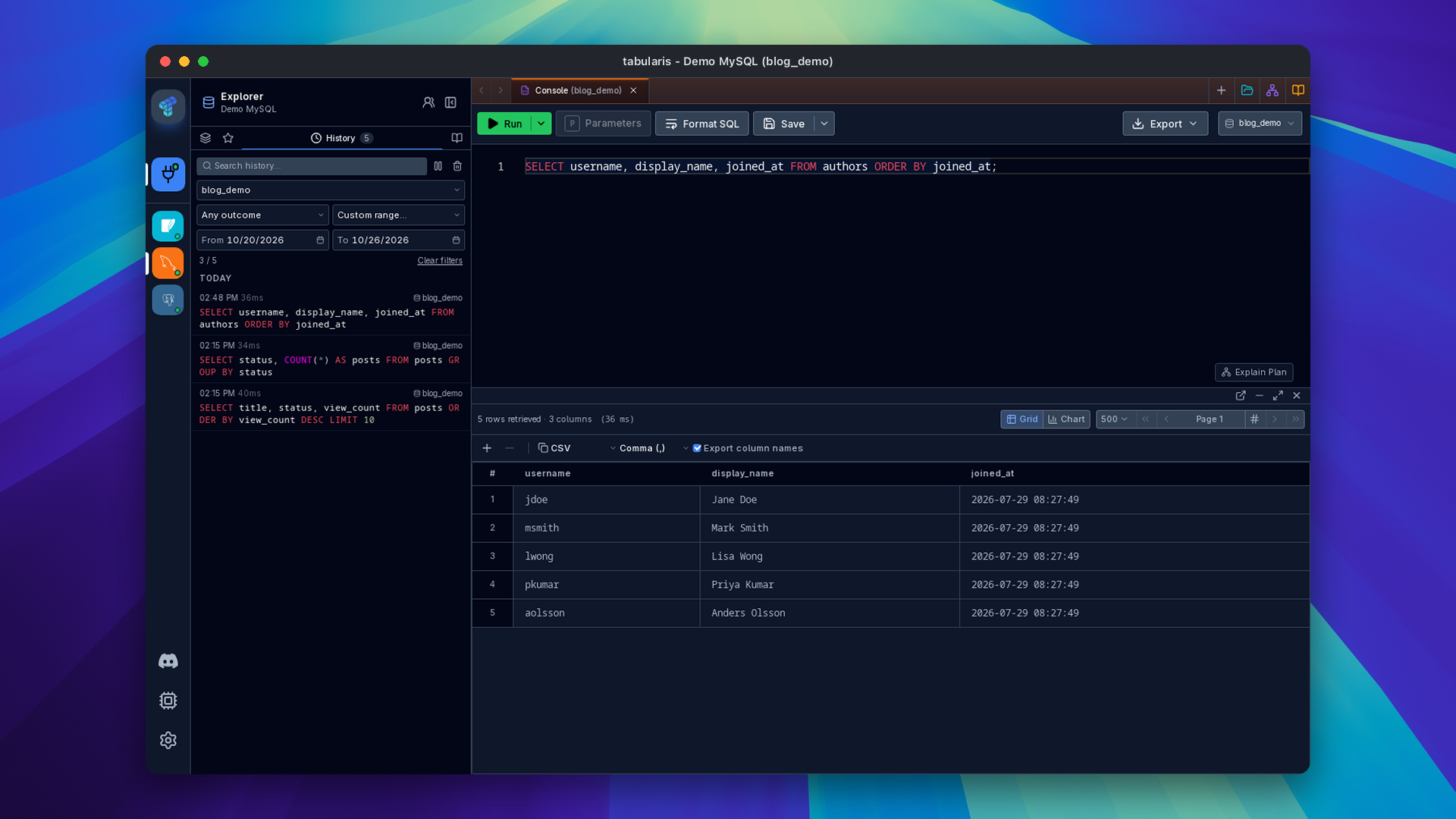
Filter by database. One connection can run queries against several databases, and every history entry records which. A new select above the outcome and time filters shows only the queries for one of them, or the entries with no database recorded (@Detoy, PR #1218, closes #1148).
Custom date range. The time-range select has Custom range…, which shows From and To dates (@Lym308758, PR #1226, closes #1149). Both days are inclusive and computed in your display timezone, either side can be left empty, and an inverted range is refused with a message instead of being widened. Clear filters resets everything to All time and all databases.
A Proxy Mode per Traffic Category
Settings → Network used to have one proxy that each traffic category opted into. In PR #1283, following discussion #1254, @zeevenn gives every category its own mode. App HTTP requests and AI providers can be System, which follows the proxy configured on the machine, Custom or Disabled, and default to System. Database connections and SSH can be Custom or Disabled, and default to Disabled. All Custom categories share one proxy server, and per-connection and per-provider overrides still win. The update check and the update download now follow the App HTTP mode too.
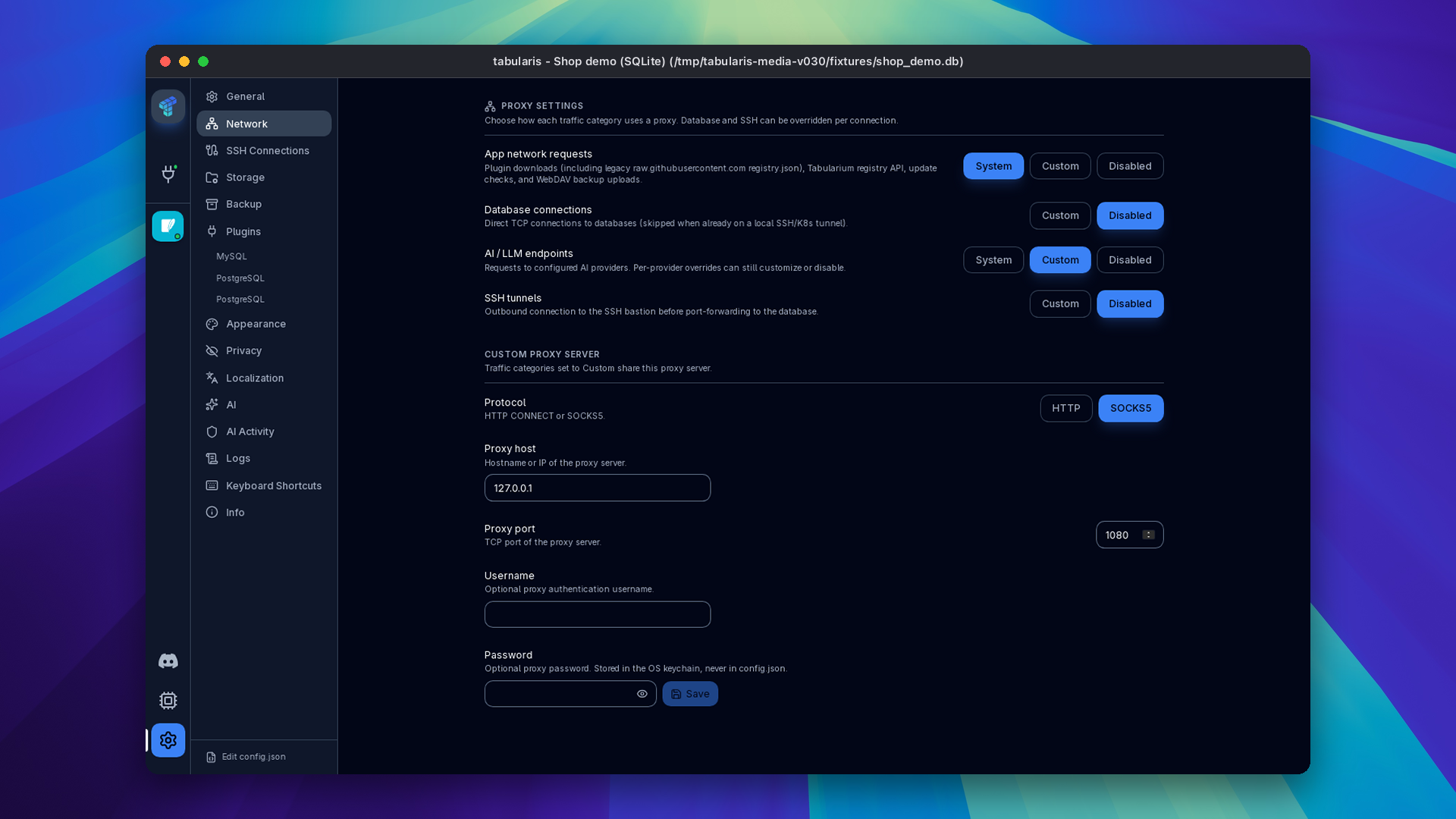
Existing settings are migrated: a category you had opted into becomes Custom, or Disabled if the proxy was switched off; one you had left out becomes Disabled; categories that were never set take the new defaults. See Network & Proxies.
Around the Ecosystem
Website
The download page has a Self-host in your browser section, from @NewtTheWolf (#39): the Docker, Compose and Helm commands above, each with a copy button and a link to the container guide.
Plugins
PostgreSQL reached 1.0.0-rc.12, both release candidates from @aesslinger. Tables with non-builtin types (a custom enum, a composite or domain type, citext, Supabase's auth.uid) could hang or fail behind PgBouncer and Supavisor in transaction mode; rc.11 fixed that, and rc.12 fixed the same hang on direct connections and in transaction sessions. Ping, connect and cancel now run on their own lanes, so a stuck query no longer blocks them.
Trino went from 0.1.6 to 0.1.10. @1-DARK added query diagnostics: the Trino query ID, its final state, elapsed time and split statistics, and errors with their code and SQL location. SQL Server 1.0.0-beta.4 moves to version 0.2.0 of Microsoft's TDS libraries, which allows non-ASCII login names and passwords and minimal BEGIN TRANSACTION; COMMIT TRANSACTION; batches, and reads metadata on databases below compatibility level 110. DuckDB 0.2.5 moves to DuckDB 2.0 and keeps new files readable by 1.x. Oracle 0.1.1 returns NUMBER values with more than 15 significant digits exactly instead of rounding them.
The other official plugins got a dependency sweep: libSQL, Elasticsearch, Cassandra, MongoDB, BigQuery, ClickHouse (by @harshbhx) and Hacker News each have a patch release with patched TLS and Tokio dependencies, scheduled RustSec audits and --locked release builds. The Tabularis registry already serves all of them.
Smaller Things
- AI in the command palette: AI Assist: Generate SQL and AI Query Explanation are palette commands in console tabs with AI enabled. The palette also stopped stealing focus back from the dialog a command opened (@verbaux, PR #1268).
- Full column types in the explorer: the Columns list, the table schema view and the ER diagram show
varchar(255),decimal(10,2),int unsignedorinteger[]instead of the bare base type, on MySQL, MariaDB and PostgreSQL (@itsmunzir, PR #1279, closes #1277). - Autocomplete quotes names that need it: a table such as
global-conf_modulos, or a column calledorder, is inserted quoted with the driver's quote character (@itsmunzir, PR #1261, closes #1260). Notebook cell references close[with]on bracket-quoting plugins (PR #1285), and Copy as SQL INSERT and Copy column name (quoted) use the driver's quote character too (@jay23606, PR #1051, closes #1027). - Table filter keys: in the explorer's table filter, Enter opens the first match and Escape clears it (@SyntaxSphinx, PR #1201, closes #1043).
- EXPLAIN CSV: the plan table export splits cost into numeric
startup_costandtotal_cost, writes the estimate gap as a number, and shows a toast with the reason when it fails (@itsmunzir, PR #1237, closes #1231). - Partial exports: exporting loaded rows warns that the file is partial even when the total row count is unknown (@Asymtode712, PR #1225, closes #1214).
- Plugin installs: a driver installed from Plugin Center or a deep link shows up as installed in Add Connection right away, without a restart (@Asymtode712, PRs #1263, #1266, closes #1262). Column statistics follow-ups for plugins: a translated error,
sql_syntax.extendscounts as SQL-compatible (@Asymtode712, PR #1239). - Interface font: switching back to System restores the theme's font (@zeevenn, PR #1245). A
nulldatabase value no longer throws in the connection list (@aesslinger, PR #1136). - Nightly builds ship source maps, so a stack trace from DevTools points to real files and lines. Stable releases are unchanged (@aesslinger, PR #1272).
create-plugin:npm create @tabularis/pluginandpnpm create @tabularis/pluginfailed on 0.4.x because the package has two binaries; acreate-pluginbinary fixes it (@itsmunzir, PR #1270). The generated release workflow buildsdarwin-arm64onmacos-latest, since GitHub retiresmacos-14on November 2 (PR #1269); existing plugins can pick it up withnpx @tabularis/create-plugin migrate --cionce the next version is on npm. The generated README states the minimumjustversion (@tejasvasingh2004, PR #1259, closes #1213).- LinkedIn: Tabularis has a LinkedIn page, linked from Info, Community and What's New (PR #1244). The contributing guide's links and locale paths follow the frontend move (@Jhon103, PR #1251).
Thanks
Fifteen external contributors land in this release. @NewtTheWolf took Tabularis Web from a working branch to something you can deploy: the Tauri-free server image, the Helm chart, the encrypted secret store for containers, one shared implementation for desktop and browser, a long series of session, authorization and file-transfer hardening fixes, and the self-hosting section of the website (#1255, #1257). @itsmunzir built result charts and column resizing, stopped orphaned plugin processes, and fixed full column types, identifier quoting, the EXPLAIN CSV and create-plugin (#1193, #1222, #1284, #1279, #1261). @markankamaransheogarat-sys added scheduled database backups (#1207). @Detoy froze the first column and filtered history by database (#1234, #1218). @Lym308758 added selected-row export and the custom history range (#1227, #1226). @zeevenn reworked the proxy modes and fixed the System font (#1283, #1245).
@harshbhx added Match case and made MCP report keychain failures, and secured the ClickHouse plugin. @Asymtode712 fixed plugin installs in Add Connection, partial-export warnings and column statistics for plugins. @aesslinger shipped two PostgreSQL plugin release candidates, nightly source maps and connection hardening. @verbaux put the AI commands in the palette. @wajrock formatted and reorganized the codebase. Thanks also to @jay23606, @SyntaxSphinx, @tejasvasingh2004 and @Jhon103, and to @fabricioartur for the MCP security report. In the wider ecosystem, @1-DARK added query diagnostics to the Trino plugin.
If you want Tabularis on a server, or reachable from a machine where you can't install it, this is the upgrade.


Download the latest published version from the download page. Release notes and packages are available on GitHub Releases.