

Tabularis Web
Since v0.30.0, Tabularis can run as a server and be used from a browser. tabularis web starts the same application without a desktop window: the same React interface, served over HTTP, talking to the same Rust backend over an authenticated RPC endpoint and a WebSocket. Running tabularis without web still opens the desktop app.
Desktop and Web modes share the configuration and data directories of the account that runs them, so connections, saved queries, settings and history are the same in both.
Start it locally
tabularis web
# Tabularis Web is available at http://127.0.0.1:8080
Tabularis binds to 127.0.0.1:8080 and opens your default browser. See Command Line Interface for where the tabularis binary lives on each platform.
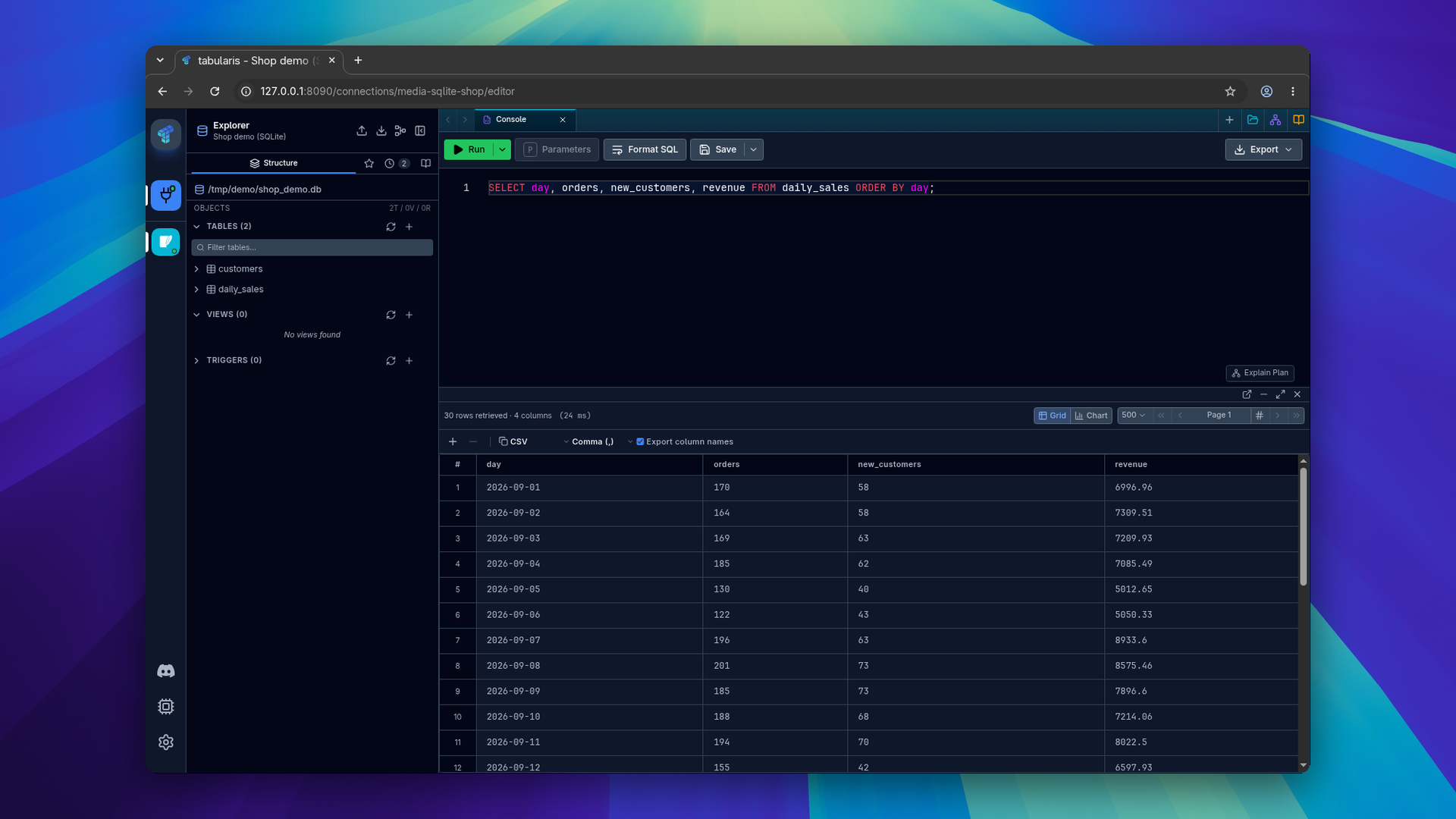
The local mode is authenticated even though it only listens on loopback:
- Startup creates a single-use token that expires after 60 seconds, and the browser opens with it.
- The server exchanges it for an eight-hour
HttpOnly,SameSite=Strictsession cookie. - Every request is checked for
HostandOrigin, and state-changing requests for a CSRF token.
If no browser can be opened (a headless machine, an SSH session), the one-time URL is printed to the terminal instead. It is valid once, for one minute; restart tabularis web for a new one. Closing the browser tab does not stop the server: stop it with Ctrl+C.
Options
| Option | Purpose |
|---|---|
--host |
Bind address. Default 127.0.0.1. A non-loopback address is refused unless remote authentication is configured. |
--port |
Bind port. Default 8080, with no automatic fallback. |
--no-open |
Don't launch a browser. Use it for services; the one-time URL is not printed, so it does not end up in service logs. |
--auth |
Remote authentication: password or proxy. Requires --public-url and --allowed-origin. |
--public-url |
The HTTPS origin browsers use, e.g. https://tabularis.example.com. Plain HTTP is accepted only for a loopback host. |
--allowed-origin |
An allowed browser origin. Repeat it for more; the public URL must be one of them. |
--trusted-proxy |
A proxy network (CIDR) allowed to send X-Forwarded-For. Repeatable, empty by default. |
--allow-high-risk |
Give remote sessions local-administrator rights. Off by default; don't enable it on shared deployments. |
--server-file-browser-root |
A server directory the browser may browse, for SQLite files and backup folders. Repeatable, off by default. |
--web-root |
Development override for a built web UI directory. Packaged installs find their own assets. |
Remote access
Tabularis does not terminate TLS. For remote use, put the listener behind a TLS reverse proxy that preserves the public Host and proxies WebSocket upgrades, keep clients from reaching the listener directly, and pick an authentication mode:
- Password:
--auth password, with a password of at least 12 characters inTABULARIS_WEB_PASSWORD. - Trusted proxy:
--auth proxy, for a proxy that authenticates users itself. It sends the user inX-Tabularis-Userand a shared secret of at least 32 characters, fromTABULARIS_WEB_PROXY_SECRET, inX-Tabularis-Proxy-Secret.
export TABULARIS_WEB_PASSWORD='replace-with-a-long-unique-password'

tabularis web \
  --host 127.0.0.1 --port 8080 --no-open \
  --auth password \
  --public-url https://tabularis.example.com \
  --allowed-origin https://tabularis.example.com
Failed logins are rate-limited per client. Remote sessions can only work with databases by default: SSH and Kubernetes tunnels, AI keys and approvals, imports and exports, backups and dumps, plugin installs, host logs and tasks, and global settings stay denied unless the operator passes --allow-high-risk. The MCP server is never available remotely.
The full threat model, with Nginx, systemd and firewall examples, is in the remote security guide.
Docker, Compose and Helm
The official image is ghcr.io/tabularisdb/tabularis, for linux/amd64 and linux/arm64, tagged latest, 0.30 and 0.30.0. It is built without the desktop runtime, so it only runs tabularis web and tabularis --mcp.
docker run -d --name tabularis \
  -p 127.0.0.1:8080:8080 \
  -v tabularis-data:/data \
  ghcr.io/tabularisdb/tabularis
docker logs tabularis   # prints the generated login password
Open http://localhost:8080. Without TABULARIS_WEB_PASSWORD, a password is generated on first start, stored on the data volume and printed once.
- Compose: the repository's
docker/compose.yamlruns the same setup. Addcompose.tls.yamlfor a Caddy front end with automatic Let's Encrypt certificates. - Helm:
helm install tabularis oci://ghcr.io/tabularisdb/charts/tabularis --set publicUrl=https://tabularis.example.com --set ingress.enabled=true. The chart runs one replica, generates the password and the secret key on the volume when you don't set them, and renders the same output on everyhelm template, so it works with Argo CD and Flux.
Secrets in containers. A container has no OS keychain. The image keeps the secrets the desktop app would store there (database and SSH passwords, connection URIs, plugin secrets, AI keys) in /data/secrets.enc.json, encrypted with AES-256-GCM under a key derived from TABULARIS_SECRET_KEY with Argon2id. Without that variable a random key is generated in /data/secrets.key, which anyone who can read the volume can use. In production, set your own key and back it up apart from the volume: without it the stored credentials can't be recovered.
The container guide lists every environment variable and chart value.
Differences from the desktop app
The interface and the backend are the same; what changes is what a browser can do.
- Files move through uploads and downloads with single-use, expiring tokens. The browser never sends a server path. Opening a SQLite file or choosing a backup folder on the server uses the server file picker, which only shows the roots passed with
--server-file-browser-root. - Secondary windows (detached results, JSON viewer, ER diagram) open in a browser tab.
- Clipboard access asks for the browser's permission.
- Stored secrets are never sent back to the browser. Edit dialogs show that a value is stored, and leaving a field empty keeps it.
- Desktop only: in-app updates, ChatGPT sign-in, deep links and developer tools.
- Plugins: driver plugins run on the server, over the same JSON-RPC protocol. UI extensions load in the page, as trusted code.
- Large results are bounded per page; use pagination or a streamed export for big datasets.
The server binary and the web UI assets must come from the same release.